Geekzone: technology news, blogs, forums
Guest
Welcome Guest.
You haven't logged in yet. If you don't have an account you can register now.


lyndondrake

236 posts

Master Geek
+1 received by user: 24

ID Verified

#138751 15-Jan-2014 15:44
Send private message

I've got a Mikrotik Routerboard hooked up to a (Snap) VDSL connection via a Vigor VDSL router in bridge mode. Overnight my observed speed dropped substantially, and after hunting around for a while I've noticed that the Mikrotik is reporting fairly heavy transmit bandwidth usage (3-5Mbps). The link speed from the Vigor is sill about 26 down/7 up, which I think is quite reasonable and is consistent with what I normally get.

I've gradually unplugged everything on the network side of the Mikrotik without seeing the Tx usage drop. This suggests to me that the Mikrotik is doing something stupid with the connection. Or perhaps someone's compromised the router?

Any thoughts?

Create new topic
Beccara
1473 posts

Uber Geek
+1 received by user: 517

ID Verified

  #967627 15-Jan-2014 15:54
Send private message

Have you turned off the bandwidth test server authentication? Try torching the interface facing the Vigor and see what the traffic is (prot/port)


Most problems are the result of previous solutions...

All comment's I make are my own personal opinion and do not in any way, shape or form reflect the views of current or former employers unless specifically stated 


lyndondrake

236 posts

Master Geek
+1 received by user: 24

ID Verified

  #967645 15-Jan-2014 16:17
Send private message

]

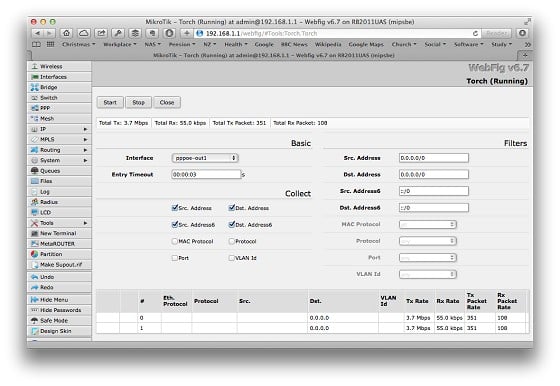
This is torch on the interface. Not sure how to get info on the source/dest port?

As far as I can tell the bandwidth test is not configured at all (there's 0.0.0.0 in the "Test to" field.

sbiddle
30853 posts

Uber Geek
+1 received by user: 9996

Retired Mod
Trusted
Biddle Corp
Lifetime subscriber

  #967650 15-Jan-2014 16:20
Send private message

What are your firewall rules for the WAN? Is your DNS exposed?

You really need to torch the interface and see what the traffic is and where it's going.


Beccara
1473 posts

Uber Geek
+1 received by user: 517

ID Verified

  #967658 15-Jan-2014 16:27
Send private message

lyndondrake: ]


This is torch on the interface. Not sure how to get info on the source/dest port?

As far as I can tell the bandwidth test is not configured at all (there's 0.0.0.0 in the "Test to" field.


You need to tick Port and Protocol


Most problems are the result of previous solutions...

All comment's I make are my own personal opinion and do not in any way, shape or form reflect the views of current or former employers unless specifically stated 

lyndondrake

236 posts

Master Geek
+1 received by user: 24

ID Verified

  #967659 15-Jan-2014 16:29
Send private message

BTW figured out how to use torch - but now whatever was going on seems to have stopped.

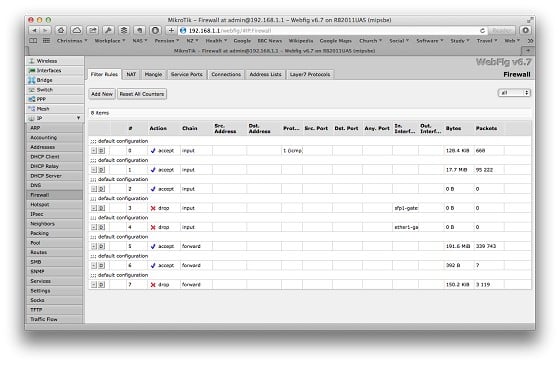
Here's my firewall rules - might well need to put some more in there :-)


lyndondrake

236 posts

Master Geek
+1 received by user: 24

ID Verified

  #967747 15-Jan-2014 19:44
Send private message

Having eventually figured out how to use torch I realised I was being used for DNS amplification (is that the right term? spurious DNS requests). I had to add a default drop rule to the pppoe interface as of course the ether1 interface doesn't get a chance to intercept the packets.


Shop on-line at New World now for your groceries (affiliate link).
sbiddle
30853 posts

Uber Geek
+1 received by user: 9996

Retired Mod
Trusted
Biddle Corp
Lifetime subscriber

  #967793 15-Jan-2014 21:25
Send private message

Hardly surprising it was DNS, it's a massive problem now.

If you have a router that has DNS exposed it's not a matter of when you'll get attacked, it's simply a matter of how much bandwidth the attack will use and how long it'll take to be detected.

Why do you have the forward rules?


lyndondrake

236 posts

Master Geek
+1 received by user: 24

ID Verified

  #968179 16-Jan-2014 14:13
Send private message

I've removed the forward rules. At one point I reset the Mikrotik and the rules it put in were different from those I'd had previously.

Thanks for the help — things seem to have calmed down now.

Create new topic


Geekzone Live »

Try automatic live updates from Geekzone directly in your browser, without refreshing the page, with Geekzone Live now.


Are you subscribed to our RSS feed? You can download the latest headlines and summaries from our stories directly to your computer or smartphone by using a feed reader.