Geekzone: technology news, blogs, forums
Guest
Welcome Guest.
You haven't logged in yet. If you don't have an account you can register now.


Odsodium

7 posts

Wannabe Geek
+1 received by user: 1


#323046 19-Oct-2025 22:01
Send private message

I've been trying to figure out how to connect my ONT to the existing ethernet ports located in my house. The current wiring in my house is as follows.


There seems to be a white network cable (ethernet?) going from the ETP into my attic and coming to a wall in the living room where it connects to the ONT. This was added after the home was built.


From the same location in the attic, there is another blue network cable coming from the ETP, this cable goes to a RJ45 outlet in one of the bedrooms and daisy chained to the rest of the outlets in other rooms? All of the outlets in the rooms have the same blue network cable and I assume this was installed when the home was built.


I have throughly looked everywhere and there is no patch panel where the cables meet. Could anyone give me any advice on how I would go about connecting internet to the outlets?


Filter this topic showing only the reply marked as answer View this topic in a long page with up to 500 replies per page Create new topic
 1 | 2
Linux
12198 posts

Uber Geek
+1 received by user: 8485

Trusted
Lifetime subscriber

  #3426532 19-Oct-2025 22:03
Send private message

@Odsodium Where is your router? This would plug into the ONT


Odsodium

7 posts

Wannabe Geek
+1 received by user: 1


  #3426533 19-Oct-2025 22:04
Send private message

The router is near the ONT, in the living room. But its not connected to any of the rooms.


JemS
86 posts

Master Geek
+1 received by user: 46

ID Verified

  #3426545 20-Oct-2025 05:53
Send private message

If that blue ethernet cable is coming from the ETP and is daisy chained between rooms, I think that would be a copper phone line. There isn't an easy way to use these for internet without adding and removing some cables as ethernet isn't daisy chainable.


Join Mercury and I’ll get bonus rewards points. Make sure you use my referral link to explore their wonderful offers. https://www.mercury.co.nz/join?m_copc=FGF50&m_rc=100211888685 


Router: UXG-Lite


AP's: 2x U6-Pro, 1x U6-Lite, 1x UK-Ultra, 1x AC Mesh Pro


Phone: S26 Ultra


Wearable: Garmin Forerunner 955


ascroft
437 posts

Ultimate Geek
+1 received by user: 177


  #3426546 20-Oct-2025 06:00
Send private message

Typically connections are:


room outlets>patch panel>switch>router>ONT


"Artificial Intelligence" - aka Machine Learning 2.0


Dynamic
4018 posts

Uber Geek
+1 received by user: 1857

ID Verified
Trusted
Lifetime subscriber

  #3426567 20-Oct-2025 08:48
Send private message

@Odsodium attach some photos when time allows.  In the meantime, I have a couple of questions:


  • In what room of the house is the ONT?
  • In what room of the house is the router?
  • If the router is not beside the ONT, what is your key reason for wanting this in a different location?  They are most often located together, though this is definitely not compulsory.

Key points to bear in mind:


  • The router's WAN must connect to the ONT.  This can be directly via a network cable, or via the RJ45 cabling in the house.  There should be no electronic devices between these two.
  • Ignoring Wi-Fi for the purposes of this discussion and lets concentrate on the devices that connect via cable.  The router's LAN ports are what your computers, Smart TV etc connect to.  These cable-connected devices must connect directly to the router's LAN ports and the connections cannot (normally) be daisy-chained.
  • If you have 4 rooms with one RJ45 connection in each room, there will be a central point with 4x RJ45 connections (unless the sparky who did the wiring majorly messed up).   The router is typically located at that central point.
  • If you need more LAN ports than the router can provide, or if the router is in Room 1 and you need several LAN ports in Room 2, a Network Switch will give you more LAN ports.  One of the Network Switch's ports must first be connected by cable to one of the router's LAN ports.


“Don't believe anything you read on the net. Except this. Well, including this, I suppose.” Douglas Adams


mrgsm021
1540 posts

Uber Geek
+1 received by user: 310

ID Verified
Trusted

  #3426612 20-Oct-2025 10:01
Send private message

OP did mention the router is near the ONT but does sound like internal cabling needs to be rewired.


Shop now for Lego sets and other gifts (affiliate link).
Dynamic
4018 posts

Uber Geek
+1 received by user: 1857

ID Verified
Trusted
Lifetime subscriber

  #3426632 20-Oct-2025 10:58
Send private message

mrgsm021:


OP did mention the router is near the ONT but does sound like internal cabling needs to be rewired.


Thank you, I missed that Odsodium had clarified this.


Odsodium, if you carefully unscrew one of the RJ45 outlets from the wall and gently pull it away from the wall enough to see the cabling into the back of it, there should only be a single cable 'punched down' into the back of each socket.  If the wiring is daisy-chained and there are two cables connected to the back of each socket, there is a different discussion to be had about whether this was deliberate (i.e. intended for an old analog-only phone) or whether the person who did this wiring messed up and there is a potential warranty claim.


“Don't believe anything you read on the net. Except this. Well, including this, I suppose.” Douglas Adams


coffeebaron
6306 posts

Uber Geek
+1 received by user: 3569

Trusted
Lifetime subscriber

  #3426702 20-Oct-2025 13:41
Send private message

If the cables are daisy chain, you can make a daisy chain network. I've done this before, a network switch at each point, or jumper the cables. Sometimes you can use the cables as draw wires for new cables too.


Rural IT and Broadband support.


Broadband troubleshooting and master filter installs.
Starlink installer - one month free: https://www.starlink.com/?referral=RC-32845-88860-71 
Wi-Fi and networking
Cel-Fi supply and installer - boost your mobile phone coverage legally


Need help in Auckland, Waikato or BoP? Click my email button, or email me direct: [my user name] at geekzonemail dot com


richms
29114 posts

Uber Geek
+1 received by user: 10229

Trusted
Lifetime subscriber

  #3426708 20-Oct-2025 14:04
Send private message

If gigabit is ok for you, there are cheap as gigabit power over ethernet extenders on aliex that will let you power all the switches from one end of the daisy chain and make it less likely that someone powers down their switch to plug in a hairdryer while someone at the end of the chain is in the middle of a game or something else important.


Richard rich.ms

Odsodium

7 posts

Wannabe Geek
+1 received by user: 1


  #3427029 21-Oct-2025 15:43
Send private message

Appreciate the responses.


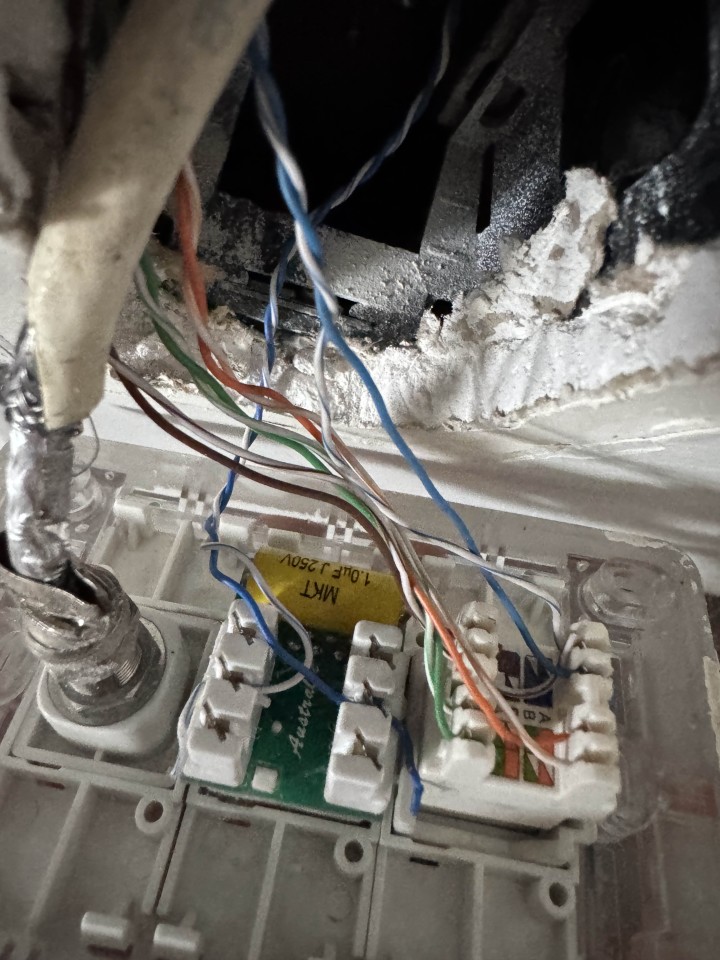
It looks like I have been mistaken as the cables are not daisy chained. Both cables look the same so maybe the reason for my confusion. Attached is the photo of one of the outlets.


To clarify the router is beside the ONT. The ONT and router are not connected to any internal internet wiring in my house (apart from the phone line). 


I want to make use of the internal wiring of my home to provide ethernet internet connection to each of the rooms and as I understand I will need to connect the cable from the respective outlets to my router.


I have a couple questions


  1. How would I go about tracing where the ethernet cable from the outlet goes to? Again there is no patch panel and when looking in the attic, it appears all the cables from the outlets just lead to other outlets.
  2. If the keystone is wired for type A, do I need to terminate my ethernet cables with type A. Does it matter if I plug a type B ethernet cable into a type A outlet.

Odsodium

7 posts

Wannabe Geek
+1 received by user: 1


  #3427030 21-Oct-2025 15:44
Send private message


Shop now on AliExpress (affiliate link).
richms
29114 posts

Uber Geek
+1 received by user: 10229

Trusted
Lifetime subscriber

  #3427032 21-Oct-2025 15:58
Send private message

Oh hell, that's a bunch of terrible work right there. Even the coax managed to be done with a machete. 


Pull on the cables and see if you can get to the jacket, as they may have done something stupid with joiners and the blue pair and put it on both the phone and the data outlet. 


This is why you do not let cavemen pretend they are electricians and do data.


Richard rich.ms

wellygary
8828 posts

Uber Geek
+1 received by user: 5310


  #3427035 21-Oct-2025 16:14
Send private message

Odsodium:


I have a couple questions


  1. How would I go about tracing where the ethernet cable from the outlet goes to? Again there is no patch panel and when looking in the attic, it appears all the cables from the outlets just lead to other outlets.
  2. If the keystone is wired for type A, do I need to terminate my ethernet cables with type A. Does it matter if I plug a type B ethernet cable into a type A outlet.


You could get a cable tester, but Its just as easy to stick a switch/router on one end and plug in a device on the other end... the LED lights on the device's Ethernet port will blink furiously if you hit the jack pot..


Dynamic
4018 posts

Uber Geek
+1 received by user: 1857

ID Verified
Trusted
Lifetime subscriber

  #3427036 21-Oct-2025 16:17
Send private message

OP, when was this cabling done and are you the first owner of this house?


This work has not been done to a professional standard.  Not.  Even.  Close.


“Don't believe anything you read on the net. Except this. Well, including this, I suppose.” Douglas Adams


Odsodium

7 posts

Wannabe Geek
+1 received by user: 1


  #3427039 21-Oct-2025 16:20
Send private message

Dynamic:


OP, when was this cabling done and are you the first owner of this house?


This work has not been done to a professional standard.  Not.  Even.  Close.


The house was built in the 2010s, I'm not the first owner of the house so I cant really speak much about it.


How should it the cabling look and what could I do to fix it?


 1 | 2
Filter this topic showing only the reply marked as answer View this topic in a long page with up to 500 replies per page Create new topic


Geekzone Live »

Try automatic live updates from Geekzone directly in your browser, without refreshing the page, with Geekzone Live now.


Are you subscribed to our RSS feed? You can download the latest headlines and summaries from our stories directly to your computer or smartphone by using a feed reader.