Geekzone: technology news, blogs, forums
Guest
Welcome Guest.
You haven't logged in yet. If you don't have an account you can register now.


rossmcm

111 posts

Master Geek
+1 received by user: 11


#243833 4-Jan-2019 14:01

I am leeching off an obliging neighbour for the holiday period.  The setup is as shown:
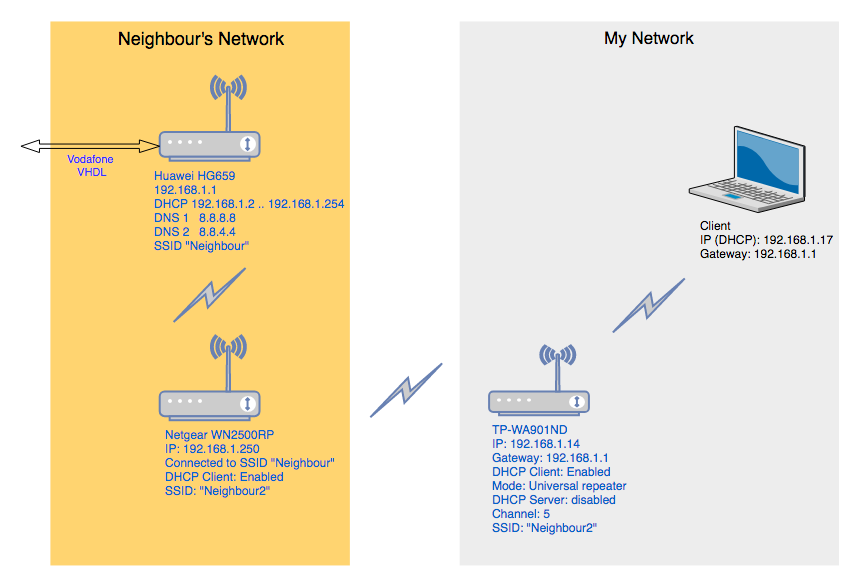


The issue is that the connection to the internet is very flaky.  After setting it up it as shown and connecting to the extender SSID it works OK but eventually seems to revert to "Connected -no internet".  Signal strengths are fine.


One issue is that the TP-WA901ND range extender can't be configured so that the SSID of the extended network is different from the network it is connected to.  My ipad only shows one available network, but I'm not sure which one it is (the neighbour's "source" network or the extender one).  It connects but with the IP address 169.254.25.251 and shows "no internet".


I'd appreciate any comments or tips on how to set this up if I have it wrong somehow.


View this topic in a long page with up to 500 replies per page Create new topic

This is a filtered page: currently showing replies marked as answers. Click here to see full discussion.

rossmcm

111 posts

Master Geek
+1 received by user: 11


  #2155879 7-Jan-2019 15:50

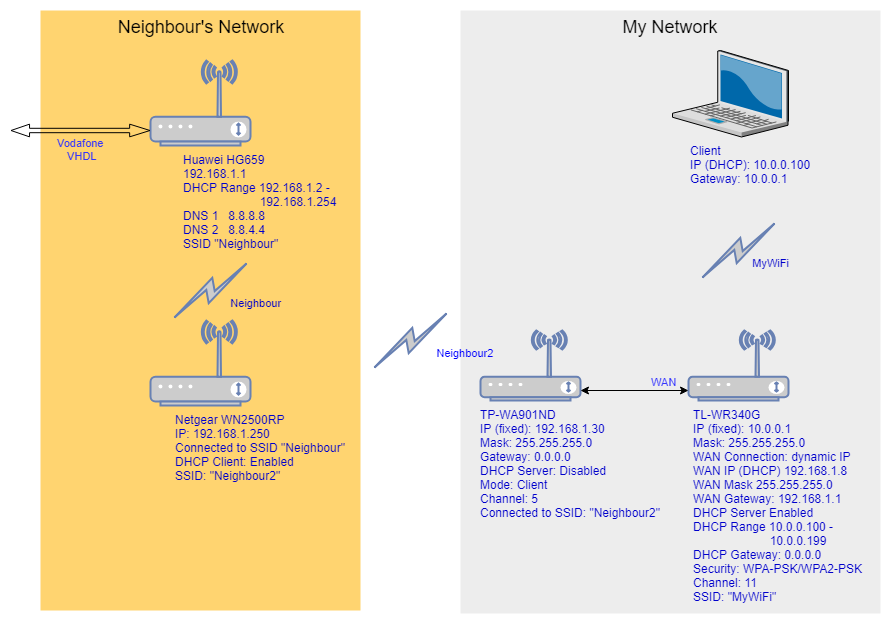
OK, this is what I ended up with, based on the suggestion of  rich.ms.  


The neighbour's extender Netgear WN2500RP is 2-3 walls and 10-15 metres from my TP-WA901ND running in "client" mode, and the TL-WR340G is at the other end of the house and connected with a 20m length of exterior CAT6 cable.


So far it's working with no issues, which is more than I can say for any of the other configurations I've tried.  Many thanks for all the suggestions.


View this topic in a long page with up to 500 replies per page Create new topic


Geekzone Live »

Try automatic live updates from Geekzone directly in your browser, without refreshing the page, with Geekzone Live now.


Are you subscribed to our RSS feed? You can download the latest headlines and summaries from our stories directly to your computer or smartphone by using a feed reader.