Geekzone: technology news, blogs, forums
Guest
Welcome Guest.
You haven't logged in yet. If you don't have an account you can register now.


gzjdoe

45 posts

Geek
+1 received by user: 16


#279636 29-Oct-2020 13:41
Send private message

Hi team


I have replaced my ISP router from a "FritzBox 7490" to a "Huawei Home Gateway HG659". The previous router had been supplied by 2degrees and the new one is supplied by BigPipe (if that information is relevant).


My home setup is all based on the Unifi network devices. So I usually have my Unifi devices connected to the ISP router and I connect everything via the Unifi network. In a gist this is what I have:


Internet > ISP Router > Unifi USG > Unifi Switch > Unifi Access Points


My Unifi USG (and all my devices) are on the 192.168.1.x subnet, and the previous ISP router was on 192.168.178.x subnet. So my Unifi USG would get an WAN IP on the 178.x range, but would act as a DHCP server on the 1.x range.


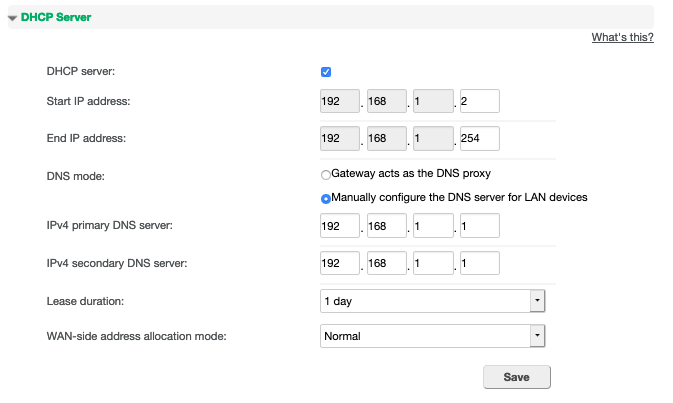
Now the new Huawei router is also on the 1.x range, which is making my Unifi network inaccessible. I thought I could simply change the ISP router's LAN interface details to a different range, but I can't seem to make it work. If I change the LAN Interface IP on the picture below I can't save the settings at the same time as when I need to change the DHCP server, which causes the router to become inaccessible as well. Could someone help me find the right settings?


If I select to manually configure the DNS server these options become available:


Create new topic

This is a filtered page: currently showing replies marked as answers. Click here to see full discussion.

Lias
5655 posts

Uber Geek
+1 received by user: 3978

ID Verified
Trusted
Lifetime subscriber

  #2593343 29-Oct-2020 14:51
Send private message

Why not just take the Huawei out of the picture entirely and use the USG?


*edit* Also pretty sure that range is hard coded in many of those cheap Huawei routers and you can't change it short of somewhat extreme measures like modifying firmware. 


I'm a geek, a gamer, a dad, a Quic user, and an IT Professional. I have a full rack home lab, size 15 feet, an epic beard and Asperger's. I'm a bit of a Cypherpunk, who believes information wants to be free and the Net interprets censorship as damage and routes around it. If you use my Quic signup you can also use the code R570394EKGIZ8 for free setup. Opinions are my own and not the views of my employer.


Create new topic


Geekzone Live »

Try automatic live updates from Geekzone directly in your browser, without refreshing the page, with Geekzone Live now.


Are you subscribed to our RSS feed? You can download the latest headlines and summaries from our stories directly to your computer or smartphone by using a feed reader.
