Geekzone: technology news, blogs, forums
Guest
Welcome Guest.
You haven't logged in yet. If you don't have an account you can register now.


sud0

283 posts

Ultimate Geek
+1 received by user: 117

ID Verified
Lifetime subscriber

#293008 20-Dec-2021 13:45
Send private message

Hi guys. I have a bit of a situation here.


I have a UDM-PRO, and I'm only getting 40Mbps on a Gigabit UFW plan. My network is like this:


[ ONT -> Orcon router (Bridge mode, receives the fiber) -> UDM PRO (VLAN 10, gets the WAN IP Address). ]


I'm testing the speed directly on the UDM-PRO dashboard, and from my laptop using Speedtest.


This is what I've tried so far:


  • I called Orcon and they said it's all good on their end. They suggested restarting everything (which I had already done) to reset the ISP's session. We did that, but had the same issue;
  • Shutdown UDM-PRO via the console (and the rest of the equipment) for 30 minutes;
  • Connected my laptop directly to the UDM-PRO;
  • Disabled Threat Management and DPI;
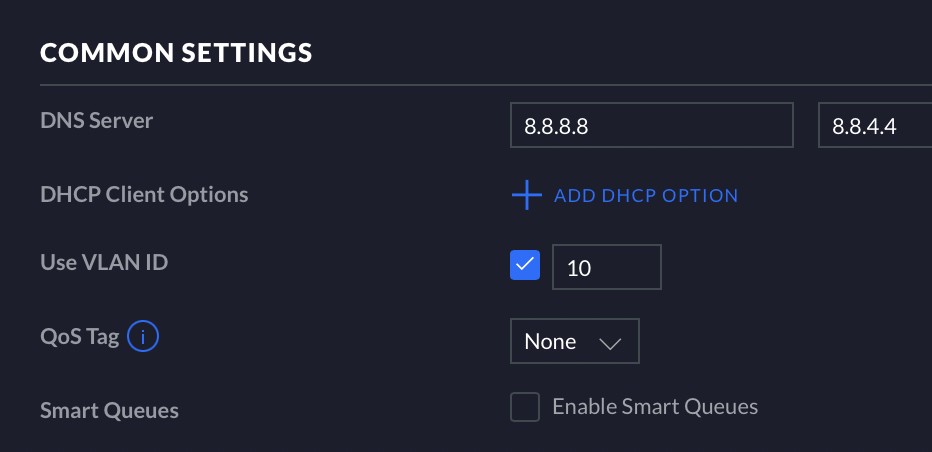
  • Changed DNS (just in case) from 1.1.1.1 to 8.8.8.8 on my UDM-PRO;
  • Disabled the Bandwidth limitation for the Guests network (I'm not connected to this network, but just in case);


However, if I connect my laptop directly to the Orcon router and perform a speed test, it gives me 100Mbps (my USB network adapter is only 100MB). So this shows me that there is something wrong with my UDM-PRO.


I don't know what else I can do, and I do not know when this issue happened. Any suggestions are welcome, please.

Thanks!


Lucas


lpossamai.me


View this topic in a long page with up to 500 replies per page Create new topic

This is a filtered page: currently showing replies marked as answers. Click here to see full discussion.

sud0

283 posts

Ultimate Geek
+1 received by user: 117

ID Verified
Lifetime subscriber

  #2836050 20-Dec-2021 16:03
Send private message

Jiriteach:


Yup so it’s something with the configuration. Sometimes disabling and re-enabling the ports can fix things.


Found the issue!


Disabling Smart Queues fixed it! (I don't know why it was enabled in the first place)


Lucas


lpossamai.me


View this topic in a long page with up to 500 replies per page Create new topic


Geekzone Live »

Try automatic live updates from Geekzone directly in your browser, without refreshing the page, with Geekzone Live now.


Are you subscribed to our RSS feed? You can download the latest headlines and summaries from our stories directly to your computer or smartphone by using a feed reader.