Geekzone: technology news, blogs, forums
Guest
Welcome Guest.
You haven't logged in yet. If you don't have an account you can register now.


XeonYK

1 post

Wannabe Geek
Inactive user


#10107 5-Nov-2006 16:26
Send private message

Hi,

I hope someone can help me. I've just bought a laptop and was looking forward to setting up a Bluetooth LAN with my desktop, which has aBroadCom 2045 Bluetooth 2.0 USB Device . The laptop is an Acer Travelmate 3273WXmi with a WidComm Bluetooth software 5.0.1.1500. The laptop BT drivers are WIDCOMM v 5.0.1.1500 and I am running XP Pro. I am not interested in ICS at the moment.

I have constantly got the "A network cable is unplugged" for the "Bluetooth Network" entry under "LAN or High-Speed Internet" and in the system tray. When running the network setup wizard I am told to plug it in. This doesn't make any sense!!
The Bluetooth can't send file to computer from handphone.

I really hope someone has some ideas as I want to get full use out of my BT devices.


Many thanks

Create new topic
freitasm
BDFL - Memuneh
80646 posts

Uber Geek
+1 received by user: 41029

Administrator
ID Verified
Trusted
Geekzone
Lifetime subscriber

  #51114 5-Nov-2006 16:41
Send private message

The Bluetooth profile for LAN access is different from the profile for sending files - so let's work on one each.

The PAN profile is like a network connection - if the computers are not connect it's like removing the cable from an ethernet adapter, therefore you will see the "Network cable unplugged message". As soon as you connect one computer to another this message goes away. Nothing wrong with it.

How you connect? Pair your computers, and from one find the icon corresponding to the other PC. Double-click it and you will see the services available. One of those is the Network service. Double-click to connect, that's it.

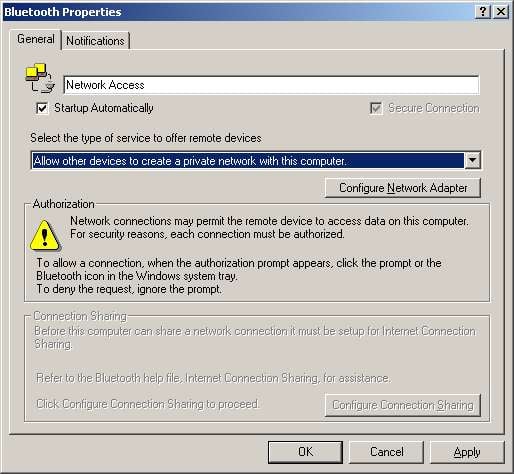
You have to be sure your adapters are configured as this:


Referral links: Quic Broadband (free setup code: R587125ERQ6VE) | Samsung | AliExpress | Wise | Sharesies 


Support Geekzone by subscribing (browse ads-free), or making a one-off or recurring donation through PressPatron.


Create new topic


Geekzone Live »

Try automatic live updates from Geekzone directly in your browser, without refreshing the page, with Geekzone Live now.


Are you subscribed to our RSS feed? You can download the latest headlines and summaries from our stories directly to your computer or smartphone by using a feed reader.