Geekzone: technology news, blogs, forums
Guest
Welcome Guest.
You haven't logged in yet. If you don't have an account you can register now.


JeremyNzl

361 posts

Ultimate Geek
+1 received by user: 74


#105684 7-Jul-2012 21:38
Send private message

Hi,

Iam having a spot of trouble trying to setup pfsense. 
My Dgn3500 will not connect in PPoe, (iam not sure if orcon support ppoe, also Iam rural on a conklin)
So I am wondering what my options are.

I have setup pfsense as a test but am unable to get internet access though it.
I understand this is due to running nat before the pfsense box. 
I found a post somewhere in my fruitless searches, ( I cannot find it again) 
suggesting someone was using  Dmz to feed the Pfsense Box is this an option.

My goals with Pfsense are to Traffic shape, as our connection is 400KB max, and peak times is 
as low as 50-150Kbs, I need to balance the traffic, As atm p2p can swamp the connection and render 
standard web pages unloadable for the other connections.

Any suggestions welcome, 

Thanks Jeremy

Create new topic
insane
3324 posts

Uber Geek
+1 received by user: 1006

ID Verified
Trusted
2degrees
Subscriber

  #652407 7-Jul-2012 23:27
Send private message

You're best of buying a Draytek Vigor 120 and set that up in bridge mode with the pfsense box. I may be wrong but I don't think the DGN even supports half-bridge mode which would have been the second best option.


Ragnor
8279 posts

Uber Geek
+1 received by user: 585

Trusted

  #652504 8-Jul-2012 14:24
Send private message

Mostly PPPoA is used in NZ for ADSL/ADSL2+

There are some exceptions:
1: Where the ISP has their own gear in the exchange,
2: The ISP supports PPPoE over Chorus EUBA,
3: VDSL

None of those seem to apply in your case. 

Unfortunately you can't easily bridge PPPoA, as insane mentions you have a couple of options (from most expensive/best to cheaper/worse):

1: Buy a Draytek Vigor 120 modem for it's PPPoA to PPPoE relay/passthrough functionality, ~$100
2: Dynalink RTA1320x or TP Link TD-8840 for half bridge/ip extension, can get these cheap on trademe
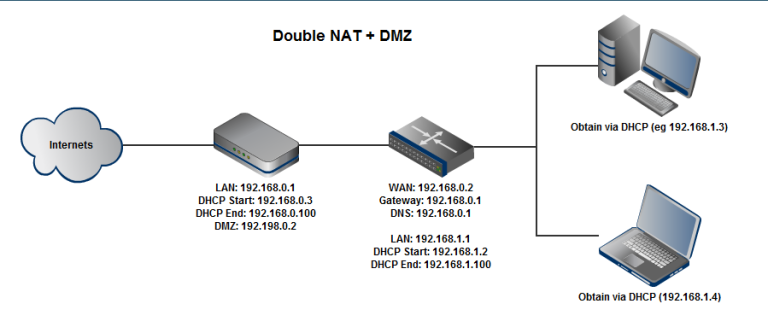
3: Use double NAT + DMZ

Double NAT + DMZ will probably give you some issues with gaming and p2p but for general web/email it should be ok.

For 3#
You need to make sure your modem and pfsense box are using different ip ranges

In the modem use 192.168.0.1 for it's lan ip address, 192.168.0.3 to 192.168.0.100 for it's DHCP range.

In pfsense use 192.168.1.1 for it's lan ip address, 192.168.1.2 to 192.168.1.100 for dhcp range. For wan use ip=192.168.0.2, gateway=192.168.0.1, dns=192.168.0.1

In the modem add 192.168.0.2 to the DMZ list

Ragnor
8279 posts

Uber Geek
+1 received by user: 585

Trusted

  #652512 8-Jul-2012 14:45
Send private message

Should work ok for general internet (not recommended for gamers/p2p/voip)


JeremyNzl

361 posts

Ultimate Geek
+1 received by user: 74


  #652617 8-Jul-2012 20:06
Send private message

Thankyou for all your suggestions,

I have since got it working. The key was the different subnets for Modem & Lan.
If I wish to persever with this route I will get a Draytrek 120.

Is Pfsense the best solution for me, as my primary goals are to make the net usable on the rest on the lan when p2p traffic is on (shaping that can throttle p2p base on load, Pfsense can do this I belive).
I would also like to prioritize gaming, viop and http.

Any suggestions of different Linux packages most welcome.

Cheers 

Jeremy


Ragnor
8279 posts

Uber Geek
+1 received by user: 585

Trusted

  #652708 9-Jul-2012 03:03
Send private message

pfsense has pretty good QoS.

JeremyNzl

361 posts

Ultimate Geek
+1 received by user: 74


  #652731 9-Jul-2012 08:13
Send private message

Yes the qos in Pfsense looks ok just fiddly to setup, also some mentioned in a previous post with my current setup, double nat is not ideal for gaming or viop. Is that due to the double Nat setup ?.  
When I get a Draytrek will the Pfsense setup be beset for my situation.


Shop now for Dell laptops and other devices (affiliate link).
shrub
790 posts

Ultimate Geek
+1 received by user: 272

ID Verified

  #652972 9-Jul-2012 15:12
Send private message

I have tried pfsence, monowall, untangle and smoothwall. The best option in the end was a vigor 120 to a tplink TP-Link TL-WR941ND running dd-wrt. Its way cheaper to run and maintain than a dedicated box that has to be on 24/7. Unless you need VPN access then dd-wrt fails

JeremyNzl

361 posts

Ultimate Geek
+1 received by user: 74


  #652977 9-Jul-2012 15:20
Send private message

Thanks,

I have just ordered a Draytek 120, so I am halve way there. I am happier today as Pfsense is correctly identifying my p2p traffic, I just need it to stop catching Battle Field 3 traffic as p2p (I have put off entering its ports 1 by 1 atm)

The Tplink dd-wrt looks like a solid option if I run aground with Pfsense.

Thanks

Jeremy


sbiddle
30853 posts

Uber Geek
+1 received by user: 9996

Retired Mod
Trusted
Biddle Corp
Lifetime subscriber

  #652988 9-Jul-2012 15:36
Send private message

It's pretty much impossible to identify P2P traffic these days with anything close to 100% accuracy.


Ragnor
8279 posts

Uber Geek
+1 received by user: 585

Trusted

  #653009 9-Jul-2012 16:02
Send private message

sbiddle: It's pretty much impossible to identify P2P traffic these days with anything close to 100% accuracy.


You don't have to though, on software like pfsense, Tomato, Gargoyle Router, DD-WRT etc you can still get an excellent result for home use by specifically classifying stuff you want to prioritise and dumping everything else in a bulk traffic class that gets lower priority/bandwidth.


chevrolux
4962 posts

Uber Geek
+1 received by user: 2638
Inactive user


  #653122 9-Jul-2012 18:59
Send private message

Ragnor:
sbiddle: It's pretty much impossible to identify P2P traffic these days with anything close to 100% accuracy.


You don't have to though, on software like pfsense, Tomato, Gargoyle Router, DD-WRT etc you can still get an excellent result for home use by specifically classifying stuff you want to prioritise and dumping everything else in a bulk traffic class that gets lower priority/bandwidth.


Surely if you set your p2p application to use a way out there port the router shouldnt pick any other traffic except for the one you specify for p2p.

HP


Shop now for HP laptops and other devices (affiliate link).
JeremyNzl

361 posts

Ultimate Geek
+1 received by user: 74


  #654136 11-Jul-2012 19:09
Send private message

Thanks Guys,

Iam up and running with Draytek ppoe/ppoa to Pfsense with squid 3 proxy server and traffic shaping. 
This has greatly improved the user experience of the 4 pcs, 3 ipads and 2 iphones. 

Laughing

I am however having one last problem, my orcon usage widget no longer registers and when I goto orcon.net.nz  it also fails to recognise me, Any suggestions how to fix that.
I also cant get the flash video on the rock to work either to listen to wind up your wife which is odd. 

Cheers

Jeremy

Create new topic


Geekzone Live »

Try automatic live updates from Geekzone directly in your browser, without refreshing the page, with Geekzone Live now.


Are you subscribed to our RSS feed? You can download the latest headlines and summaries from our stories directly to your computer or smartphone by using a feed reader.