Geekzone: technology news, blogs, forums
Guest
Welcome Guest.
You haven't logged in yet. If you don't have an account you can register now.


Cheese

7 posts

Wannabe Geek


#1093 18-Feb-2004 13:26
Send private message

After mucking around for the last few days I still fail to understand bluetooth networking and fail to get it working.

Im using a Billionton dongle and a 2210 with the bluetooth update. Bluetooth works ie: I can use activesync with no probs.

Firstly some hazy issues that I have in my understanding of Bluetooth Networking.
Firstly what does the Bluetooth adapter on my PC represent? Does my pda have its own IP/adapter that communicates with that adaptor via bluetooth or does establishing a bluetooth network connection cause the adapter on my PC to be the virtual adapter for the pda?

Currently (on my pc) I have the Bluetooth Adapter set to 192.168.0.1 and my network adapter for my PC set to 192.168.0.2. Using vxUtil trying to ping either adaptor returns nothing. I have tried various things like bridging but nothing seems to get a ping returned.

What I am trying to do is establish a TCP/IP connection so I can access the server(s) running on my PC. Ideally I would also use it to access my proxy (on my pc) but until then activesync will have to do.

Cheers in advance ;)

Create new topic
freitasm
BDFL - Memuneh
80646 posts

Uber Geek
+1 received by user: 41030

Administrator
ID Verified
Trusted
Geekzone
Lifetime subscriber

#3640 18-Feb-2004 13:54
Send private message

The Bluetooth adapter on your PC is another adapter, like your ethernet card. Depending on Bluetooth version and configuration you can use it in two ways:

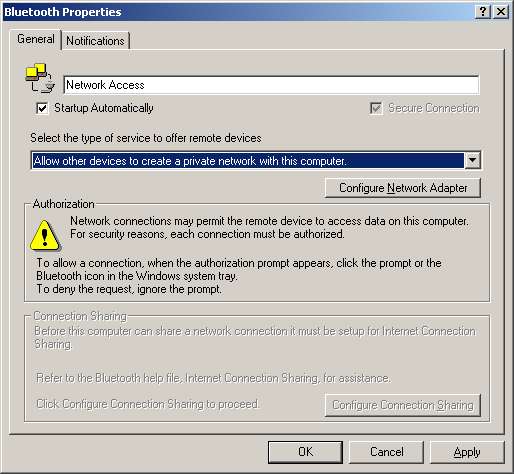
LAN Access gives you a passthrough to LAN resources, like the Internet. Because the Pocket PC will connect to this adapter as a "PPP dial-in" connection you need to have a mini-DHCP server and a PPP access server. Using ICS will provide this. To have ICS working you need this adapter to have the address 192.168.0.1, and the DNS addresses configured. When using this type of access your Pocket PC should have addresses and configuration assigned by the DHCP server. Because of the ICS requirement of having this 192.168.0.1 address on your computer's Bluetooth adapter you might see some conflicts if other devices in your network already have this (for example a router or ADSL modem). You know you have this access when you have this configuration:


When using the PAN driver (Personal Area Network) you can pretty much configure the Bluetooth adapter on your desktop and your Pocket PC with the addresses you want. This is only supported by the latest drivers in both devices. You know you're using this access on your desktop when you have this configuration:


In our Bluetooth Guides we have the script to configure in the LAN Access mode, because this is more common. There's no mystery in configuring really, except the care of network conflicts.


Referral links: Quic Broadband (free setup code: R587125ERQ6VE) | Samsung | AliExpress | Wise | Sharesies 


Support Geekzone by subscribing (browse ads-free), or making a one-off or recurring donation through PressPatron.


Cheese

7 posts

Wannabe Geek


#3641 18-Feb-2004 14:54
Send private message

Im still not sure

I have set up my bt adaptor to 192.168.0.1 (although I plan to use proxy rather than ICS eventually), i have set my local adaptor to 192.169.0.2 and I have connected. The configuration is set to be a PAN.

However I still cannot ping any IPs of my PC from the pda.

Is there something I have missed? I dont think I missed anything in the guides...

professorcheese@hotmail.com for Messenger or post here


Cheese

7 posts

Wannabe Geek


#3642 18-Feb-2004 14:57
Send private message

if i look at the information on my adaptors on my pda, there are three

Widcomm BT Null modem
IP: 192.168.55.101
Subnet: 255.255.255.0
etc...

Serial on USB
IP: 192.168.55.101
Subnet: 255.255.255.0
etc... (same as above)

BTCDPAN1 - Bluetooth PAN user driver
IP: 0.0.0.0
Subnet: 0.0.0.0
etc...

Note that only the network access bt service is connected and im not in the cradle


freitasm
BDFL - Memuneh
80646 posts

Uber Geek
+1 received by user: 41030

Administrator
ID Verified
Trusted
Geekzone
Lifetime subscriber

#3643 18-Feb-2004 15:00
Send private message

It looks like you're not being assigned an IP. You have to use either ICS or (if using XP) Bridge to have this assigned automatically.

If you want to use PAN then you have to enter the IP configuration on your Pocket PC, including DNS addresses.


Referral links: Quic Broadband (free setup code: R587125ERQ6VE) | Samsung | AliExpress | Wise | Sharesies 


Support Geekzone by subscribing (browse ads-free), or making a one-off or recurring donation through PressPatron.


Cheese

7 posts

Wannabe Geek


#3644 18-Feb-2004 15:14
Send private message

so where on my pda do i enter the ips? i would have thought i would have come across that by now

Cheese

7 posts

Wannabe Geek


#3645 18-Feb-2004 15:16
Send private message

aaahh i found it!


Shop now for Dell laptops and other devices (affiliate link).
Cheese

7 posts

Wannabe Geek


#3646 18-Feb-2004 16:07
Send private message

yaaargh, someone please tell me what im doing wrong, i went back to basics and simply tried bridging my PC's connections and setting the ip of 192.168.0.1 and setting my pda to 192.168.0.2 and attempting to ping either one.

my pc CAN now ping my pda, however the pda cannot ping 192.168.0.1, i get "request timed out"

freitasm
BDFL - Memuneh
80646 posts

Uber Geek
+1 received by user: 41030

Administrator
ID Verified
Trusted
Geekzone
Lifetime subscriber

#3648 18-Feb-2004 17:41
Send private message

You can ping from your PC but from your PDA you get a timeout, right?

Are you running the Windows XP firewall, or Norton NIS, or Zone Alarm?


Referral links: Quic Broadband (free setup code: R587125ERQ6VE) | Samsung | AliExpress | Wise | Sharesies 


Support Geekzone by subscribing (browse ads-free), or making a one-off or recurring donation through PressPatron.


Cheese

7 posts

Wannabe Geek


#3670 19-Feb-2004 00:46
Send private message

no, i have made sure im not

Create new topic


Geekzone Live »

Try automatic live updates from Geekzone directly in your browser, without refreshing the page, with Geekzone Live now.


Are you subscribed to our RSS feed? You can download the latest headlines and summaries from our stories directly to your computer or smartphone by using a feed reader.