Geekzone: technology news, blogs, forums
Guest
Welcome Guest.
You haven't logged in yet. If you don't have an account you can register now.


gumdigger

429 posts

Ultimate Geek
+1 received by user: 3


#156065 18-Nov-2014 10:47
Send private message

I'm new to VPN and was wondering if i could get some help setting this up using openvpn.

I would like to setup VPN so communication between a lan device accessing the internet is encrypted.

i believe this can be achieved by setting up openvpn as a server on gargoyle and openvpn client on the other end?

Looking at my network diagram is this possible?

Click to see full size

Create new topic
sidkumar
84 posts

Master Geek
+1 received by user: 1


  #1177867 18-Nov-2014 11:51
Send private message

Yes it is possible. However, the Draytek must pass all the incoming OpenVPN traffic to the Gargoyle on the UDP ports you configure it for. I have a slightly different setup where my modem is setup as transparent and Gargoyle is setup to connect to the ISP.

You will need to setup a different IP range for your VPN clients as I think only TAP VPN is supported in Gargoyle and not TUN.


gumdigger

429 posts

Ultimate Geek
+1 received by user: 3


  #1177908 18-Nov-2014 12:43
Send private message

Hello

Do you mean put my modem in bride mode? Do i have to do this?. i Have port forwarded UDP 1195 on Gargoyle and DV120.
is it possible to get a screenshot of your OpenVPN Config page?

sidkumar
84 posts

Master Geek
+1 received by user: 1


  #1178031 18-Nov-2014 16:25
Send private message

You don't need to put it in bridge mode. It should work even in this scenario. Have you tried connecting?


gumdigger

429 posts

Ultimate Geek
+1 received by user: 3


  #1179626 19-Nov-2014 15:09
Send private message

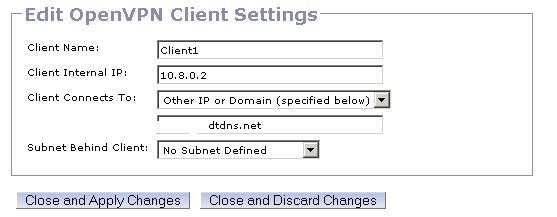
Check my settings and please tell me what am i doing wrong.
Click to see full size

Click to see full size

Click to see full size

Subnet behind client in client settings set to "No Subnet Defined" or 192.168.1.0/24 allows me to ping 192.168.0.1 which is the gargoyle ip.
but i cant ping anything else on the LAN.

Please advise.

sidkumar
84 posts

Master Geek
+1 received by user: 1


  #1179896 19-Nov-2014 23:06
Send private message

I am assuming that your use case for the VPN is to connect to home network from Internet (say mobile broadband). Let me know if this is correct.

Your second image is missing in the post. Try these:
1. Allow credential re-use (second to last item in vpn server). Allow multiple clients to use the same certificate, at least for troubleshooting purpose.
2. Change the Client Connects to (third screenshot) to the WAN IP and not Other IP.
3. Re-Download the connection files and then try

Which type of client are you trying to connect and how is it connected to the Internet? Is it Android, IOS, Windows, Linux, Mac or something else?

Cheers.

gumdigger

429 posts

Ultimate Geek
+1 received by user: 3


  #1179962 20-Nov-2014 09:24
Send private message

Hi Sid.

I'm connecting via internet from another location. using windows openvpn client to connect.

I tried what you suggested but it fails to connect as soon as i set the client to use WAN IP instead of Other IP. Because my WAN IP (That gargoyle see's) is 192.168.1.11 which is not rout'able on the internet.

Please check the attached screenshots.

Click to see full size


Shop on-line at New World now for your groceries (affiliate link).
sidkumar
84 posts

Master Geek
+1 received by user: 1


  #1180003 20-Nov-2014 10:57
Send private message

Right, so definitely WAN IP will not work as you are not in bridge mode. Change it back to other and try with the public IP assigned to the modem (and not the domain).

When you connect to OpenVPN from Windows clent, do you get an IP address assigned? What is it? Which address are you trying to ping? Can you share the screenshot of route settings (Connection->Routing)? Do mask your public IP address.

The other thing I see in your settings that you have chosen to use VPN only for host behind VPN and not all traffic, this will require you to define the hosts behind VPN in your client settings.

Do remember to re-download the config and apply to client everytime you make change.

gumdigger

429 posts

Ultimate Geek
+1 received by user: 3


  #1180181 20-Nov-2014 15:14
Send private message

sidkumar: Right, so definitely WAN IP will not work as you are not in bridge mode. Change it back to other and try with the public IP assigned to the modem (and not the domain).

When you connect to OpenVPN from Windows clent, do you get an IP address assigned? What is it? Which address are you trying to ping? Can you share the screenshot of route settings (Connection->Routing)? Do mask your public IP address.

The other thing I see in your settings that you have chosen to use VPN only for host behind VPN and not all traffic, this will require you to define the hosts behind VPN in your client settings.

Do remember to re-download the config and apply to client everytime you make change.


I tried using public IP instead of the WAN IP option. but again i can only ping 192.168.0.1.

i get assigned 10.8.0.2.

route settings? is this what your after?


is this where i define the hosts behind VPN?

sidkumar
84 posts

Master Geek
+1 received by user: 1


  #1180199 20-Nov-2014 15:53
Send private message

In the second screenshot where you have to choose a subnet behind the host, select the 192.168.0.0, that is the one which is behind your VPN and has all the internal hosts like NAS, as per your original diagram. Or otherwise allow all traffic via the VPN, in your server settings.

Try tracert to one of the internal host after you have connected to the VPN and see where it is being dropped.

Create new topic


Geekzone Live »

Try automatic live updates from Geekzone directly in your browser, without refreshing the page, with Geekzone Live now.


Are you subscribed to our RSS feed? You can download the latest headlines and summaries from our stories directly to your computer or smartphone by using a feed reader.