I had my router replaced by my wifi provider and now my Samsung tv model un46d6000sfxza wont reconnect back to the internet. I have a wireless lan adapter that I plug into my tv. It was working with the last Mikrotik router. Do I need to have my provider put the Mac address from adapter into router? or is their anything that needs to be unblocked in router? Nobody seems to have the solution. I am not very tech savy just trying to find a solution. The wifi provider says to call Samsung, and they say call wifi provider. :(
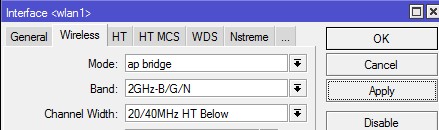
If you've got admin access to the mikrotik then check the wifi settings
If you're 20/40 above and on channel 11 this can cause problems so change it to below and likewise on channel 1 you want to be above.
Basically have a play - if all else fails change it to 20mhz - it will be slower but could be more reliable depending on the amount of wifi activity around you.
Same company but I dont know how to reconfigure my tv, I have reset to factory setting but that says it wont change any previous network settings. My tv has a mac address for lan stick. Do you thing I need to put that mac address into the router?
Are you subscribed to our RSS feed? You can download the latest headlines and summaries from our stories directly
to your computer or smartphone by using a feed reader.





 ID Verified