Geekzone: technology news, blogs, forums
Guest
Welcome Guest.
You haven't logged in yet. If you don't have an account you can register now.


d3mon

14 posts

Geek
+1 received by user: 2


#258491 6-Oct-2019 23:55
Send private message

I've noticed that there is a unknown device that is connected to our home network so i have blocked it and it appears to be trying to connect every 2hours.


I'm really stumped on what this device is as it has used 5.50gb/250mb of traffic in the past 15 days.
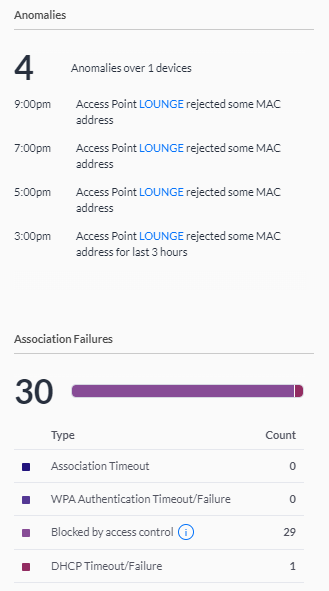


Does anyone know how i should go about looking for it? I've asked around the house and it doesn't appear to be anyone's device.


MAC Address 88:12:4e:06:43:e2
Manufacturer Qualcomm
Source Device OUI


Filter this topic showing only the reply marked as answer Create new topic
yitz
2238 posts

Uber Geek
+1 received by user: 594


  #2331654 7-Oct-2019 00:18
Send private message

88:12:4e - seems that range is a Dell device.


BarTender
3629 posts

Uber Geek
+1 received by user: 2572

ID Verified
Trusted
Lifetime subscriber

  #2331681 7-Oct-2019 07:54
Send private message

Change your wireless password to something else? Preferably a longer password and make sure that WPA2 AES (not TKIP) is only enabled, not WPA.


Jase2985
13730 posts

Uber Geek
+1 received by user: 6202

ID Verified
Lifetime subscriber

  #2331685 7-Oct-2019 08:01
Send private message

brother in law had the same thing, turned out it was his heat-pump which was WiFi enabled


freitasm
BDFL - Memuneh
80646 posts

Uber Geek
+1 received by user: 41024

Administrator
ID Verified
Trusted
Geekzone
Lifetime subscriber

  #2331689 7-Oct-2019 08:15
Send private message

Lots of devices use WiFi these days. If your router allows it, as soon as you connecr something make sure to change its name in the router's tables.

Scales, Freeview boxes, security cameras, smart plugs and so on. Think of all the stuff you have...


Referral links: Quic Broadband (free setup code: R587125ERQ6VE) | Samsung | AliExpress | Wise | Sharesies 


Support Geekzone by subscribing (browse ads-free), or making a one-off or recurring donation through PressPatron.


kobiak
1615 posts

Uber Geek
+1 received by user: 551

Trusted

  #2331701 7-Oct-2019 08:44
Send private message

it can be well the same device you see, but over IPv6 and duplicating MAC address


MY DHCP server shows these separately and sometimes MAC address is missing from IPv6 enabled device.


helping others at evgenyk.nz


wellygary
8810 posts

Uber Geek
+1 received by user: 5287


  #2331706 7-Oct-2019 09:03
Send private message

Have you got Fing?


https://www.fing.com/


It can help by telling you what services and ports are running on the device (amongst others)


... But you have to let it back on to your network first .....


Shop now for Dyson appliances (affiliate link).
MurrayM
2502 posts

Uber Geek
+1 received by user: 742

ID Verified
Trusted
Lifetime subscriber

  #2331729 7-Oct-2019 09:50
Send private message

freitasm: Lots of devices use WiFi these days. If your router allows it, as soon as you connecr something make sure to change its name in the router's tables.

Scales, Freeview boxes, security cameras, smart plugs and so on. Think of all the stuff you have...


Yup I've set up my router to show sensible names for all the devices on my network. It also lets me assign a little icon to each device, which I find handy.


tripper1000
1648 posts

Uber Geek
+1 received by user: 1176


  #2331771 7-Oct-2019 11:06
Send private message

Chromcast in the back of the Lounge room TV? That kind of data volume suggests media streaming more than "smart" device telemetry. 


Maybe someone in your house and the neighbours hit the WPS buttons at the same time as each other and it's their device.


d3mon

14 posts

Geek
+1 received by user: 2


  #2332904 8-Oct-2019 18:22
Send private message

BarTender:


Change your wireless password to something else? Preferably a longer password and make sure that WPA2 AES (not TKIP) is only enabled, not WPA.


Thanks mate, that helped me narrow it down to an old dell tablet that i was upgrading to windows 10 and left in the bottom of the drawer because it was taking forever to download. I feel so dumb now, i thought it was a neighbour or someone trying to steal our wifi lol


BarTender
3629 posts

Uber Geek
+1 received by user: 2572

ID Verified
Trusted
Lifetime subscriber

  #2332996 8-Oct-2019 20:06
Send private message

d3mon:


BarTender:


Change your wireless password to something else? Preferably a longer password and make sure that WPA2 AES (not TKIP) is only enabled, not WPA.


Thanks mate, that helped me narrow it down to an old dell tablet that i was upgrading to windows 10 and left in the bottom of the drawer because it was taking forever to download. I feel so dumb now, i thought it was a neighbour or someone trying to steal our wifi lol


It's always the easiest solutions that are often the best. And it's unlikely that someone has gone to the effort to hack your WiFi.


Last week my daughter gave a friend of hers the WiFi password. So I asked around the house who "Grilled-cheezus" was... Embarrassed daughter, embarrassed friend... Yes your parents are keeping an eye on you lot.


hio77
'That VDSL Cat'
13036 posts

Uber Geek
+1 received by user: 3896

ID Verified
Trusted
Lizard Networks
Subscriber

  #2332998 8-Oct-2019 20:10
Send private message

BarTender:


d3mon:


BarTender:


Change your wireless password to something else? Preferably a longer password and make sure that WPA2 AES (not TKIP) is only enabled, not WPA.


Thanks mate, that helped me narrow it down to an old dell tablet that i was upgrading to windows 10 and left in the bottom of the drawer because it was taking forever to download. I feel so dumb now, i thought it was a neighbour or someone trying to steal our wifi lol


It's always the easiest solutions that are often the best. And it's unlikely that someone has gone to the effort to hack your WiFi.


Last week my daughter gave a friend of hers the WiFi password. So I asked around the house who "Grilled-cheezus" was... Embarrassed daughter, embarrassed friend... Yes your parents are keeping an eye on you lot.


I'd have attributed that name to you straight away!


#include <std_disclaimer>


Any comments made are personal opinion and do not reflect directly on the position my current or past employers may have. 


Filter this topic showing only the reply marked as answer Create new topic


Geekzone Live »

Try automatic live updates from Geekzone directly in your browser, without refreshing the page, with Geekzone Live now.


Are you subscribed to our RSS feed? You can download the latest headlines and summaries from our stories directly to your computer or smartphone by using a feed reader.

