Geekzone: technology news, blogs, forums
Guest
Welcome Guest.
You haven't logged in yet. If you don't have an account you can register now.


Paul1977

5171 posts

Uber Geek
+1 received by user: 2192


#272871 21-Jul-2020 18:31
Send private message

Is there any way to configure an EdgeSwitch to function as a DNS server?


For some reason I thought you could, but there certainly isn't anything in the GUI and Google has only told me that it wasn't possible as of 4 years ago - so not exactly up to date info.


Create new topic
michaelmurfy
meow
13579 posts

Uber Geek
+1 received by user: 10910

Moderator
ID Verified
Trusted
Lifetime subscriber

  #2526694 21-Jul-2020 18:39
Send private message

Why would you? Just use the Edgerouter for DNS. The Edgeswitch is just a switch, not a router.


Michael Murphy | https://murfy.nz
Referral Links: Quic Broadband (use R122101E7CV7Q for free setup)

Are you happy with what you get from Geekzone? Please consider supporting us by subscribing.
Opinions are my own and not the views of my employer.


Paul1977

5171 posts

Uber Geek
+1 received by user: 2192


  #2526700 21-Jul-2020 18:49
Send private message

michaelmurfy:


Why would you? Just use the Edgerouter for DNS. The Edgeswitch is just a switch, not a router.


I have specific reasons why I need 2 DNS servers. I'd been using an old Fritz for one but was hoping to ditch it.


Lias
5655 posts

Uber Geek
+1 received by user: 3978

ID Verified
Trusted
Lifetime subscriber

  #2526716 21-Jul-2020 19:33
Send private message

Paul1977:


michaelmurfy:


Why would you? Just use the Edgerouter for DNS. The Edgeswitch is just a switch, not a router.


I have specific reasons why I need 2 DNS servers. I'd been using an old Fritz for one but was hoping to ditch it.


Could you run 2 DHCP scopes on separate edgerouter ports, and thus have '2' DNS servers (being the ER's IP on 2 separate sub nets)?


I'm a geek, a gamer, a dad, a Quic user, and an IT Professional. I have a full rack home lab, size 15 feet, an epic beard and Asperger's. I'm a bit of a Cypherpunk, who believes information wants to be free and the Net interprets censorship as damage and routes around it. If you use my Quic signup you can also use the code R570394EKGIZ8 for free setup. Opinions are my own and not the views of my employer.


michaelmurfy
meow
13579 posts

Uber Geek
+1 received by user: 10910

Moderator
ID Verified
Trusted
Lifetime subscriber

  #2526719 21-Jul-2020 19:59
Send private message

Lias:


Could you run 2 DHCP scopes on separate edgerouter ports, and thus have '2' DNS servers (being the ER's IP on 2 separate sub nets)?


Yes, you can run multiple DNS servers on the Edgerouter. And as an Edgeswitch is used just pass a VLAN to the device.


Michael Murphy | https://murfy.nz
Referral Links: Quic Broadband (use R122101E7CV7Q for free setup)

Are you happy with what you get from Geekzone? Please consider supporting us by subscribing.
Opinions are my own and not the views of my employer.


Paul1977

5171 posts

Uber Geek
+1 received by user: 2192


  #2533850 3-Aug-2020 16:32
Send private message

Without going into the details of why, I require 2 DNS servers on one subnet. The DNS needs to resolve FQDNs to different IPs depending on the client making the request.


SirHumphreyAppleby
2938 posts

Uber Geek
+1 received by user: 1860


  #2533855 3-Aug-2020 16:49
Send private message

Paul1977:


Without going into the details of why, I require 2 DNS servers on one subnet. The DNS needs to resolve FQDNs to different IPs depending on the client making the request.


Is there a reason why you can't use the hosts file on the client for this?


Shop now on AliExpress (affiliate link).
mentalinc
3384 posts

Uber Geek
+1 received by user: 1023

Trusted

  #2533860 3-Aug-2020 16:59
Send private message

Sounds like you need to do further subnetting so the clients can only access the dns server and IPs in their range...


two dns servers in the same range serving different clients doesn't sound close to ideal....


CPU: AMD 5900x | RAM: GSKILL Trident Z Neo RGB F4-3600C16D-32GTZNC-32-GB | MB:  Asus X570-E | GFX: EVGA FTW3 Ultra RTX 3080Ti| Monitor: LG 27GL850-B 2560x1440


Quic: https://account.quic.nz/refer/473833 R473833EQKIBX 


fe31nz
1294 posts

Uber Geek
+1 received by user: 423


  #2534205 4-Aug-2020 01:20
Send private message

Paul1977:


Without going into the details of why, I require 2 DNS servers on one subnet. The DNS needs to resolve FQDNs to different IPs depending on the client making the request.


If you are using ISC Bind 9 for the DNS server, then you can easily do what you want using two different "view"s - dual horizon.  I am doing this so that I have different DNS for internal and external requests, but the ACL controls you have for selecting which view is used are quite flexible.  This is what I have for selecting to use my "internal-view":


acl internal-acl {


   localnets;


   localhost;


   10.0.0.0/8;


   XXXX:XXXX:1:2800::/56; /* Delegated static IPv6 prefix. */


   fe80::/10;


   xxx.xxx.xxx.xxx;   /* External static IPv4 address. */


   172.16.0.0/12;


   192.168.0.0/16;


};


So if you want to specify individual IPv4 addresses to match that ACL specification, you would do with a /32 mask like this:


   192.168.22.7/32;


You set up the ACL so that anything that matches the ACL goes to one view, and anything that does not match goes to the other view.

Paul1977

5171 posts

Uber Geek
+1 received by user: 2192


  #2534245 4-Aug-2020 09:06
Send private message

Thanks for the replies guys.


I want to keep devices on the same subnet. It all works perfectly as long as I have 2 separate DNS servers on the subnet. I was really just enquiring if the EdgeSwitch could function as a DNS server so I could have one less box in my cabinet.


The reason I need 2 DNS servers is that I have some devices that I want to use my EdgeRouter for DNS resolution (which uses dnsmasq for geo-unblocking), but other devices I specifically don't want geo-unblocked.


What I currently do is assign the EdgeRouter as the DNS server for everything via DHCP, but redirect DNS requests from certain clients to the 2nd DNS server. That way all clients are on the same subnet, all are assignmed addresses etc via DHCP, but I can control what DNS server each client uses from one place (the EdgeRouter).


I currently use an old FritzBox as the second DNS server, was just hoping I could ditch it. EdgeSwitch can be configured to function as a DHCP server, and I think I must have misread that as DNS server.


Alternatively, if there was a way to tell the EdgeRouter to use the dnsmasq file for requests from some client but not others? I don't think this is possible, but happy to be corrected.


michaelmurfy
meow
13579 posts

Uber Geek
+1 received by user: 10910

Moderator
ID Verified
Trusted
Lifetime subscriber

  #2534249 4-Aug-2020 09:16
Send private message

You can use a DNAT rule to redirect DNS from these clients to an external DNS server (eg - Cloudflare DNS or your ISP's DNS servers) achieving the same thing.


Michael Murphy | https://murfy.nz
Referral Links: Quic Broadband (use R122101E7CV7Q for free setup)

Are you happy with what you get from Geekzone? Please consider supporting us by subscribing.
Opinions are my own and not the views of my employer.


mentalinc
3384 posts

Uber Geek
+1 received by user: 1023

Trusted

  #2534349 4-Aug-2020 11:21
Send private message

ahhh "clients" as in devices... not "clients" as in customers.


CPU: AMD 5900x | RAM: GSKILL Trident Z Neo RGB F4-3600C16D-32GTZNC-32-GB | MB:  Asus X570-E | GFX: EVGA FTW3 Ultra RTX 3080Ti| Monitor: LG 27GL850-B 2560x1440


Quic: https://account.quic.nz/refer/473833 R473833EQKIBX 


Stream your favourite shows now on Apple TV (affiliate link).
Paul1977

5171 posts

Uber Geek
+1 received by user: 2192


  #2534598 4-Aug-2020 16:18
Send private message

michaelmurfy:


You can use a DNAT rule to redirect DNS from these clients to an external DNS server (eg - Cloudflare DNS or your ISP's DNS servers) achieving the same thing.


Only downside with that is I can't set a secondary DNS server. When using router as a DNS "server" it's really only a forwarder to the ISPs DNS servers - and you specify primary and secondary. With the DNAT rule you can only only redirect to one address. So if the ISP has issues with their primary DNS server then those clients won't get their requests resolved. Probably a very infrequent occurrence though.


michaelmurfy
meow
13579 posts

Uber Geek
+1 received by user: 10910

Moderator
ID Verified
Trusted
Lifetime subscriber

  #2534635 4-Aug-2020 17:21
Send private message

Paul1977:


Only downside with that is I can't set a secondary DNS server. When using router as a DNS "server" it's really only a forwarder to the ISPs DNS servers - and you specify primary and secondary. With the DNAT rule you can only only redirect to one address. So if the ISP has issues with their primary DNS server then those clients won't get their requests resolved. Probably a very infrequent occurrence though.


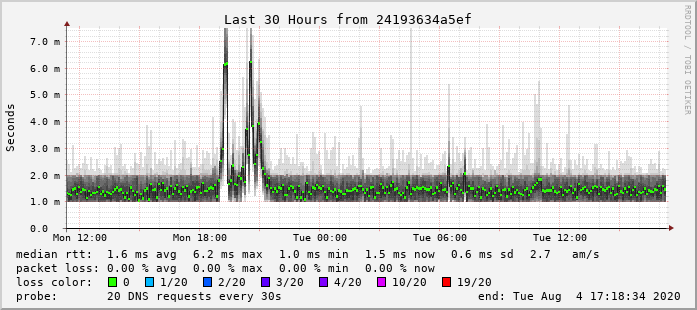
It is very infrequent. For example the below graph to 2degrees primary DNS server:


Basically what happens is if your closest DNS server is having issues then you get routed to the next closest working DNS server so you may see latency jump a little like this graph shows. I've otherwise never had an issue using this method and would prefer it than running another appliance :)


Michael Murphy | https://murfy.nz
Referral Links: Quic Broadband (use R122101E7CV7Q for free setup)

Are you happy with what you get from Geekzone? Please consider supporting us by subscribing.
Opinions are my own and not the views of my employer.


Create new topic


Geekzone Live »

Try automatic live updates from Geekzone directly in your browser, without refreshing the page, with Geekzone Live now.


Are you subscribed to our RSS feed? You can download the latest headlines and summaries from our stories directly to your computer or smartphone by using a feed reader.