Geekzone: technology news, blogs, forums
Guest
Welcome Guest.
You haven't logged in yet. If you don't have an account you can register now.


CapnAargh

2 posts

Wannabe Geek


#285901 24-May-2021 10:58
Send private message

I have Spark Fibre on an unlimited plan, and wanted to replace the HG659b router (about 3years old, spotty performance recently) with a new router.

the AX11000 definitely has better range on 2/5Ghz, and if I have the new router configured as an AP role plugged into old router, then all good (good signal in living room without a repeater - finally) - however I want to ditch the old router completely.

Issue:
When I change the router config to router mode, connect directly to ONT (old router off and out of picture) and use the basic settings (via PBTechs guide - although the exact model is not there, there isn't a lot to change (the AX11000 doesn't have an IPTv section, for example) - and assume the old user@spark.co.nz / password combo is fine - but the PPPoE connection never connects.

I have tried
- upgraded firmware
- factory reset
- different power off/on combos with the Fibre ONT
- fiddled with different settings, hardwiring DNS, chaging connection detect method etc, then reverted...


... no joy.


Has anyone successfully used the AX11000 with Spark fibre, and is there a trick to it?  If everyone elseis just plug and go, then there must be something odd with my fibre config - but of course Spark doesn't want to know once you start using a non-approved router...


Any help greatly appreciated


Create new topic
Delorean
673 posts

Ultimate Geek
+1 received by user: 343

ID Verified
Trusted
Lifetime subscriber

  #2712095 24-May-2021 11:05
Send private message

Do check your VLAN is set to 10 (It refers to NZ UFB from a dropdown box). As from memory, this is only visible when you access the web portal from a PC (the TP-Link App doesn't show that setting)


Referral Link: | Quic Broadband (use R142206E0L2CR for free setup)


CapnAargh

2 posts

Wannabe Geek


  #2712148 24-May-2021 11:58
Send private message

this is the ASUS ROG https://www.pbtech.co.nz/product/NETAS4110/ASUS-ROG-Rapture-GT-AX11000-Wi-Fi-6-Gigabit-Gaming not TP link model? 

I do appreciate the answer and will see if I can get to the setting, though I think it might be something model specific.


michaelmurfy
meow
13579 posts

Uber Geek
+1 received by user: 10910

Moderator
ID Verified
Trusted
Lifetime subscriber

  #2712154 24-May-2021 12:03
Send private message

That router is seriously rubbish and you've been ripped off if you've bought it especially at that price. I'd strongly recommend returning it and saving money by contacting Spark and getting a Spark Smart Modem + Spark Smart Mesh which even if you need to pay for it will come in at a small fraction of the cost you've paid and actually perform better...


Furthermore: https://www.duckware.com/tech/wifi-in-the-us.html


Don't get sucked in by expensive routers such as this. You can get much better for a fraction of the cost.


Michael Murphy | https://murfy.nz
Referral Links: Quic Broadband (use R122101E7CV7Q for free setup)

Are you happy with what you get from Geekzone? Please consider supporting us by subscribing.
Opinions are my own and not the views of my employer.


Delorean
673 posts

Ultimate Geek
+1 received by user: 343

ID Verified
Trusted
Lifetime subscriber

  #2712205 24-May-2021 13:28
Send private message

CapnAargh:


this is the ASUS ROG https://www.pbtech.co.nz/product/NETAS4110/ASUS-ROG-Rapture-GT-AX11000-Wi-Fi-6-Gigabit-Gaming 
not TP link model? 

I do appreciate the answer and will see if I can get to the setting, though I think it might be something model specific.


Oh, sorry, misread the model number; I would return that router. Maybe swap it out for an Amplifi HD or a commercial-grade Ubiquiti product if that's your budget range.


As already mentioned, the Spark Router is more than adequate and will perform much better IMO


Referral Link: | Quic Broadband (use R142206E0L2CR for free setup)


Jase2985
13730 posts

Uber Geek
+1 received by user: 6202

ID Verified
Lifetime subscriber

  #2712431 24-May-2021 16:32
Send private message

holy crap $800+ for an all in one, you could get 2 decent AP's and a stand alone router for that and have change


1101
3141 posts

Uber Geek
+1 received by user: 1143


  #2713098 26-May-2021 09:20
Send private message

CapnAargh:


Has anyone successfully used the AX11000 with Spark fibre, and is there a trick to it? 


if you cant return it,


use these settingings .
make sure VLAN (10) is enabled


https://www.spark.co.nz/help/internet/set-up/non-spark-modem/


  • Operating mode: MDI/MDIX
  • PPP protocol: PPPoE
  • PPP username: user@spark.co.nz
  • PPP password: password
  • PPP auth type: PAP
  • PPP mode: Always on (dial on demand disabled)
  • Encapsulation: 802.1Q
  • PCP marking: 0
  • VID (or VLAN): 10
  • MTU: Auto or 1500


Move to New Zealand's best fibre broadband service (affiliate link). Free setup code: R587125ERQ6VE. Note that to use Quic Broadband you must be comfortable with configuring your own router.
OrangeKiwi
1 post

Wannabe Geek


#2856905 26-Jan-2022 22:05
Send private message

****SOLVED!!*****


I bought the GT-AX11000 the other day and it didn't take long before I realised as an amature to networking I was way in the deep-end when trying to connect this router to the Spark Fibre Network! So an upfront thanks to the previous responses in this thread and also to the those who responded on this thread (https://www.geekzone.co.nz/forums.asp?forumid=39&topicid=253060), as you gave me the keys to making it work!


How to setup the GT-AX11000 for Spark Fibre:


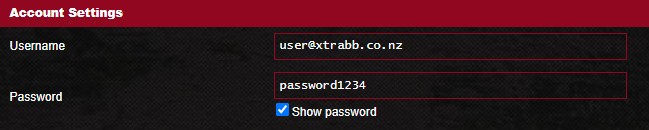
1. Under the WAN tab keep everything the same following initial internet setup except make the following changes:


    Username =  user@xtrabb.co.nz 


    Password = password1234


    (Note, I suspect the Username and Password are not super critical as I had previously miss typed them and it still connected to the internet.)


    You don't need a 'Special Requirement from ISP' so set 'Enable VPN + DHCP Connection' to 'No'.


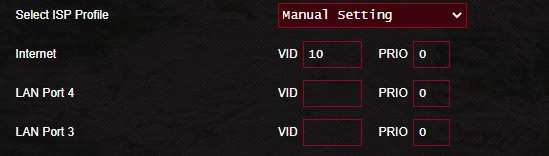
2. You do need to set up the VLAN tagging but this is achieved through the LAN tab:


    IPTV>Select ISP Profile>choose 'Manual Setting' from the dropdown menu


    Internet>VID then enter '10'


   That's it, you don't need to select anything else.


I assume that because the VLAN setup is through the LAN section that we loose the ability to run Dual WAN's. But still many impressive  features on this Router, so hope you can also get it working. ;)


Create new topic


Geekzone Live »

Try automatic live updates from Geekzone directly in your browser, without refreshing the page, with Geekzone Live now.


Are you subscribed to our RSS feed? You can download the latest headlines and summaries from our stories directly to your computer or smartphone by using a feed reader.