Geekzone: technology news, blogs, forums
Guest
Welcome Guest.
You haven't logged in yet. If you don't have an account you can register now.


danepak

1124 posts

Uber Geek
+1 received by user: 85


#312111 18-Mar-2024 15:49
Send private message

Hi, is this possible?


Our tenants next door are moving out and we’re considering switching the WiFi off in that house and instead see if we can spread the WiFi signal from our house.


I’ve got two wireless access points in our house (one upstairs and one downstairs, both installed in ceiling. Great coverage in our house.


Is it possible to use mesh and wireless access points at the same time (with two different WiFi names)?


So for our house, we'll keep using HOME WIFI (through the wireless access points)


And for next door, they're using GUEST WIFI (through mesh)


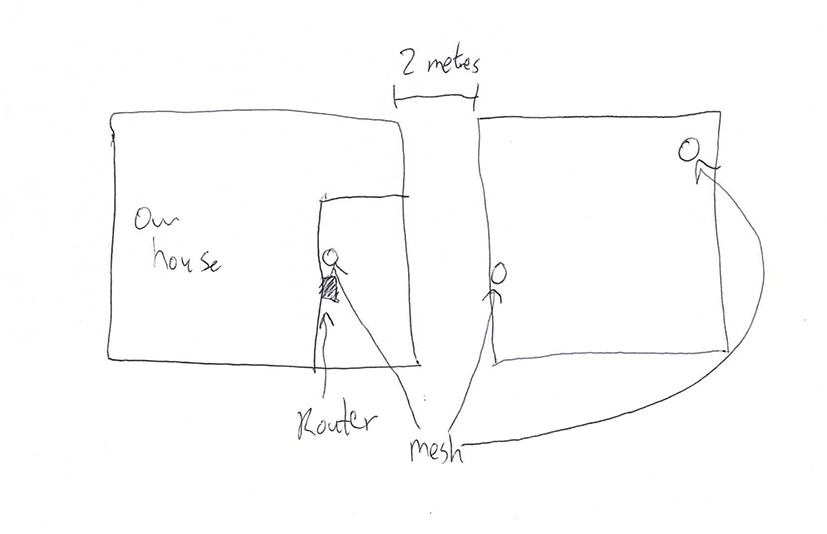
Our router in our house is quite close to the neighbouring house (approx 4 1/2 metres to the outer wall). One mesh would be connected to my router. Then I would have a mesh by the wall at the other house (so as mentioned before, approx 4 1/2 metres away from the other mesh). And then add another one elsewhere in the other house to ensure that there’s good coverage.


And no, running a cable to the other house is not an option.


Please see photo.


I hope it makes sense 😊


Filter this topic showing only the reply marked as answer View this topic in a long page with up to 500 replies per page Create new topic
 1 | 2
Spyware
3818 posts

Uber Geek
+1 received by user: 1366

Lifetime subscriber

  #3207556 18-Mar-2024 16:43
Send private message

What cladding do the buildings have??


Spark Max Fibre using Mikrotik CCR1009-8G-1S-1S+, CRS125-24G-1S, Unifi UAP, U6-Pro, UAP-AC-M-Pro, Apple TV 4K (2022), Apple TV 4K (2017), iPad Air 1st gen, iPad Air 4th gen, iPhone 13, SkyNZ3151 (the white box). If it doesn't move then it's data cabled.


freitasm
BDFL - Memuneh
80646 posts

Uber Geek
+1 received by user: 41030

Administrator
ID Verified
Trusted
Geekzone
Lifetime subscriber

  #3207558 18-Mar-2024 16:57
Send private message

"switching the WiFi off in that house"

Does it mean they currently have their own Internet connection and you want to turn it off?


Referral links: Quic Broadband (free setup code: R587125ERQ6VE) | Samsung | AliExpress | Wise | Sharesies 


Support Geekzone by subscribing (browse ads-free), or making a one-off or recurring donation through PressPatron.


danepak

1124 posts

Uber Geek
+1 received by user: 85


  #3207559 18-Mar-2024 17:00
Send private message

freitasm: "switching the WiFi off in that house"

Does it mean they currently have their own Internet connection and you want to turn it off?


Correct. We don’t want to pay for two connections, as the house soon will be empty and we’re unsure of future plans. Potentially turning it into AirBnB.


danepak

1124 posts

Uber Geek
+1 received by user: 85


  #3207571 18-Mar-2024 17:27
Send private message

Spyware:

What cladding do the buildings have??


Our house is brick veneer.
The other house is plasterboard.

toejam316
1516 posts

Uber Geek
+1 received by user: 888

Trusted
Lifetime subscriber

  #3207578 18-Mar-2024 17:43
Send private message

https://www.gowifi.co.nz/preconfigured-kits/rbwapg-60adkit.html


Bang one of those on each side in a window with clear line of sight, use it like you would have used the cable that cannot be run. Should do the job nicely, and probably much less flakey than hoping mesh will penetrate the cladding successfully.


Join Quic Broadband with my referral - no sign up fee and gives me account credit


Anything I say is the ramblings of an ill informed, opinionated so-and-so, and not representative of any of my past, present or future employers, and is also probably best disregarded.


freitasm
BDFL - Memuneh
80646 posts

Uber Geek
+1 received by user: 41030

Administrator
ID Verified
Trusted
Geekzone
Lifetime subscriber

  #3207583 18-Mar-2024 17:59
Send private message

But then you will have some ugly things in the window (TM).


Referral links: Quic Broadband (free setup code: R587125ERQ6VE) | Samsung | AliExpress | Wise | Sharesies 


Support Geekzone by subscribing (browse ads-free), or making a one-off or recurring donation through PressPatron.


Stream your favourite shows now on Apple TV (affiliate link).
cshwone
1091 posts

Uber Geek
+1 received by user: 844


  #3207586 18-Mar-2024 18:13
Send private message

I just used a pair of Deco M4's. One in the main house at a window connected to the router and the other in my daughters cottage about 15m away. Great coverage in the cottage.


danepak

1124 posts

Uber Geek
+1 received by user: 85


  #3207593 18-Mar-2024 18:26
Send private message

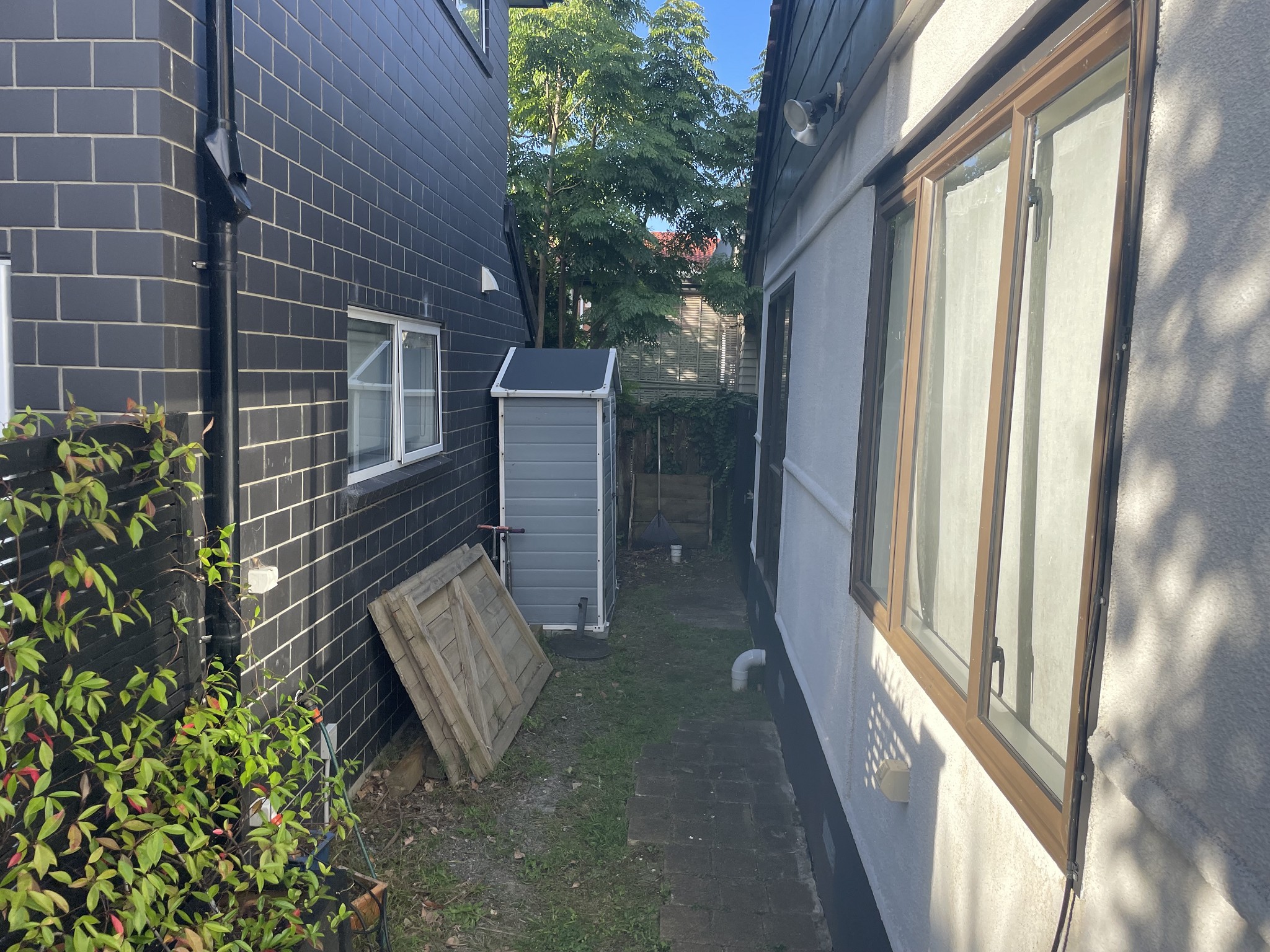
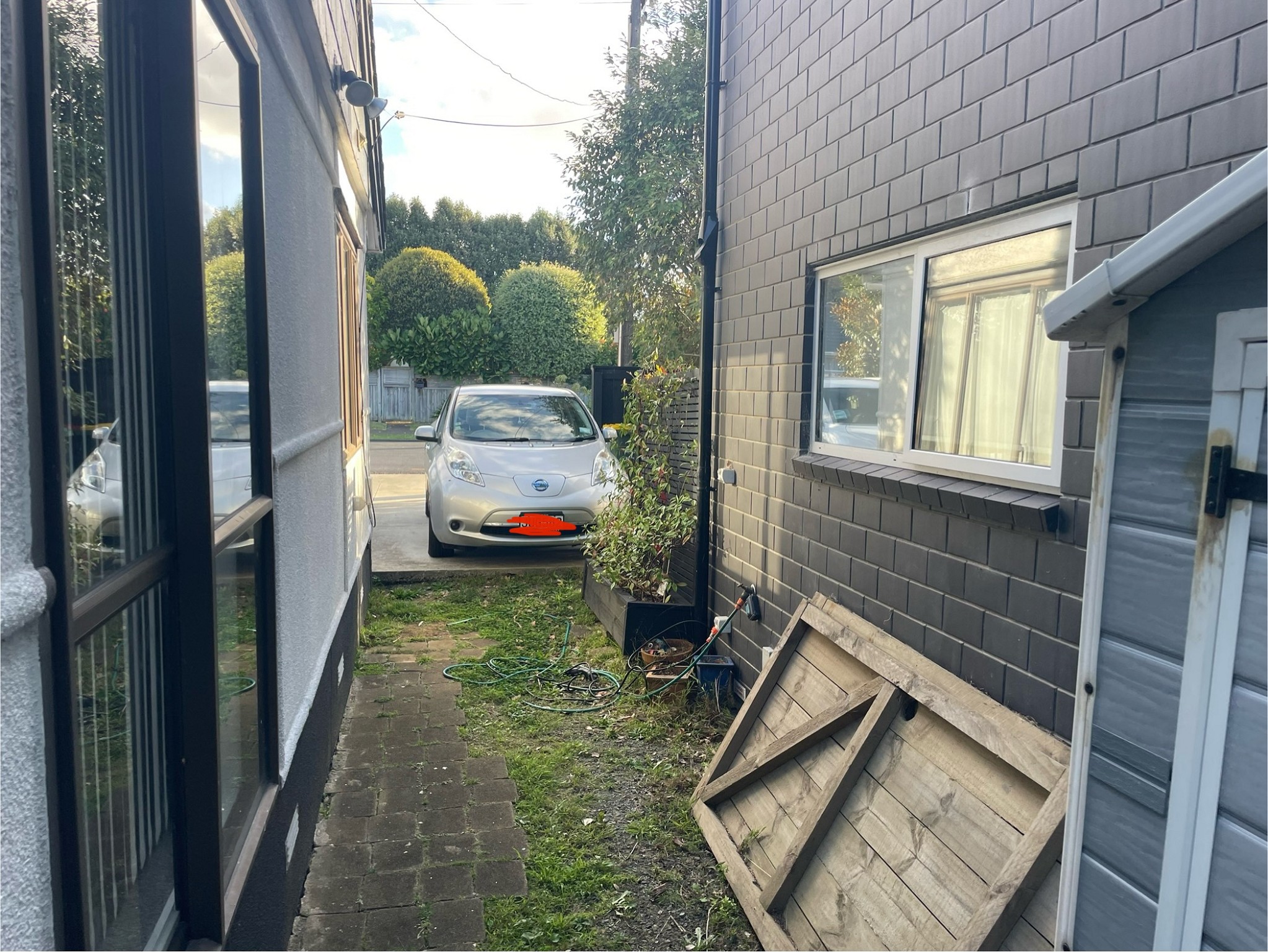
Photos of the houses. Brick veneer is the house we live in.
Clear line of sight between the houses.


networkn
Networkn
32862 posts

Uber Geek
+1 received by user: 15453

ID Verified
Trusted
Lifetime subscriber

  #3207879 19-Mar-2024 11:03
Send private message

Personally, I wouldn't do this, and I wouldn't move into a property where it was done. 


Sharing your internet connection is fraught with potential issues, security, behavioural, and access. You are making their internet your problem and responsibility. An entry level internet connection is $60 a month. 


I'd be even more inclined to separate this, if I was airBNB'ing it. 


mentalinc
3384 posts

Uber Geek
+1 received by user: 1023

Trusted

  #3207894 19-Mar-2024 11:16
Send private message

Looks like the ONT is on the outside wall, should be pretty easy to get a second fibre connection added directly to the second dwelling.


CPU: AMD 5900x | RAM: GSKILL Trident Z Neo RGB F4-3600C16D-32GTZNC-32-GB | MB:  Asus X570-E | GFX: EVGA FTW3 Ultra RTX 3080Ti| Monitor: LG 27GL850-B 2560x1440


Quic: https://account.quic.nz/refer/473833 R473833EQKIBX 


Aaroona
3204 posts

Uber Geek
+1 received by user: 169


  #3207982 19-Mar-2024 12:02
Send private message

networkn:


Personally, I wouldn't do this, and I wouldn't move into a property where it was done. 


Sharing your internet connection is fraught with potential issues, security, behavioural, and access. You are making their internet your problem and responsibility. An entry level internet connection is $60 a month. 


I'd be even more inclined to separate this, if I was airBNB'ing it. 


Purely for Air BnB, I would consider it.


From a security perspective, yes I would absolutely separate this in some way. I think a singular "line" would make sense as a cost optimization, provided you have the appropriate security measures in place. (Network isolation, separate SSID, UPNP turned off, etc.) 


As a long term tenant though, I would not want to rent a place with a shared internet connection. But I also know plenty of people that would move into a property and not think twice about it. The same that seek out open wifi connections with no additional layers of security.


Want to support Geekzone and browse the site without the ads? Subscribe to Geekzone now (monthly, annual and lifetime options).
freitasm
BDFL - Memuneh
80646 posts

Uber Geek
+1 received by user: 41030

Administrator
ID Verified
Trusted
Geekzone
Lifetime subscriber

  #3207994 19-Mar-2024 12:34
Send private message

Aaroona:


As a long term tenant though, I would not want to rent a place with a shared internet connection. But I also know plenty of people that would move into a property and not think twice about it. The same that seek out open wifi connections with no additional layers of security.


Not even then. You don't know what type of content they are downloading or sharing and if the police won't show at your doorsetp.


Nope.


Referral links: Quic Broadband (free setup code: R587125ERQ6VE) | Samsung | AliExpress | Wise | Sharesies 


Support Geekzone by subscribing (browse ads-free), or making a one-off or recurring donation through PressPatron.


Aaroona
3204 posts

Uber Geek
+1 received by user: 169


  #3207996 19-Mar-2024 12:35
Send private message

freitasm:


Aaroona:


As a long term tenant though, I would not want to rent a place with a shared internet connection. But I also know plenty of people that would move into a property and not think twice about it. The same that seek out open wifi connections with no additional layers of security.


Not even then. You don't know what type of content they are downloading or sharing and if the police won't show at your doorsetp.


Nope.


... And having a connection under your name for an Air BnB wouldn't result in the same problem? 


EDIT: I don't actually disagree with you, just that the argument of what they're downloading, at least with an Air Bnb situation, would still fall to you as the connection holder regardless.

From a tenant perspective, I wouldn't want to move into a property where I don't control my own connection. And equally as a property owner, I wouldn't want to provide it to someone either- partly for the reason you mentioned but also because I don't want to support them - I already deal with support at work.


networkn
Networkn
32862 posts

Uber Geek
+1 received by user: 15453

ID Verified
Trusted
Lifetime subscriber

  #3208011 19-Mar-2024 13:06
Send private message

Aaroona:


... And having a connection under your name for an Air BnB wouldn't result in the same problem? 


It's *considerably* more defendable. Clear and obvious demarcation point. 


nztim
4012 posts

Uber Geek
+1 received by user: 2710

ID Verified
Trusted
TEAMnetwork
Subscriber

  #3208031 19-Mar-2024 14:22
Send private message

Things to consider.


  • You are liable as the account holder for anything done on that connection.
  • If you are going to share the connection, I would suggest an RSP that can provide you a /30 so that your traffic for your secondary dwelling is separated from your primary dwelling so that any traffic on that secondary dwelling can be identified as coming form a different IP address, this still doesn't preclude you from being liable but at least the traffic is identifiable and you can shut that segment of your network down

Now I have that out of the way the technical solution.


  • I would not go down the mesh path all devices will be on the same Layer2 network as yourself, therefore occupants of the secondary dwelling can cast to your TV which is far from Ideal.
  • It looks like it would be easy to trench between the two dwellings, based on those photos there is a grass patch.
  • I would go fiber as the power feeds to each dwelling are likely to be on different phases meaning you can have potential difference between the two dwellings which is dangerous (unless everything is powered with PoE form the primary dwelling then you can go Cat6)  
  • Wireless bridge in the windows will also work, but as others have said are ugly.


Any views expressed on these forums are my own and don't necessarily reflect those of my employer. 


 1 | 2
Filter this topic showing only the reply marked as answer View this topic in a long page with up to 500 replies per page Create new topic


Geekzone Live »

Try automatic live updates from Geekzone directly in your browser, without refreshing the page, with Geekzone Live now.


Are you subscribed to our RSS feed? You can download the latest headlines and summaries from our stories directly to your computer or smartphone by using a feed reader.