Geekzone: technology news, blogs, forums
Guest
Welcome Guest.
You haven't logged in yet. If you don't have an account you can register now.


kiwifidget

"Cookie"
3640 posts

Uber Geek
+1 received by user: 1969

Lifetime subscriber

#315677 6-Aug-2024 08:57
Send private message

I'm not sure when this started happening, but I can no longer reach my UltraHub via web browser.


I can ping it, and it's obviously still working to some degree as I have internet (fibre).


I don't use it for wifi, the login page however is playing hard to get.
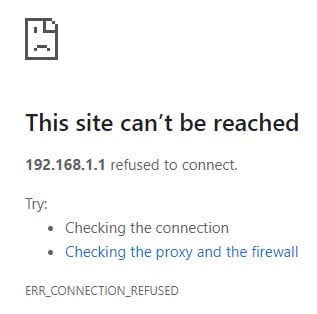


Any other UltraHub owners out there with this issue too?


If it's just me I'll call support.


Delete cookies?! Are you insane?!


View this topic in a long page with up to 500 replies per page Create new topic
 1 | 2
richms
29098 posts

Uber Geek
+1 received by user: 10208

Trusted
Lifetime subscriber

  #3268526 6-Aug-2024 09:41
Send private message

Try explicitly putting http in the address bar - I have had chrome just give up instead of warning me and falling back to http a few times after a recent update when I was trying to configure LAN devices.


Richard rich.ms


kiwifidget

"Cookie"
3640 posts

Uber Geek
+1 received by user: 1969

Lifetime subscriber

  #3268617 6-Aug-2024 13:34
Send private message

@richms  Thanx, I have tried that (I was using Chrome), and also in Edge and Firefox, to no avail.


Maybe I need a new router.


Could be hard convincing One I need one as in all other respects it seems to be working.


What router are they giving out these days?


Delete cookies?! Are you insane?!


MaxineN
Max
2049 posts

Uber Geek
+1 received by user: 1662

ID Verified
Trusted
Subscriber

  #3268638 6-Aug-2024 14:52
Send private message

kiwifidget:

@richms  Thanx, I have tried that (I was using Chrome), and also in Edge and Firefox, to no avail.


Maybe I need a new router.


Could be hard convincing One I need one as in all other respects it seems to be working.


What router are they giving out these days?


Last time I checked it was a Huawei DN8245X6 (wifi 6 160mhz capable) for resi and the Deco X50 DSL for business. Could have changed, the DN8 was speculated to be on its way out as I left.

I have a DN8 in very good condition that I could part ways.


Ramblings from a mysterious lady who's into tech. Warning I may often create zingers.


drajk
204 posts

Master Geek
+1 received by user: 19

Trusted

  #3268701 6-Aug-2024 15:55
Send private message

I have experienced this previously and would be fixed by complete power off then restart. Would then work for a while before issue recurred so if needing to access would need to do after ppower off and restart.  I presume you have probably attempted that?


kiwifidget

"Cookie"
3640 posts

Uber Geek
+1 received by user: 1969

Lifetime subscriber

  #3268845 6-Aug-2024 20:30
Send private message

drajk:


I have experienced this previously and would be fixed by complete power off then restart. Would then work for a while before issue recurred so if needing to access would need to do after ppower off and restart.  I presume you have probably attempted that?


Yes, I have tried that, twice. 


Delete cookies?! Are you insane?!


jrdobbs
106 posts

Master Geek
+1 received by user: 73


  #3268849 6-Aug-2024 20:45
Send private message

kiwifidget:


I'm not sure when this started happening, but I can no longer reach my UltraHub via web browser.


Have you tried a factory reset on it?


I don't practice what I preach because I'm not the kind of person I'm preaching to.


Shop now for Dell laptops and other devices (affiliate link).
kiwifidget

"Cookie"
3640 posts

Uber Geek
+1 received by user: 1969

Lifetime subscriber

  #3268852 6-Aug-2024 20:50
Send private message

jrdobbs:


kiwifidget:


I'm not sure when this started happening, but I can no longer reach my UltraHub via web browser.


Have you tried a factory reset on it?


No. ISP provided router, I don't have the documentation to reconfigure it.


Delete cookies?! Are you insane?!


SpartanVXL
1498 posts

Uber Geek
+1 received by user: 666


  #3268918 6-Aug-2024 23:16
Send private message

If it is ISP provided then it will be loaded with defaults from your ISP i.e ready to go for your connection.

At least thats how it’s always been.

Goosey
3014 posts

Uber Geek
+1 received by user: 867

Subscriber

  #3268954 7-Aug-2024 06:56
Send private message

SpartanVXL: If it is ISP provided then it will be loaded with defaults from your ISP i.e ready to go for your connection.

At least thats how it’s always been.


this, there’s not much really to configure other than you loggin in, switch to advanced and then go about sorting your wifi settings e.g. switch it off or set it to low power and non broadcast ssid for those times you might need a fall back.


everything else will just work as it should.


beware, after a reset, it takes a few minutes for the phone connection to come back to life….so give it a good 5 minutes before you try using the phone (assuming you have a landline tied to it).


take some photos of the stickers, will be easier when you call the helpdesk and ask for a new one when you need to…


kiwifidget

"Cookie"
3640 posts

Uber Geek
+1 received by user: 1969

Lifetime subscriber

  #3268957 7-Aug-2024 07:11
Send private message

So a factory reset will retain the configuration that VF put in it when they sent it to me?


Yes, there is a landline tied to it.


How do you factory reset an UltraHub? (a wee hole you stick an unbent paperclip into??)


EDIT: found manual online, so yes, a reset pinhole.


It will be the weekend before I can try this out, which is probably the worst time to do it, so maybe early next week.


Delete cookies?! Are you insane?!


MaxineN
Max
2049 posts

Uber Geek
+1 received by user: 1662

ID Verified
Trusted
Subscriber

  #3268971 7-Aug-2024 08:51
Send private message

kiwifidget:

So a factory reset will retain the configuration that VF put in it when they sent it to me?


Yes, there is a landline tied to it.


How do you factory reset an UltraHub? (a wee hole you stick an unbent paperclip into??)


EDIT: found manual online, so yes, a reset pinhole.


It will be the weekend before I can try this out, which is probably the worst time to do it, so maybe early next week.


Ah okay.

So when you factory reset it, it will send a request to the ACS (device manager) and it will pull down the landline again so it will work. Wifi default stuff is already loaded onto the UltraHub.

If you had any other One NZ RGW and it wasn't registered to your account then it would not pull down the landline (such as me providing that DN8 to you, will need frontline to intervene).


Ramblings from a mysterious lady who's into tech. Warning I may often create zingers.


HP


Shop now for HP laptops and other devices (affiliate link).
nztim
4012 posts

Uber Geek
+1 received by user: 2710

ID Verified
Trusted
TEAMnetwork
Subscriber

  #3269379 8-Aug-2024 08:26
Send private message

MaxineN:

So when you factory reset it, it will send a request to the ACS (device manager) and it will pull down the landline again so it will work. Wifi default stuff is already loaded onto the UltraHub.

If you had any other One NZ RGW and it wasn't registered to your account then it would not pull down the landline (such as me providing that DN8 to you, will need frontline to intervene).


This is why, ONE NZ need to move to ONT Based Voice like almost every other provider has done.


Any views expressed on these forums are my own and don't necessarily reflect those of my employer. 


MaxineN
Max
2049 posts

Uber Geek
+1 received by user: 1662

ID Verified
Trusted
Subscriber

  #3269403 8-Aug-2024 09:18
Send private message

nztim:


MaxineN:

So when you factory reset it, it will send a request to the ACS (device manager) and it will pull down the landline again so it will work. Wifi default stuff is already loaded onto the UltraHub.

If you had any other One NZ RGW and it wasn't registered to your account then it would not pull down the landline (such as me providing that DN8 to you, will need frontline to intervene).


This is why, ONE NZ need to move to ONT Based Voice like almost every other provider has done.


/shrug. 


Lot of cost to do that. 


Ramblings from a mysterious lady who's into tech. Warning I may often create zingers.


kiwifidget

"Cookie"
3640 posts

Uber Geek
+1 received by user: 1969

Lifetime subscriber

  #3269571 8-Aug-2024 18:20
Send private message

Due to the lack of cabling in my house, having the landline come out of the ONT would be a major problem.


Having it come out of the router is the perfect solution for me.


Even perfecter would be not having a landline at all, but.... Himself.


Delete cookies?! Are you insane?!


kiwifidget

"Cookie"
3640 posts

Uber Geek
+1 received by user: 1969

Lifetime subscriber

  #3275266 26-Aug-2024 10:04
Send private message

I finally got around to online chatting with One about the Ultrahub login page.


Did a reset, tried multiple browsers, on multiple computers, connecting a laptop to all 3 LAN ports, to be told that yes, a new modem will be needed.


They offered me a X53 at $4/mth if I go back on a 12 month contract.


I was OK with that until I was informed that because of other changes to their plans my bill would also go up another $15/mth.


Time to take a pause I think and consider other ISPs.


If not now, while I'm not on contract,  then when right?


Delete cookies?! Are you insane?!


 1 | 2
View this topic in a long page with up to 500 replies per page Create new topic


Geekzone Live »

Try automatic live updates from Geekzone directly in your browser, without refreshing the page, with Geekzone Live now.


Are you subscribed to our RSS feed? You can download the latest headlines and summaries from our stories directly to your computer or smartphone by using a feed reader.
