Geekzone: technology news, blogs, forums
Guest
Welcome Guest.
You haven't logged in yet. If you don't have an account you can register now.


David321

507 posts

Ultimate Geek
+1 received by user: 105


#315736 11-Aug-2024 13:50
Send private message

Hi all,

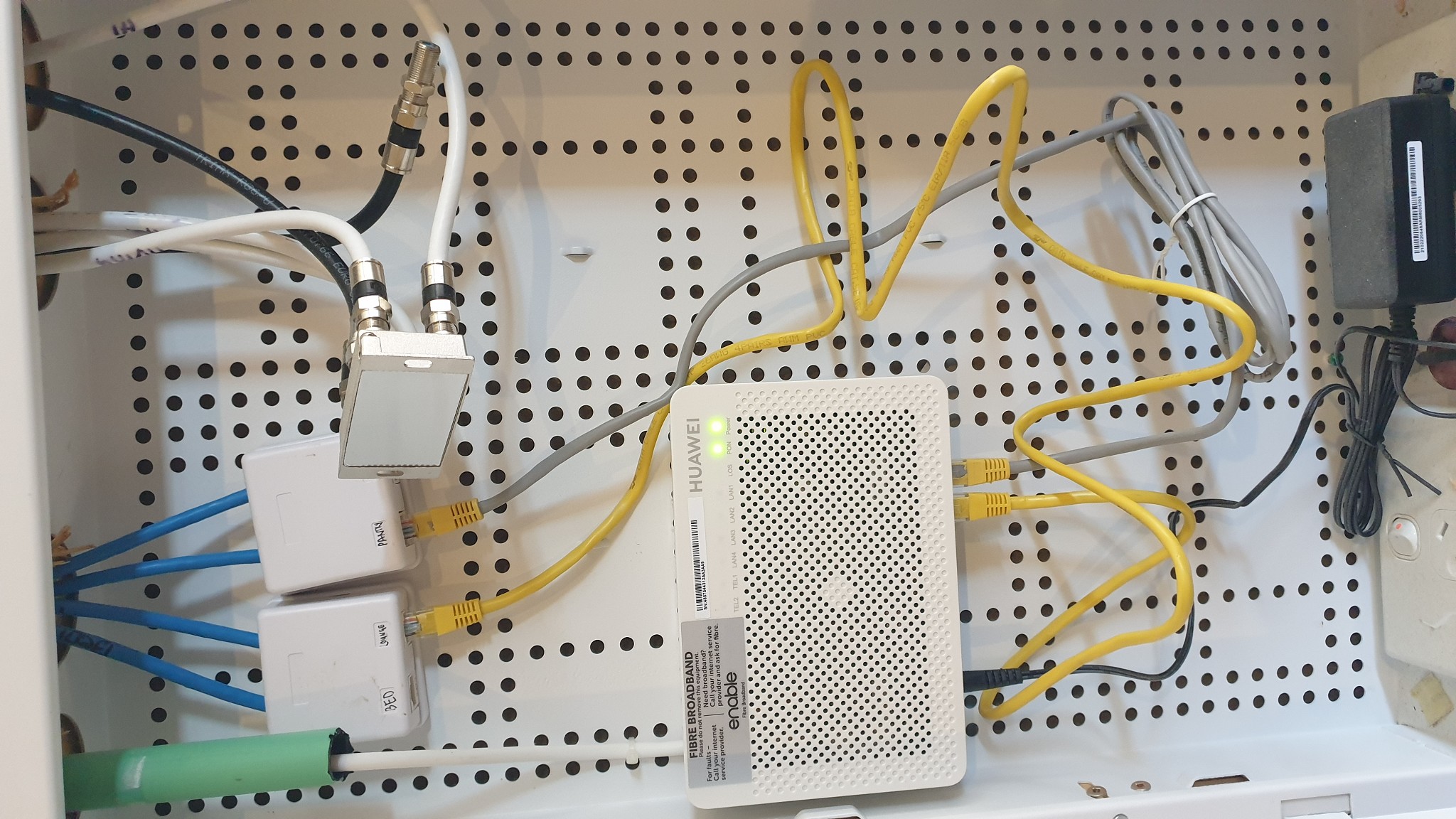
I have just moved in to a new house which has what I think is a smart systems system installed, there are 4 ethernet ports around the house and a hub in the garage with a fibre box.

Vodafone told me to connect my modem to "LAN 1" on the fibre box, but as there is not much room for the modem in the smart systems pannel I connected an ethernet cable to "LAN1" on the fibre box to the lead that says pantry and connected the modem to the ethernet port in the pantry using the "WAN" port on the modem. Now I have WiFi throughout the house.

I much prefer to have cable connections for the TV's which will be near the other data ports so I have connected another ethernet cable in the smart systems pannel between the fibre box LAN2 and the "lounge" port. But the TV is not picking up any internet connection at all.

I thought this would work as the fibre box would act like a modem also, or do I have to somehow fit the modem in the smart systems pannel and put cables between the modem and data ports labeled lounge, bedroom, pantry etc?




_David_

Filter this topic showing only the reply marked as answer Create new topic
Jase2985
13732 posts

Uber Geek
+1 received by user: 6205

ID Verified
Lifetime subscriber

  #3270538 11-Aug-2024 14:12
Send private message

Every other port you want to have internet on needs to come from the "modem", not the fibre box. so if you wanted the other ports around the house to have internet, you would need to connect the modem in the wall box in the garage.


RunningMan
9186 posts

Uber Geek
+1 received by user: 4839


  #3270539 11-Aug-2024 14:12
Send private message

Your TV needs to connect to a LAN port on your router, not on the ONT. If there is more than one outlet in the pantry then you can use the other to patch back to to the TV, otherwise you need to put your router back in the cabinet.


David321

507 posts

Ultimate Geek
+1 received by user: 105


  #3270542 11-Aug-2024 14:32
Send private message

Thanks for the answers guys, ok ill put the modem in the pannel. Problem is the WiFi won't go throughout the house as the pannel is in the garage and the bedroom is down the other end of the house.

I guess I need a WiFi extender or second modem?

What are the other ports used for on the fibre box if they do not distribute internet?

Thanks


_David_


Spyware
3818 posts

Uber Geek
+1 received by user: 1366

Lifetime subscriber

  #3270545 11-Aug-2024 14:43
Send private message

Don't use extenders, buy an access point and connect via the cable run. Turn wifi off in router. Ubiquiti, Grandstream, Aruba, Ruckus.


LAN ports on ONT (fibre box) can supply service from four different ISPs.


Spark Max Fibre using Mikrotik CCR1009-8G-1S-1S+, CRS125-24G-1S, Unifi UAP, U6-Pro, UAP-AC-M-Pro, Apple TV 4K (2022), Apple TV 4K (2017), iPad Air 1st gen, iPad Air 4th gen, iPhone 13, SkyNZ3151 (the white box). If it doesn't move then it's data cabled.


Filter this topic showing only the reply marked as answer Create new topic


Geekzone Live »

Try automatic live updates from Geekzone directly in your browser, without refreshing the page, with Geekzone Live now.


Are you subscribed to our RSS feed? You can download the latest headlines and summaries from our stories directly to your computer or smartphone by using a feed reader.