Geekzone: technology news, blogs, forums
Guest
Welcome Guest.
You haven't logged in yet. If you don't have an account you can register now.


Earbanean

1110 posts

Uber Geek
+1 received by user: 377


#317556 25-Oct-2024 15:54
Send private message

A couple of years ago I set up 2 x Grandstream WAPs in the local rugby club (cabling and mounting of WAPs courtesy of @CoffeeBaron). The layout was one WAP in an upstairs bar/function room and second WAP in a downstairs bar.  The router is located in an office off the upstairs bar, quite close to the upstairs WAP.  It's a Spark supplied router (not sure exact model).


I set a couple of dual band SSIDs on the WAPs ('admin' and 'guest') and switched off Wifi on the Spark outer.  Recently I dropped by to check on everything.  Things were all OK, except the Wifi on the Spark router had been switched back on - with SSID set to the admin one.  I'm not sure who did that, as there is very low tech knowledge in the staff.  It may have been Spark doing remote admin and not knowing about the existence of the WAPs?


Now I'm unsure how best to configure this going forward, given the Wifi on the router could well get switched on again in future.  Would I maybe be best to explicitly set the Wifi channels on the router and 2 WAPs to non-overlapping channels?  Then if it gets switched back on, interference will be lessoned.  How bad is it to have two radios close together if they're on different channels?


Or should I hobble the router Wifi some other way - given Spark (or someone else) could "fix" that?


Create new topic
nzkc
1634 posts

Uber Geek
+1 received by user: 1041


  #3301517 25-Oct-2024 16:32
Send private message

Any reason to _not_ keep the Spark router Wifi and turn off/remove the Grandstream one in the same area? (Big fan of the Grandstream APs by the way).

Other alternative would be to swap out the Spark router with one that does not have Wifi (perhaps one of Grandstream 700x ones).


wellygary
8810 posts

Uber Geek
+1 received by user: 5287


  #3301524 25-Oct-2024 16:58
Send private message

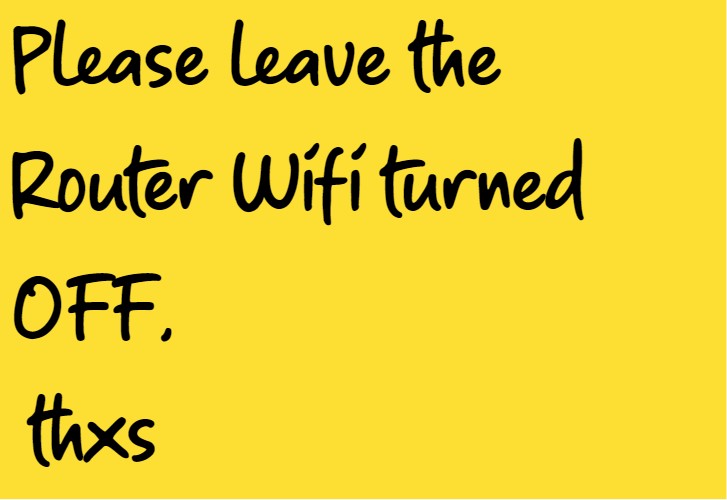
Is something like this to much to hope for :)


Earbanean

1110 posts

Uber Geek
+1 received by user: 377


  #3301547 25-Oct-2024 19:10
Send private message

nzkc:


Any reason to _not_ keep the Spark router Wifi and turn off/remove the Grandstream one in the same area? (Big fan of the Grandstream APs by the way).


The router is on a desk in an office, behind a wall/door from the bulk of the wireless clients in the main bar.  The WAP up on a ceiling beam in the bar gives much better Wifi coverage.  Hence the need for the WAPs in the first place.


nzkc:
Other alternative would be to swap out the Spark router with one that does not have Wifi (perhaps one of Grandstream 700x ones).


Yeah, thought about that.  But it's hard justifying (and explaining) any cost for a non-profit club.  Also, with the Spark provided router, they get support.  A BYOD router would probably risk more input being required from me going forward.


Earbanean

1110 posts

Uber Geek
+1 received by user: 377


  #3301549 25-Oct-2024 19:13
Send private message

wellygary:


Is something like this to much to hope for :)


Ha ha, I wish.  It's near impossible to explain the difference between "Wifi", "internet", "broadband", etc to the people involved.  That note would lead to questions like "How will we send emails and surf the web if we turn off Wifi?"


Also, I think, but don't know, that remote management of the router by Spark may have turned it on in the first place.  


Earbanean

1110 posts

Uber Geek
+1 received by user: 377


  #3301550 25-Oct-2024 19:15
Send private message

I guess my first question still stands.  i.e. is it a problem if the router Wifi is on, but it's on a different, non-overlapping, channel from the nearby WAPs?


richms
29097 posts

Uber Geek
+1 received by user: 10205

Trusted
Lifetime subscriber

  #3301576 25-Oct-2024 20:38
Send private message

Earbanean:


I guess my first question still stands.  i.e. is it a problem if the router Wifi is on, but it's on a different, non-overlapping, channel from the nearby WAPs?


Yes because consumer stuff never kicks devices off when the signal is bad, so things will connect to it and stay there instead of moving to the other APs when they get to -80 on the AP.


Richard rich.ms


Move to New Zealand's best fibre broadband service (affiliate link). Free setup code: R587125ERQ6VE. Note that to use Quic Broadband you must be comfortable with configuring your own router.
Earbanean

1110 posts

Uber Geek
+1 received by user: 377


  #3301764 26-Oct-2024 13:01
Send private message

richms:


Earbanean:


I guess my first question still stands.  i.e. is it a problem if the router Wifi is on, but it's on a different, non-overlapping, channel from the nearby WAPs?


Yes because consumer stuff never kicks devices off when the signal is bad, so things will connect to it and stay there instead of moving to the other APs when they get to -80 on the AP.


Yeah, that's a really good point.  Users will enter the building via the main bar first, so could connect to the Granstream WAP first.  However, the Router is in an office closer to the windows to the carpark.  That means, users could connect to that Wifi first before they enter the building, then not roam off it when inside - which is worst case scenario. 


So, I think I really do need ensure they router Wifi is off.  Maybe if I change the SSID on it to something other than the existing known admin and guest SSIDs.  Then if it's on, nothing shouldconnect to it.


Spyware
3817 posts

Uber Geek
+1 received by user: 1366

Lifetime subscriber

  #3301768 26-Oct-2024 13:22
Send private message

Change the SSID to advertise the day they need to put the bins out.


Spark Max Fibre using Mikrotik CCR1009-8G-1S-1S+, CRS125-24G-1S, Unifi UAP, U6-Pro, UAP-AC-M-Pro, Apple TV 4K (2022), Apple TV 4K (2017), iPad Air 1st gen, iPad Air 4th gen, iPhone 13, SkyNZ3151 (the white box). If it doesn't move then it's data cabled.


SirHumphreyAppleby
2938 posts

Uber Geek
+1 received by user: 1859


  #3301771 26-Oct-2024 14:02
Send private message

Earbanean:


It's near impossible to explain the difference between "Wifi", "internet", "broadband", etc to the people involved.


Start with an easier concept... the difference between internet and Internet.


nzkc
1634 posts

Uber Geek
+1 received by user: 1041


  #3301772 26-Oct-2024 14:05
Send private message

I would probably:


  • Disable the wifi
  • Change the SSID and password to something unknown to anyone else (just in case the wifi comes back on)
  • Change the admin user/password too
  • Write in sharpie on the router: DO NOT ENABLE WIFI ON THIS ROUTER

I really dont see what else you can do if you're not going to swap it out.


Earbanean

1110 posts

Uber Geek
+1 received by user: 377


  #3301779 26-Oct-2024 14:53
Send private message

Spyware:


Change the SSID to advertise the day they need to put the bins out.


Ha ha.  Actually, could put something like "If you're drinking, don't drive home"


Support Geekzone with one-off or recurring donations Donate via PressPatron.
Earbanean

1110 posts

Uber Geek
+1 received by user: 377


  #3302118 27-Oct-2024 17:17
Send private message

nzkc:


I would probably:


  • Disable the wifi
  • Change the SSID and password to something unknown to anyone else (just in case the wifi comes back on)
  • Change the admin user/password too
  • Write in sharpie on the router: DO NOT ENABLE WIFI ON THIS ROUTER

I really dont see what else you can do if you're not going to swap it out.


Yeah, I think some combination of those is the best way forward.


raytaylor
4076 posts

Uber Geek
+1 received by user: 1296

Trusted

  #3302152 27-Oct-2024 19:04
Send private message

Earbanean:


Things were all OK, except the Wifi on the Spark router had been switched back on - with SSID set to the admin one. 


Two possibilities 


1) Some models of spark branded router will reset themselves after a power cut. I am not sure what does it but over the last 10 years I have noticed it seems to happen most with spark routers.        


2) Spark support will first of all tell the customer to press the reset button - they know their default config works and anything else is beyond the responsibilities of their support desk.  


Ray Taylor

There is no place like localhost

Spreadsheet for Comparing Electricity Plans Here


raytaylor
4076 posts

Uber Geek
+1 received by user: 1296

Trusted

  #3302155 27-Oct-2024 19:05
Send private message

richms:


Yes because consumer stuff never kicks devices off when the signal is bad, so things will connect to it and stay there instead of moving to the other APs when they get to -80 on the AP.


Note for anyone watching - unifi doesnt do this either. 
I am pretty sure its a limitation of the underlying chipset and not the brand of access point. They only check the signal level at the time of the initial connection.  


Ray Taylor

There is no place like localhost

Spreadsheet for Comparing Electricity Plans Here


Earbanean

1110 posts

Uber Geek
+1 received by user: 377


  #3302501 28-Oct-2024 15:31
Send private message

raytaylor:


Two possibilities 


1) Some models of spark branded router will reset themselves after a power cut. I am not sure what does it but over the last 10 years I have noticed it seems to happen most with spark routers.        


2) Spark support will first of all tell the customer to press the reset button - they know their default config works and anything else is beyond the responsibilities of their support desk.  


I guess that's possible, although the correct SSID names and PWDs were configured.  So, it either wasn't a factory reset or someone re-entered them.


Create new topic


Geekzone Live »

Try automatic live updates from Geekzone directly in your browser, without refreshing the page, with Geekzone Live now.


Are you subscribed to our RSS feed? You can download the latest headlines and summaries from our stories directly to your computer or smartphone by using a feed reader.