Geekzone: technology news, blogs, forums
Guest
Welcome Guest.
You haven't logged in yet. If you don't have an account you can register now.


hmin7186

7 posts

Wannabe Geek
Inactive user


#577 1-Oct-2003 12:48
Send private message

hi. i have a jabra BT-200 headset and i'm wondering if there's any BT USB dongle or adapter that i can pair the headset with to use it on my computer for voice chats?
do you know is this is possible? and if anyone is actually doing this... ?

please advice me on this matter. thank you guys..

Create new topic
freitasm
BDFL - Memuneh
80646 posts

Uber Geek
+1 received by user: 41030

Administrator
ID Verified
Trusted
Geekzone
Lifetime subscriber

#1637 1-Oct-2003 13:23
Send private message

Look in our Bluetooth Guides for the article "How to configure your desktop/laptop to use the Bluetooth headset".


Referral links: Quic Broadband (free setup code: R587125ERQ6VE) | Samsung | AliExpress | Wise | Sharesies 


Support Geekzone by subscribing (browse ads-free), or making a one-off or recurring donation through PressPatron.


hmin7186

7 posts

Wannabe Geek
Inactive user


#1639 1-Oct-2003 13:28
Send private message

i already did and it only shows how to connect it not how to pair it..
i'm not sure which usb adapters have headset profile..
and the one that was used in the article is not on production anymore and i couldn't find one

freitasm
BDFL - Memuneh
80646 posts

Uber Geek
+1 received by user: 41030

Administrator
ID Verified
Trusted
Geekzone
Lifetime subscriber

#1641 1-Oct-2003 13:34
Send private message

Pairing is described on the manual, but it goes like this:

- turn off your Jabra BT200
- press the button to turn it on and don't release it
- after a few seconds the BT200 will blink faster and it'll be in discoverable mode
- From your computer do a search
- When the BT200 is found, right-click the icon and select Pair device

The default PIN code is 0000


Referral links: Quic Broadband (free setup code: R587125ERQ6VE) | Samsung | AliExpress | Wise | Sharesies 


Support Geekzone by subscribing (browse ads-free), or making a one-off or recurring donation through PressPatron.


freitasm
BDFL - Memuneh
80646 posts

Uber Geek
+1 received by user: 41030

Administrator
ID Verified
Trusted
Geekzone
Lifetime subscriber

#1642 1-Oct-2003 13:36
Send private message

Regarding the adapters with Headset profile... Any widcom/CSR based with version 1.3 and greater have this. Including TDK, Bluetak, Belkin (except F8T001 version 1), DLINK and some others.

The adapter used in the articles is the TDK, and it's in production.


Referral links: Quic Broadband (free setup code: R587125ERQ6VE) | Samsung | AliExpress | Wise | Sharesies 


Support Geekzone by subscribing (browse ads-free), or making a one-off or recurring donation through PressPatron.


hmin7186

7 posts

Wannabe Geek
Inactive user


#1643 1-Oct-2003 13:37
Send private message

thanks.. i gotta find one now with a decent price

hmin7186

7 posts

Wannabe Geek
Inactive user


#1645 1-Oct-2003 19:26
Send private message

i have another question... i'm also using my cell phone on the headset.. how would i go back and forth from cell phone to PC?


Shop now on AliExpress (affiliate link).
hmin7186

7 posts

Wannabe Geek
Inactive user


#1646 1-Oct-2003 19:26
Send private message

i have another question... i'm also using my cell phone on the headset.. how would i go back and forth from cell phone to PC?

freitasm
BDFL - Memuneh
80646 posts

Uber Geek
+1 received by user: 41030

Administrator
ID Verified
Trusted
Geekzone
Lifetime subscriber

#1647 1-Oct-2003 19:33
Send private message

While the headset is idle the first connection will go through... But if the headset is in use, the other connection will be rejected.


Referral links: Quic Broadband (free setup code: R587125ERQ6VE) | Samsung | AliExpress | Wise | Sharesies 


Support Geekzone by subscribing (browse ads-free), or making a one-off or recurring donation through PressPatron.


madjohnw
2 posts

Wannabe Geek
Inactive user


#1679 3-Oct-2003 06:52
Send private message

A few comments regarding the Jabra BT200:

I was able to pair the device with my laptop using the Hawking USB BT adapter and the 1.3.2.7 software. Follow the above instructions for pairing, the Jabra manual is not much help (neither is their web site). Be sure the headset is not in the charging cradle during pairing. Also, it is easier to pair and connect if the charging cradle has the AC adapter connected. To use the phone setup again, I sometimes have to unpair the headset from the laptop. Stopping the BT adapter would probably work as well.

allanamadler
1 post

Wannabe Geek
Inactive user


#2088 5-Nov-2003 13:18
Send private message

I am having a similar problem using a Jabra BT200 connecting to my toshiba XP Pro laptop through a DLink DBT-120 USB adapter.

I've got the pariing to work fine and can hear things through the speaker, but I am unable to get any consistent use out of the Jabra's microphone for making VoIP calls or recording my voice.

Any ideas?

Thank you,

Allan Adler
425-443-8572
allan@amadler.com

chrismax
146 posts

Master Geek


#2093 5-Nov-2003 22:01
Send private message

As to recording in XP, the 1.4.1.6 Widcomm drivers have a reported bug. Voice recorded (in XP only AFAIK) will be almost doubled in speed during playback. If recording (e.g. via a webcam while using a BT mic), the playback of the video is also accelerated.

Unfortunately, this is the latest build released by D-Link. It has been reported to them, but no date on release of 1.4.2.10 which seems to correct this problem.

On VoIP or IM, I've found the quality to be somewhat unacceptable. A couple of things are working against its use for this function.

1. The current adapters seem to have a problem with the two voice streams. That is, when talking over the headset, there's the voice stream transmitting from your mic to the pc and most times you'll have the voice stream from the other party transmitting from the pc to your headset. Audio packets are lost, causing one to break up.
2. Any background programs running on your pc that kick up the CPU will degrade performance.

I've tried my HBH-35 with NetMeeting, Yahoo & MSN Messenger as well as Net2Phone. Results were frustrating. Perhaps as the technology matures in this area, we'll see better results.


Chris

Devices Used: Nokia 3650 (v3.16), D-Link DBT-120 - Revision B3 (Widcomm 1.4.2.10a) & SE HBH-35 Headset.


Want to support Geekzone and browse the site without the ads? Subscribe to Geekzone now (monthly, annual and lifetime options).
rdlenny
2 posts

Wannabe Geek
Inactive user


#2330 2-Dec-2003 22:09
Send private message

Hi,

I've got a Jabra BT 200 headset and a Belkin PCMCIA Bluetooth adapter in my laptop. I can successfully pair up these devices, but don't seem to have the ability to "Connect Headset". I've read the Bluetooth guid on this site, but its not helping me here.

Anyone managed to get this working?

TIA

freitasm
BDFL - Memuneh
80646 posts

Uber Geek
+1 received by user: 41030

Administrator
ID Verified
Trusted
Geekzone
Lifetime subscriber

#2331 2-Dec-2003 22:14
Send private message

rdlenny, are you using drivers version 1.3 or up? The headset profile needed is only present in these versions.


Referral links: Quic Broadband (free setup code: R587125ERQ6VE) | Samsung | AliExpress | Wise | Sharesies 


Support Geekzone by subscribing (browse ads-free), or making a one-off or recurring donation through PressPatron.


rdlenny
2 posts

Wannabe Geek
Inactive user


#2362 5-Dec-2003 00:56
Send private message

Ok. I downloaded latest drivers from Belkin and that didn't help. How do I know if I've got version 1.3 or not.

FYI here is what the hardware tab on the bluetooth config tells me:

Belkin CardBus Bluetooth Dongle
Manufacturer: Cambridge Silicon Studio
Firmware Revision: 115

HCI Version: Bluetooth HCI 1.1
HCI Revision: 0073
LMP Version: Bluetooth LMP 1.1
LMP Sub Version: 0073

Any assistance you could give to get Version 1.3 would be greatly appreciated.

freitasm
BDFL - Memuneh
80646 posts

Uber Geek
+1 received by user: 41030

Administrator
ID Verified
Trusted
Geekzone
Lifetime subscriber

#2364 5-Dec-2003 06:55
Send private message

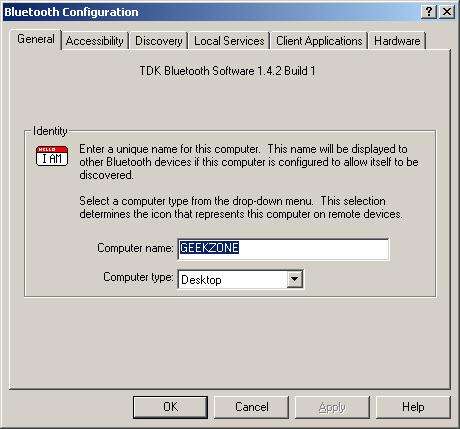
You can right-click the Bluetooth icon in the system tray and select Advanced Configuration (if you don't have this then it's 1.2 and below). The dialog will tell you the version:


Referral links: Quic Broadband (free setup code: R587125ERQ6VE) | Samsung | AliExpress | Wise | Sharesies 


Support Geekzone by subscribing (browse ads-free), or making a one-off or recurring donation through PressPatron.


Create new topic


Geekzone Live »

Try automatic live updates from Geekzone directly in your browser, without refreshing the page, with Geekzone Live now.


Are you subscribed to our RSS feed? You can download the latest headlines and summaries from our stories directly to your computer or smartphone by using a feed reader.