Geekzone: technology news, blogs, forums
Guest
Welcome Guest.
You haven't logged in yet. If you don't have an account you can register now.


NickeM

6 posts

Wannabe Geek


#755 25-Nov-2003 01:37
Send private message

Hi!

I have tried to set up my Ipaq 3870 to sync via Bluetooth. The com ports in ActiveSync an the local services are the same (port 6).

But I cant get the connection to work...

In one of the guides on geekzone the Ipaq get lots of available services for the laptop. But I only have The pairing choice. I think the problem is that I dont have to Connect to Serial Bluetooth option in the menu. How do I configure my computer to let the Ipaq to see this option? I have no restricitions on my services on my laptop. But unfortenaly I have missed something.

Regards!
/N

Create new topic
freitasm
BDFL - Memuneh
80646 posts

Uber Geek
+1 received by user: 41025

Administrator
ID Verified
Trusted
Geekzone
Lifetime subscriber

  #2259 25-Nov-2003 07:43
Send private message

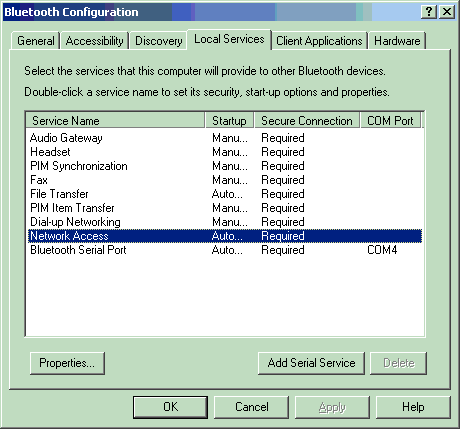
What Bluetooth adapter are you using in your laptop? Is it a built-in one? If you're using a widcomm based adapter you can right-click the Bluetooth icon in the system tray, select Advanced Configuration and switch to the Local Services tab. Do you see a list like this?


Referral links: Quic Broadband (free setup code: R587125ERQ6VE) | Samsung | AliExpress | Wise | Sharesies 


Support Geekzone by subscribing (browse ads-free), or making a one-off or recurring donation through PressPatron.


NickeM

6 posts

Wannabe Geek


  #2268 25-Nov-2003 21:47
Send private message

Yes that exactly what I see...

Its Dell Bluetooth Software I'm using

/N

freitasm
BDFL - Memuneh
80646 posts

Uber Geek
+1 received by user: 41025

Administrator
ID Verified
Trusted
Geekzone
Lifetime subscriber

  #2269 25-Nov-2003 22:23
Send private message

Thanks... And is the Bluetooth Serial Port service "Startup" set to Automatic?

If yes, what's you current security settings? Is it set to "All devices", "Only Paired Devices", "No Devices or "Only Devices Listed Below"?


Referral links: Quic Broadband (free setup code: R587125ERQ6VE) | Samsung | AliExpress | Wise | Sharesies 


Support Geekzone by subscribing (browse ads-free), or making a one-off or recurring donation through PressPatron.


NickeM

6 posts

Wannabe Geek


  #2270 25-Nov-2003 22:35
Send private message

Yes, Serial Bluetooth set to Automatic Startup and Secure Connection is Required COM Port is now COM5 both in Local Services and Active sync.

In Accessability tab Let other devices discver this device is checked and Allow is set to All devices. (I have tried to upload an image...)

Maybee it has something to do with the software version on my Ipaq?! It's an 3870 running 2.20, BT Browser 1.1.

Thanks for trying to help me out here!
/Niklas

freitasm
BDFL - Memuneh
80646 posts

Uber Geek
+1 received by user: 41025

Administrator
ID Verified
Trusted
Geekzone
Lifetime subscriber

  #2271 25-Nov-2003 22:51
Send private message

The software level on your Pocket PC is ok - it's the same as the original H3970 (and I used ActiveSync over Bluetooth with that).

Perhaps you want to turn off the Secure connection.

You said something about copying a file. If you drag and drop a file onto the Pocket PC icon in My Bluetooth Places, is it copied from your computer to your Pocket PC (it may ask for authorisation)?


Referral links: Quic Broadband (free setup code: R587125ERQ6VE) | Samsung | AliExpress | Wise | Sharesies 


Support Geekzone by subscribing (browse ads-free), or making a one-off or recurring donation through PressPatron.


NickeM

6 posts

Wannabe Geek


  #2272 26-Nov-2003 01:06
Send private message

Yes I can dragndrop files from my latop to my ipaq and they are successfully copied after I have accepted the file sharing on my ipaq.

I tried to change the autorization on my laptop and then on my ipaq and then back again. But there is no difference...

On my Ipaq the com ports can be configured and they are port 7 and 8. Is that something that has to map with my computer?


Shop now for Lenovo laptops and other devices (affiliate link).
steinmi
2 posts

Wannabe Geek


  #2457 18-Dec-2003 06:08
Send private message

NickeM

Have you solved your problem ?

I am faced to the same situation:

My configuration:
-iPAQ 3870 (PPC 2002, EUU 3.0, Bluetooth Manager 1.1)
-Acer Travelmate 804 with internal Bluetooth (Widcomm Stack Version 1.4.2.6)
-Nokia 6310i
-Logitech Bluetooth mouse


Everything works fine apart from the fact that iPAQ is not detecting any service of my Travelmate 804. But the iPAQ is detecting the services of other Bluetooth devices.
This Problem occured when I updated the Widcomm Bluetooth stack Version 1.3.2.7 to 1.4.X.X. . This was necessary for my Bluetooth mouse.
Now, as said, iPAQ cannot find the services of my Travelmate although the Travelmate is locating the services of my iPAQ.

When I close the Bluetooth manager of my iPQA due to the fact that he is still trying to locate services it is showing a failure message:

Serious application error
The application Bluetooth manager.exe made a not allowed process.
The application will be closed.
If the problem is still present please contact the manufacturer of the Software.
Failure: 0xc0000005
Adress: 00aceedc


I currently do not know whether this is a Problem of the iPAQ or a problem of the Travelmate's Bluetooth software.

I would be glad if you or somebody else has got a solution for me.


NickeM

6 posts

Wannabe Geek


  #2458 18-Dec-2003 06:23
Send private message

No I haven't solved the problem. But our problems seems to bee the same, the IPAQ cant find the services.

freitasm
BDFL - Memuneh
80646 posts

Uber Geek
+1 received by user: 41025

Administrator
ID Verified
Trusted
Geekzone
Lifetime subscriber

  #2460 18-Dec-2003 07:05
Send private message

NickeM, have a look in this thread.

steinmi, the H3970 with the original Bluetooth stack can only support a maximum of seven services. Since the release of Widcomm 1.3 there are more than seven services enabled by default on a laptop/desktop. Try right-clicking the Bluetooth icon, select Advanced Configuration, switch to the Local Services tab and disable the services you don't need. Soft reset your iPAQ and try again.


Referral links: Quic Broadband (free setup code: R587125ERQ6VE) | Samsung | AliExpress | Wise | Sharesies 


Support Geekzone by subscribing (browse ads-free), or making a one-off or recurring donation through PressPatron.


steinmi
2 posts

Wannabe Geek


  #2464 18-Dec-2003 09:21
Send private message

It works !

Yoe are my hero ! Many thanks.

NickeM

6 posts

Wannabe Geek


#2473 18-Dec-2003 21:51
Send private message

Hi!

I'm the happiest man in Sweden!
I had 8 local services available so aI disabled 2 of them and tried it all over again and now it works!!! Just as I espected in to work from the beginning.

Thanks!


Move to New Zealand's best fibre broadband service (affiliate link). Free setup code: R587125ERQ6VE. Note that to use Quic Broadband you must be comfortable with configuring your own router.
freitasm
BDFL - Memuneh
80646 posts

Uber Geek
+1 received by user: 41025

Administrator
ID Verified
Trusted
Geekzone
Lifetime subscriber

#2475 18-Dec-2003 21:57
Send private message

Wow! Two hits with a single post. Good luck guys!


Referral links: Quic Broadband (free setup code: R587125ERQ6VE) | Samsung | AliExpress | Wise | Sharesies 


Support Geekzone by subscribing (browse ads-free), or making a one-off or recurring donation through PressPatron.


Create new topic


Geekzone Live »

Try automatic live updates from Geekzone directly in your browser, without refreshing the page, with Geekzone Live now.


Are you subscribed to our RSS feed? You can download the latest headlines and summaries from our stories directly to your computer or smartphone by using a feed reader.