Geekzone: technology news, blogs, forums
Guest
Welcome Guest.
You haven't logged in yet. If you don't have an account you can register now.


Scipio

13 posts

Geek


#97111 10-Feb-2012 20:39
Send private message

My son is complaining of lag on our wireless broadband (Telstraclear cable Lightspeed) and has resorted to running a LAN cable down the stairs to connect directly to our router (Linksys E2000 N router). Obviously I'd like to remove this potential trip hazard (!). I hear it's possible to send router signal via the house power cabling? Does anyone have a view whether this is worth pursuing or perhaps other options to consider first?

PS my son's suggestion was drilling holes through the ceiling...not happening...   

Create new topic
sbiddle
30853 posts

Uber Geek
+1 received by user: 9996

Retired Mod
Trusted
Biddle Corp
Lifetime subscriber

  #579952 10-Feb-2012 20:43
Send private message

The solution would be to solve the wireless issues within your home. How far away from the router is he located?


Scipio

13 posts

Geek


  #579956 10-Feb-2012 20:46
Send private message

around 15 metres (up one flight of stairs).

Ragnor
8279 posts

Uber Geek
+1 received by user: 585

Trusted

  #580033 10-Feb-2012 23:30
Send private message

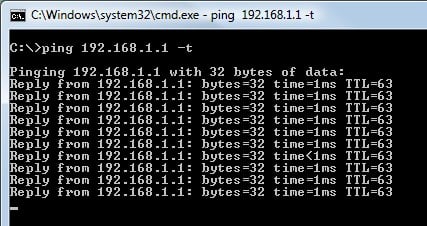
You can run a repeating ping from a pc connected via wifi to check the latency and see if it's spiking.

The default lan ip address of the E2000 is 192.168.1.1

1: Open up a run window (windows key + r)
2:  type: cmd >
3: type: ping 192.168.1.1 -t

Should look something like this..


If it's normally ok but occasionally spiking, try this application to disable various windows features that can cause the spikes with wireless:

http://www.martin-majowski.de/wlanoptimizer/

Other than that unfortunately consumer wireless will generally always have higher latency than a lan cable.

Powerline networking should have lower latency but it depends on the wiring/circumstances. 


raytaylor
4076 posts

Uber Geek
+1 received by user: 1296

Trusted

  #580168 11-Feb-2012 13:40
Send private message

Try a pair of TP-Link / Netgear / Netcomm Homeplug adaptors.

Basically they use the powerlines in your home as a lan cable.
They go about the same range indoors as a wifi connection, but should be much more stable.

Speed between the downstairs computer and the computers connected via lan cables to your router should also be much better. Wont make a difference to internet speed.

However if there is a low signal, interference or anything in the airwaves that are disrupting his wireless signal, the powerlines will be better.

There is the possibility of getting interference from electrically unstable devices on your house wiring, but that is usually from industrial machinery which you dont usually find in the home.


Ray Taylor

There is no place like localhost

Spreadsheet for Comparing Electricity Plans Here


Scipio

13 posts

Geek


  #580174 11-Feb-2012 14:04
Send private message

Many thanks for the prompt and useful tips. Will give them a try over this weekend. Son is hosting a LAN party playing Minecraft so will provide opportunity to use the ping test. 

Tockly
353 posts

Ultimate Geek
+1 received by user: 88


  #580197 11-Feb-2012 16:23
Send private message

I use the powerline adapters and they are great. Much more reliable then wifi.

When streaming to my AppleTV from my iMac across wifi the performance was rubbish. Changed to powerline and everything just works. Also meant I could move my noisy server from the office out to the garage.

Highly recommend them.


Shop on-line at New World now for your groceries (affiliate link).
Scipio

13 posts

Geek


  #584178 20-Feb-2012 21:13
Send private message

Agree looks like powerline is the way to go. I see a few options locally like NETGEAR POWERLINE AV 200Mbps or Netgear XAVB1004 Powerline AV Ethernet Kit. The first seems to be much simpler setup with just plug and play but assume some compromises with quality and/or effectiveness? 

raytaylor
4076 posts

Uber Geek
+1 received by user: 1296

Trusted

  #584271 20-Feb-2012 23:43
Send private message

Scipio: Agree looks like powerline is the way to go. I see a few options locally like NETGEAR POWERLINE AV 200Mbps or Netgear XAVB1004 Powerline AV Ethernet Kit. The first seems to be much simpler setup with just plug and play but assume some compromises with quality and/or effectiveness? 


There is two flavours 80mbit and 200mbit
No difference in reality.

No extra features - they are a pretty super simple device.
If you live in an apartment where your power supply could be on the same phase as a neighbour then i would advise against them, but in a residential neighbourhood they work really well. The reason i say that is because of the security features on the advanced models - though 80% come with built in push-button security to pair them, some of the cheaper chinese no-name brands arent that good - so if you were in an apartment building, your neighbour would be within the wiring distance to tap into your signal using a homeplug adaptor of their own.

Good brands:
 - netgear
 - tplink (i love their mini ones)
 - dlink
 - netcomm
 - belkin


Ray Taylor

There is no place like localhost

Spreadsheet for Comparing Electricity Plans Here


insane
3324 posts

Uber Geek
+1 received by user: 1006

ID Verified
Trusted
2degrees
Subscriber

  #584284 21-Feb-2012 00:49
Send private message

I've had the same problem on and off with my E4200 through a few walls.

I've tried the netcomm homeplugs, was the 200mbps set and I only achieved a maximum of around 40mbps through it, but again these seemed to suffer from from an odd form on interference and also provided a less than stable latency (lots of jitter)

In the end it came down to the polarity of my wireless routers antenna and the two antenna on my wireless NIC. After messing with the two on the PC with some results I rotating the wireless router 90 degrees so that it's facing the direction my PC, in that one simple change my unsteady latency issue was gone.

Get your son to have a play with the orientation of the devices, might sound simple but the results for me are very noticeable.


Create new topic


Geekzone Live »

Try automatic live updates from Geekzone directly in your browser, without refreshing the page, with Geekzone Live now.


Are you subscribed to our RSS feed? You can download the latest headlines and summaries from our stories directly to your computer or smartphone by using a feed reader.