|
|
|
Rather than an old PC, look at some of the mini PCs on aliexpress. ~$200 will get you a N100, 8 gigs ram and 256 SSD in it with a power brick and lower power use than some old powerhog desktop.
Ive just ordered another firebat one because the last one is now running my screens for watching my cameras on my 3d printers since it has 3 HDMI outputs on it.
I got an ODroid H4, fanless operation, runs from a laptop power supply, costs a bit more but slightly less dodgy than the Ali stuff.
tieke:
It's noticeable that at least four of the complaints in that rant are about lights, which probably reflects that the author/other users/guests interact with them on a daily basis. I've found the light integrations are one of the most solid in HA, so it's not the software or updates that is the issue here, it is the physical interface.
It's often the network not the devices or integration. Once zigbee networks get to a certain size they need a bit of structure about them. If they have grown organically from a couple of devices close to the coordinator to something fairly large over a whole house they need enough permanently powered routers to work well.
I bit the bullet a couple of years ago and redid my zigbee network. It's gone from pretty flaky to rock solid with around 60 devices on it. This is in a fairly large 2 level house made of concrete so it's a pretty poor environment for RF.
kiwijunglist:
Someone mentioned docker was best way to run HA.
A lot of people feel virtual machine is better because home assistant has addon features that run in separate dockers and HA manages all the complimentary docker addons for you if you run it as a virtual machine.
Hard agree. I went from docker to a HASSIO VM a year or so ago. It's all sooooo much simpler to work with. I have around 30 docker containers doing other things so I'm not bad with docker but it was a royal PIA with all the HA services.
Odroid M1-8GB, 64GB eMMC, 1TB NVME, PoE-supplied from the „core network“ UPS
Home Assistant ZBT-1 thread+zigbee radio, homematic BidCoS radio (both USB)
Direct control - no hubs involved.
- NET: FTTH & VDSL, OPNsense, 10G backbone, GWN APs
- SRV: 12 RU HA server cluster, 0.1 PB storage on premise
- IoT: thread, zigbee, tasmota, BidCoS, LoRa, WX suite, IR
- 3D: two 3D printers, 3D scanner, CNC router, laser cutter
richms:
Ive just ordered another firebat one because the last one is now running my screens for watching my cameras on my 3d printers since it has 3 HDMI outputs on it.
I do nearly the same with a single Raspberry Pi 3+ with Octoprint for two 3D printers and two cameras (4x USB 2.0). The camera streams are displayed in the Octoprint dashboard.
- NET: FTTH & VDSL, OPNsense, 10G backbone, GWN APs
- SRV: 12 RU HA server cluster, 0.1 PB storage on premise
- IoT: thread, zigbee, tasmota, BidCoS, LoRa, WX suite, IR
- 3D: two 3D printers, 3D scanner, CNC router, laser cutter
tieke:
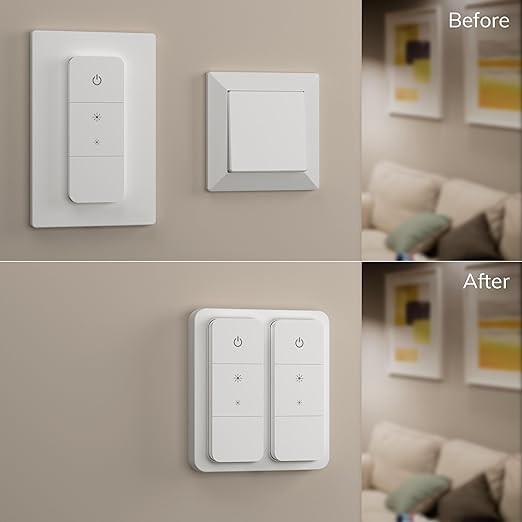
The simplest method is to adopt the existing interface - for instance I use Xiaomi Yeelight ceiling lights in most of our rooms, so just stick their big battery-powered switch/dimmers either next to or over the existing light switches, or use Shelley relays in light switch enclosures to make non-Xiaomi lights automation-compatible. Home automation examples that make people's everyday lives worse are unlikely to be adopted.
I only use zigbee/thread controllable lights/lamps, bridge the old light switch with a terminal to ‘continuous light’ and mount this over instead of the old cover: (So there is nothing that is incompatible - it is either the smart lamp from the beginning or the old lamp with a zigbee bulb mostly from ikea or a few from hue - as said, I don‘t use any hubs and prevent WiFi as much as possible).

- NET: FTTH & VDSL, OPNsense, 10G backbone, GWN APs
- SRV: 12 RU HA server cluster, 0.1 PB storage on premise
- IoT: thread, zigbee, tasmota, BidCoS, LoRa, WX suite, IR
- 3D: two 3D printers, 3D scanner, CNC router, laser cutter
richms:Rather than an old PC, look at some of the mini PCs on aliexpress. ~$200 will get you a N100, 8 gigs ram and 256 SSD in it with a power brick and lower power use than some old powerhog desktop.
Ive just ordered another firebat one because the last one is now running my screens for watching my cameras on my 3d printers since it has 3 HDMI outputs on it.
One thing that I've been working on, with a bunch of others around the world (but largely in NZ), is the eSpa project - a combination of custom firmware (running on an ESP32) and a hardware spec (or, buy a pre-built PCB) for controlling spanet spa pools. This integrates nicely with Home Assistant. You can learn more about our project at https://espa.diy, and join us on Discord at https://discord.gg/faK8Ag4wHn. Building the hardware is relatively simple, but for those who do not want to risk shorting out their spa pool, I have put together this PCB (almost at cost price) here: https://store.jonathangiles.net/product/espa-mini/
-- Jonathan
Tinkerisk: Odroid M1-8GB, 64GB eMMC, 1TB NVME, PoE-supplied from the „core network“ UPS
How has the eMMC held up? Or are you directing all the writes to the NVME?
(For non-HA people wondering about the question, HA never stops scribbling to disk and is notorious for trashing storage media).
neb:
Tinkerisk: Odroid M1-8GB, 64GB eMMC, 1TB NVME, PoE-supplied from the „core network“ UPS
How has the eMMC held up? Or are you directing all the writes to the NVME?
(For non-HA people wondering about the question, HA never stops scribbling to disk and is notorious for trashing storage media).
Yup, to NVMe and recording to NAS. eMMC is for OS only
- NET: FTTH & VDSL, OPNsense, 10G backbone, GWN APs
- SRV: 12 RU HA server cluster, 0.1 PB storage on premise
- IoT: thread, zigbee, tasmota, BidCoS, LoRa, WX suite, IR
- 3D: two 3D printers, 3D scanner, CNC router, laser cutter
|
|
|