Geekzone: technology news, blogs, forums
Guest
Welcome Guest.
You haven't logged in yet. If you don't have an account you can register now.


peejayw

1913 posts

Uber Geek
+1 received by user: 123


#289072 10-Aug-2021 20:06
Send private message

I am trying to set up what I thought would be a simple automation, have an external light turn on when a door is opened but only during the night. The automation works ( door open, light on) but when I add in the conditions of Before Sunrise and After Sunset it fails. Checking the Step Details I get "Executed: August 10, 2021, 7:51:56 PM
Result:wanted_time_before: '2021-08-09T19:08:08.262777+00:00' result: false"


I have my timezone set to Pacific/Auckland and my location is set on the map so why is my before sunrise time showing as 19:08:05.371491+00:00?


Thanks.


 I'm supposed to respect my elders, but it's getting harder and harder for me to find one now.


View this topic in a long page with up to 500 replies per page Create new topic
 1 | 2
allio
895 posts

Ultimate Geek
+1 received by user: 529


  #2758184 10-Aug-2021 20:20
Send private message

Those particular conditions are notoriously finicky in automations, particularly when created in the GUI. This is either a bug, poor documentation, confusing logic, or some combination of all three. Read through this thread and have your head explode.


Short answer: scrap that condition entirely, and replace it with a requirement that the state of sun.sun is below_horizon.


peejayw

1913 posts

Uber Geek
+1 received by user: 123


  #2758188 10-Aug-2021 20:25
Send private message

Thanks for that, I changed it to sun.sun below_horizon and that worked fine.


 I'm supposed to respect my elders, but it's getting harder and harder for me to find one now.


peejayw

1913 posts

Uber Geek
+1 received by user: 123


  #2758201 10-Aug-2021 20:50
Send private message

Thanks again, read the thread and head duly exploded :-)


 I'm supposed to respect my elders, but it's getting harder and harder for me to find one now.


hairy1
3352 posts

Uber Geek
+1 received by user: 644

ID Verified
Trusted
Lifetime subscriber

  #2758267 11-Aug-2021 00:17
Send private message

Yeah, nah. That's why I just do it all in Node Red!

Glad you got it sorted.


My views (except when I am looking out their windows) are not those of my employer.


Ge0rge
2114 posts

Uber Geek
+1 received by user: 2060

Trusted
Lifetime subscriber

  #2758279 11-Aug-2021 05:45
Send private message

Another vote for Node Red here, it's well worth the initial learning curve.

Out of curiosity, how are you telling HA that the door is open?

peejayw

1913 posts

Uber Geek
+1 received by user: 123


  #2758302 11-Aug-2021 07:40
Send private message

I'm just using a Sonoff DW2 Wifi door/window sensor, $11.70 on Banggood.


 I'm supposed to respect my elders, but it's getting harder and harder for me to find one now.


Shop now on Samsung phones, tablets, TVs and more (affiliate link).
mattenz
195 posts

Master Geek
+1 received by user: 48


  #2758313 11-Aug-2021 08:16
Send private message

The Home Assistant automations interface is under pretty rapid development, it's already good enough that for simple automations it's not really worth maintaining a separate system.

chevrolux
4962 posts

Uber Geek
+1 received by user: 2638
Inactive user


  #2758318 11-Aug-2021 08:29
Send private message

Just another vote for Node-RED. Waaaaaaay better and much more powerful than the HA automations gui.


Plus the fact it can just be installed as a simple add-on, so really no extra work to maintain at all.


SumnerBoy
2079 posts

Uber Geek
+1 received by user: 306

ID Verified
Lifetime subscriber

  #2758345 11-Aug-2021 08:43
Send private message

Can you guys explain exactly how you are using NR with HA? I am heavily invested in openHAB but am building a new house and planning to rebuild everything from scratch, and am seriously considering dropping OH and switching to NR only... just haven't quite figured out things like how to keep track of device/object/entity state. Are you still using HA but just pushing all events out to MQTT for NR to soak up and run its logic on? Then pushing commands back into HA via MQTT again?


hairy1
3352 posts

Uber Geek
+1 received by user: 644

ID Verified
Trusted
Lifetime subscriber

  #2758351 11-Aug-2021 09:06
Send private message

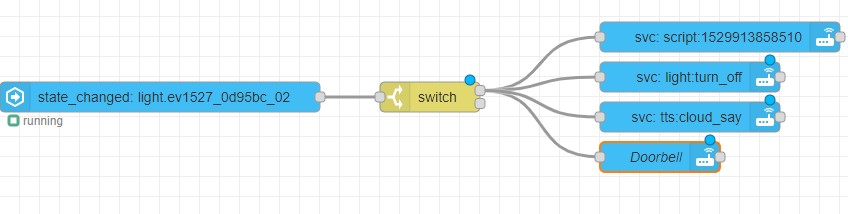
The Node Red add-on has native integration with all entities. When an entity changes state Node-Red is notified and kicks off automations. Really easy.


I am using a 433MHz switch below (which is recognised as a light). When someone presses it Node red picks up the state change and starts the automation.


My views (except when I am looking out their windows) are not those of my employer.


chevrolux
4962 posts

Uber Geek
+1 received by user: 2638
Inactive user


  #2758353 11-Aug-2021 09:07
Send private message

If you install the Node-RED add-on, it makes NR available within the HA dashboard. It also installs the HA nodes pack in to NR. NR then syncs all your HA entities so you can just drop a "entity" block in to NR and do what you'd normally do with say an MQTT input. Then there's blocks for events, state queries, HA webhooks.


It does all that with the HA API, so no need to involve anything like MQTT, or manually keeping things sync'd up and all that. Extremely easy.


edit: @hairy1 beat me to it haha.


one more edit: I used to run only Node-RED. But nowadays, the Dashboard side of things just isn't on par with what HA can do (and yes I know you can customise the NR dash, but its a bit of work). Plus HA is sooooo easy to get working nowadays too.


Shop now on Samsung phones, tablets, TVs and more (affiliate link).
SumnerBoy
2079 posts

Uber Geek
+1 received by user: 306

ID Verified
Lifetime subscriber

  #2758356 11-Aug-2021 09:12
Send private message

Thanks both - that does sound pretty easy!


SumnerBoy
2079 posts

Uber Geek
+1 received by user: 306

ID Verified
Lifetime subscriber

  #2758357 11-Aug-2021 09:13
Send private message

I am running everything in Docker containers here - in a swarm. So NodeRed is a separate stack to openHAB (and HA if I spun it up). I wonder how easy it is to get that nice tight integration in a separated environment like that. Any clues?


hairy1
3352 posts

Uber Geek
+1 received by user: 644

ID Verified
Trusted
Lifetime subscriber

  #2758365 11-Aug-2021 09:28
Send private message

@SumnerBoy Have you ever fired up HA? I think you would be pleasantly surprised how quick it would be to setup and add the Node Red add-on directly to it.


My views (except when I am looking out their windows) are not those of my employer.


SumnerBoy
2079 posts

Uber Geek
+1 received by user: 306

ID Verified
Lifetime subscriber

  #2758368 11-Aug-2021 09:29
Send private message

I have a few times, it has never grabbed me enough to warrant migrating my extensive setup from openHAB.


And I have other uses for NodeRED so need a standalone instance. I guess I could run two instances if I really had to.


 1 | 2
View this topic in a long page with up to 500 replies per page Create new topic


Geekzone Live »

Try automatic live updates from Geekzone directly in your browser, without refreshing the page, with Geekzone Live now.


Are you subscribed to our RSS feed? You can download the latest headlines and summaries from our stories directly to your computer or smartphone by using a feed reader.