Geekzone: technology news, blogs, forums
Guest
Welcome Guest.
You haven't logged in yet. If you don't have an account you can register now.


Oblivian

7345 posts

Uber Geek
+1 received by user: 2117

ID Verified

#312588 29-Apr-2024 18:53
Send private message

With the bombshell that my Lenovo smart clock, suddenly.. wasn't - after trying to change the daily alarm last week (https://www.androidauthority.com/removing-google-assistant-features-2024-3401964/ https://support.google.com/assistant/answer/13971691 )


I've been forced to googles super helpful replacement suggestion of 'Create a custom Routine'. And can imagine anyone else who got one recently was probably using it to play back media and not the horrid tone alarms will now be in the same boat.


It looked OK doing just that and having a custom 'play <radiostation> from tunein' assistant request which works fine via voice request. Set to execute at a time, with the device as the playback source. Good when I tested it on-demand. But come Monday morning it let me down. I can only assume because I edited it at some point and added wakeup light sequence. And there is some logic funk that worked then but doesn't at the trigger time.


It then dawned on me, that won't stop after 40mins-an hr that an alarm would auto-sleep. So I dropped in a 1hr pause before a stop playback.


Only to realise that then stops most other routines or on-demand testing it as it's still counting down. So now have a separate 'alarm off' with it set to stop. Or complain if nothing is already playing because I asked it something else in the interim and stopped the stream.


Does anyone have an active similar media/radio playback routine like this that they use to kick off a standard bedside alarm-clock like radio playback that can drop some tips.


It seems a common question but of course there are few pre existing replies currently as the change kicking in here seems to be recent.


View this topic in a long page with up to 500 replies per page Create new topic
 1 | 2
freitasm
BDFL - Memuneh
80646 posts

Uber Geek
+1 received by user: 41029

Administrator
ID Verified
Trusted
Geekzone
Lifetime subscriber

  #3224354 29-Apr-2024 22:26
Send private message

I wasn't aware of these changes but aren't some of these features exactly the definition of "Assistant"?


Referral links: Quic Broadband (free setup code: R587125ERQ6VE) | Samsung | AliExpress | Wise | Sharesies 


Support Geekzone by subscribing (browse ads-free), or making a one-off or recurring donation through PressPatron.


Oblivian

7345 posts

Uber Geek
+1 received by user: 2117

ID Verified

  #3224355 29-Apr-2024 22:35
Send private message

Yeppp. And a selling point for many of the assistant enabled devices at the time.

I do notice most retailers have ditched the Lenovo clocks now. Perhaps partners were warned early.

Stupid thing is you can still do the same thing via voice commands (in the case of playing radio/media). Just not schedule it daily as an alarm.

But also know of people who used the broadcast groups and recipe step throughs.

I just did anothe re-write of a morning 'play Radio' preset. It's Just started - Nearly 20mins after i pressed the start button. Less than ideal when you need time specific.
Will see what it does in the AM.

MikeFly
192 posts

Master Geek
+1 received by user: 140
Inactive user


  #3224389 30-Apr-2024 05:51
Send private message

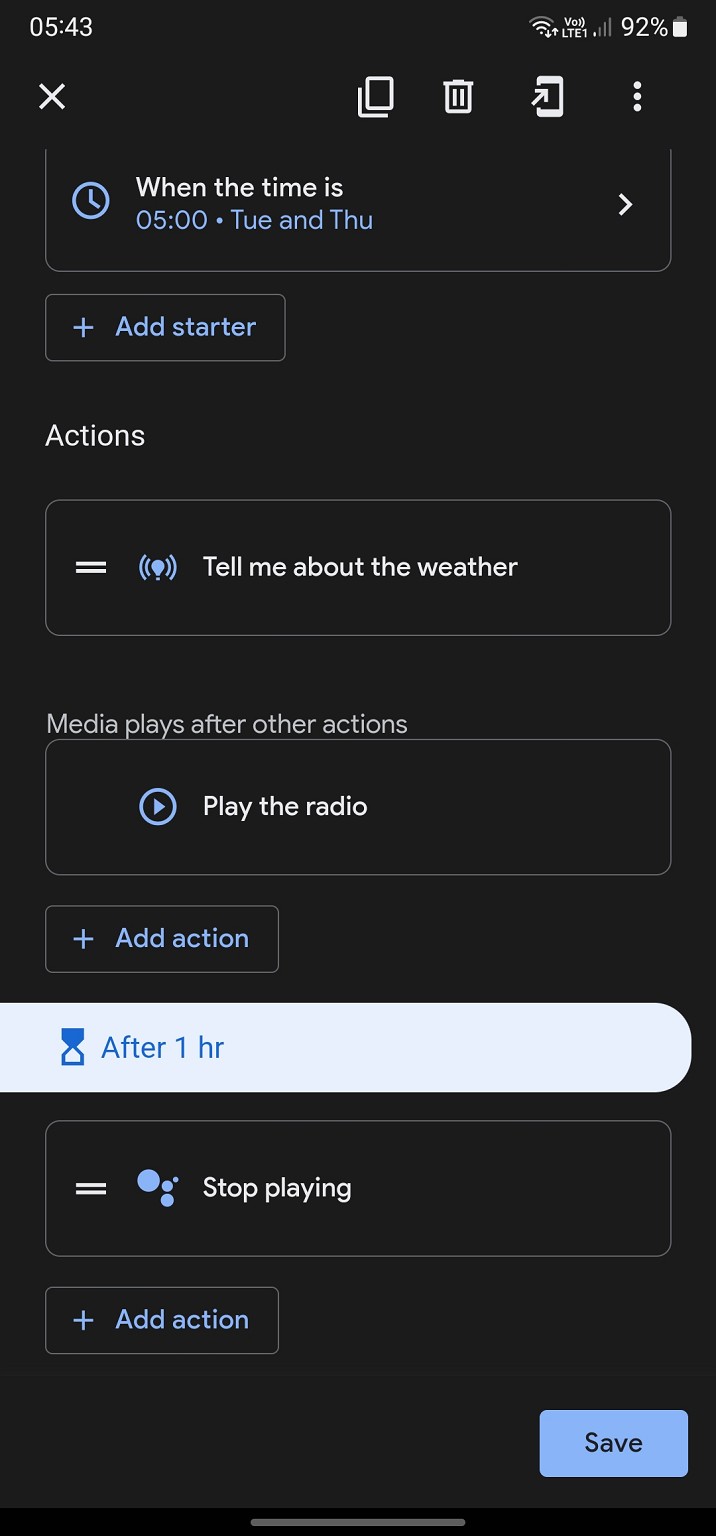
This works. I set it up under Home, automations.


Oblivian

7345 posts

Uber Geek
+1 received by user: 2117

ID Verified

  #3224391 30-Apr-2024 07:04
Send private message

That almost mirrors what I had.

But either fails on demand or stacks itself up and tried ~hr later

14 mins late amd after the backup alarm it has just started.


MikeFly
192 posts

Master Geek
+1 received by user: 140
Inactive user


  #3224393 30-Apr-2024 07:10
Send private message

What happens if you change the almost bit to exactly the same is mine?


Oblivian

7345 posts

Uber Geek
+1 received by user: 2117

ID Verified

  #3224449 30-Apr-2024 07:35
Send private message

I'll have a go after work.
But almost was just missing the weather and post pause.

I did add a variation eith 3s pause before to replicate. But clicking test ends in a message about not being able to execute here but can on another device,
Exactly as it's set for.


Stream your favourite shows now on Apple TV (affiliate link).
davidcole
6099 posts

Uber Geek
+1 received by user: 1465

Trusted

  #3224524 30-Apr-2024 10:53
Send private message

So did you have a good morning routine?   And when the lenovo goes off at gui alarm time, it just fires that off.


Is that what stopped working? or did you have somewthing else for the trigger.


Mine still runs, just device alarm, when I stop it, it fires good morning which gives the weather and starts playing zm wellington


Previously known as psycik

Home Assistant: Gigabyte AMD A8 Brix, Home Assistant with Aeotech ZWave Controller, Raspberry PI, Wemos D1 Mini, Zwave, Shelly Humidity and Temperature sensors
Media:Chromecast v2, ATV4 4k, ATV4, HDHomeRun Dual
Server
Host Plex Server 3x3TB, 4x4TB using MergerFS, Samsung 850 evo 512 GB SSD, Proxmox Server with 1xW10, 2xUbuntu 22.04 LTS, Backblaze Backups, usenetprime.com fastmail.com Sharesies Trakt.TV Sharesight 


Oblivian

7345 posts

Uber Geek
+1 received by user: 2117

ID Verified

  #3224534 30-Apr-2024 11:13
Send private message

The Lenovo clock had a 'media alarm' set to play Radio each day with a time trigger. That was it. Nothing less. It was a native feature on assistant enabled devices itself. And part of their sales pitch.

Google have now removed that ability and you get forced onto a horrid default tone wake-up when setting an alarm on the devices.

Never used the good morning routines, or had one set in Google home itself. Didn't need to.

The 'fix', now however is make a routine on your home app. Set to play the automations on a different device. (the clock) being the speaker/screen device to now execute on once started

So just wanted to confirm a simple one given as above should work as intended.

As This is where it falls over. The routine hosted on google, accessed by the mobile. Set to trigger on a remote assistant device. Is either failing to run. Or delayed until later.

No morning/wakeup routine or anything used. Just after radio at set time as above. But for whatever reason it does not want to play nice with either play radio built in action, or custom assistant ('play ' which triggers fine by voice) command to start it.

At one point it tried to start it back to back about 4x (the number of times I had previously tried the test/play button) almost an hour later.

It's as if the cloud commands to make it happen are bung. Deeper you dig the more cases you find of it.

In desperation it may end with removal and re add into the home app.

antant
119 posts

Master Geek
+1 received by user: 30


  #3224556 30-Apr-2024 12:25
Send private message

One thing to check might be the "Play On" setting down the bottom? Is it set to that clock?


Another option could be to try a Custom Command instead of the play radio option - e.g. "please play the rock radio station on [name of device]".


Oblivian

7345 posts

Uber Geek
+1 received by user: 2117

ID Verified

  #3224558 30-Apr-2024 12:42
Send private message

antant:

One thing to check might be the "Play On" setting down the bottom? Is it set to that clock?


Another option could be to try a Custom Command instead of the play radio option - e.g. "please play the rock radio station on [name of device]".


Yep. Dawned on me after a shower the 2s delay play on was not set to right device. Causing the error about can't on this device.

But even after fixing the test/run button was still a non event.

And yes, done both the internal radio routine and a custom play, similar to what a voice one will do.

When i initially tried ln the weekend the single test button was near instant. But not mon morning. So hair pulling since.
Since then noticed the hella delays in it actioning if at all.

Interestingly discovered the tunein faq suggest no automate playbacks, only voice ( https://help.tunein.com/en/support/solutions/articles/151000172315-can-i-play-a-station-from-tunein-manually-from-my-google-home-app-). Which given it does now and then seems odd. But since that is one of googles internal sources it would be quite the overlook for them to drop support and Say use automations.


Will try some device restarts etc when home. Hopefully its something as dumb as memory hog and not 'the norm'

Oblivian

7345 posts

Uber Geek
+1 received by user: 2117

ID Verified

  #3224833 30-Apr-2024 23:08
Send private message

Current routine test start times within a minute or two of launch without making any changes to routine or device.

Will see what the morning brings.


Shop now for Lego sets and other gifts (affiliate link).
Oblivian

7345 posts

Uber Geek
+1 received by user: 2117

ID Verified

  #3224868 1-May-2024 07:31
Send private message

And another failed routine that worked fine 3x testing via start button last night albeit delayed.

At this rate I may as well go back to the 35yr old string and pot resistor tuned radio that has a dead LCD I got this to replace last year.

Google appear to blame lenovo. Lenovo seem to blame google.
All the while making device's suddenly not fit for purpose.

Although I can guarantee they'd argue it as the primary clock display and playback features stand and tone alarms worked that it does.

fearandloathing
537 posts

Ultimate Geek
+1 received by user: 206

ID Verified
Lifetime subscriber

  #3224881 1-May-2024 08:30
Send private message

It seems, third party devices inevitably drop voice assistant services. It may be best to stick to first party devices from Amazon, Apple, google.

MikeFly
192 posts

Master Geek
+1 received by user: 140
Inactive user


  #3224899 1-May-2024 10:06
Send private message

fearandloathing: It seems, third party devices inevitably drop voice assistant services. It may be best to stick to first party devices from Amazon, Apple, google.


That's a good point, mine streams to a Google nest display so maybe that's why it works reliably?


Oblivian

7345 posts

Uber Geek
+1 received by user: 2117

ID Verified

  #3224926 1-May-2024 10:41
Send private message

MikeFly:

fearandloathing: It seems, third party devices inevitably drop voice assistant services. It may be best to stick to first party devices from Amazon, Apple, google.


That's a good point, mine streams to a Google nest display so maybe that's why it works reliably?


They have not admitted any reasoning but it almost looks that way. Funny enough half the functions seem to be still happy if you have a pixel.

But they're also kicking a lot of nest features out the window and shifting focus on other products.The recipe readout etc are all usually true google devices. And other older pre takeover nest devices are being curb kicked.

 1 | 2
View this topic in a long page with up to 500 replies per page Create new topic


Geekzone Live »

Try automatic live updates from Geekzone directly in your browser, without refreshing the page, with Geekzone Live now.


Are you subscribed to our RSS feed? You can download the latest headlines and summaries from our stories directly to your computer or smartphone by using a feed reader.