Geekzone: technology news, blogs, forums
Guest
Welcome Guest.
You haven't logged in yet. If you don't have an account you can register now.


Davoid

173 posts

Master Geek
+1 received by user: 37

Lifetime subscriber

#323313 17-Nov-2025 16:15
Send private message

Hello,
I don't know if this is the right place to ask this, but here goes. I have an Asus RT AX5400 router which all my other wireless items connect to without a problem. My Kindle Paper White has started not connecting to the router wifi. I have taken the Kindle into Noel Lemming and it will connect to there wireless fine. I have tried rebooting both the Kindle and router, but no luck. I am not sure what I need to show on here, so if anyone can help let me know and I will try to answer and supply the details.
Thanks,
David



View this topic in a long page with up to 500 replies per page Create new topic
 1 | 2
freitasm
BDFL - Memuneh
80646 posts

Uber Geek
+1 received by user: 41030

Administrator
ID Verified
Trusted
Geekzone
Lifetime subscriber

  #3435348 17-Nov-2025 16:29
Send private message

Is your router configured for 2.4 GHz and 5 GHz? Or 5 GHz only?


Do you have separate networks for 2.4 GHz and 5 GHz?


Are you entering the correct password?


Referral links: Quic Broadband (free setup code: R587125ERQ6VE) | Samsung | AliExpress | Wise | Sharesies 


Support Geekzone by subscribing (browse ads-free), or making a one-off or recurring donation through PressPatron.


bfginger
1330 posts

Uber Geek
+1 received by user: 191


  #3435359 17-Nov-2025 17:47
Send private message


Try manually setting the 2.4GHz wifi to channel 1 in the router settings and see if that helps.  


If not, try unplugging the router for a bit and making the Kindle forget the wifi network.


Davoid

173 posts

Master Geek
+1 received by user: 37

Lifetime subscriber

  #3435430 18-Nov-2025 05:49
Send private message

I have included a link to imgur showing the Asus wireless settings if this helps https://imgur.com/a/8S3jk5w


I have checked my password and it is the same. The Kindle comes back with "can connect to wireless but cannot access internet", but still does not connect to router and just ask's for the password again.


fearandloathing
537 posts

Ultimate Geek
+1 received by user: 206

ID Verified
Lifetime subscriber

  #3435434 18-Nov-2025 07:07
Send private message

Does your SSID has a space in the name. if so create a new SSID without a space and try again. 


Davoid

173 posts

Master Geek
+1 received by user: 37

Lifetime subscriber

  #3435455 18-Nov-2025 08:06
Send private message

No, it is just a one 6 letter word.
thanks for the help


freitasm
BDFL - Memuneh
80646 posts

Uber Geek
+1 received by user: 41030

Administrator
ID Verified
Trusted
Geekzone
Lifetime subscriber

  #3435456 18-Nov-2025 08:08
Send private message

And this Kindle used to connect to this network before?


Have you tried the option to forget networks, on your Kindle?


Referral links: Quic Broadband (free setup code: R587125ERQ6VE) | Samsung | AliExpress | Wise | Sharesies 


Support Geekzone by subscribing (browse ads-free), or making a one-off or recurring donation through PressPatron.


Support Geekzone with one-off or recurring donations Donate via PressPatron.
wired
191 posts

Master Geek
+1 received by user: 72


  #3435460 18-Nov-2025 08:34
Send private message

I have found that some kindles cannot connect to the higher 2.4 GHz channels. My router automatically selected the top channel and the kindle couldn’t match it so it didn’t work.


try setting your router to channel 1 has suggested above.


coffeebaron
6304 posts

Uber Geek
+1 received by user: 3566

Trusted
Lifetime subscriber

  #3435525 18-Nov-2025 12:27
Send private message

An set to 20MHz channel width.


Rural IT and Broadband support.


Broadband troubleshooting and master filter installs.
Starlink installer - one month free: https://www.starlink.com/?referral=RC-32845-88860-71 
Wi-Fi and networking
Cel-Fi supply and installer - boost your mobile phone coverage legally


Need help in Auckland, Waikato or BoP? Click my email button, or email me direct: [my user name] at geekzonemail dot com


Davoid

173 posts

Master Geek
+1 received by user: 37

Lifetime subscriber

  #3435529 18-Nov-2025 12:46
Send private message

Okay have set 2.4Ghz to channel 1 and set the bandwith to 20Mhz (not 20/40) but still no luck.


I am not sure how to "forget networks" on kindle? Sorry, yes it was connecting only a few weeks ago, only updates have been windows 11.


sqishy
530 posts

Ultimate Geek
+1 received by user: 193


  #3435541 18-Nov-2025 14:02
Send private message

Maybe try set-up a Guest Wifi with a new name and try that....


timmmay
20858 posts

Uber Geek
+1 received by user: 5350

Trusted
Lifetime subscriber

  #3435549 18-Nov-2025 14:07
Send private message

Can it connect to a WiFi hotspot on your phone?


Sometimes stuff just breaks. I'm on my third Kindle, mostly because of basic things like a power button not working properly after 5 years or scratching the screen.


Want to support Geekzone and browse the site without the ads? Subscribe to Geekzone now (monthly, annual and lifetime options).
coffeebaron
6304 posts

Uber Geek
+1 received by user: 3566

Trusted
Lifetime subscriber

  #3435560 18-Nov-2025 14:36
Send private message

Also set to WPA2 only.


Rural IT and Broadband support.


Broadband troubleshooting and master filter installs.
Starlink installer - one month free: https://www.starlink.com/?referral=RC-32845-88860-71 
Wi-Fi and networking
Cel-Fi supply and installer - boost your mobile phone coverage legally


Need help in Auckland, Waikato or BoP? Click my email button, or email me direct: [my user name] at geekzonemail dot com


Davoid

173 posts

Master Geek
+1 received by user: 37

Lifetime subscriber

  #3435574 18-Nov-2025 15:17
Send private message

Squishy, thank you set up a guest network and it now works fine. Still need to find out how to correct my usual setting though. Is there a safety issue using a guest network?


geek3001
220 posts

Master Geek
+1 received by user: 330

ID Verified
Subscriber

  #3435578 18-Nov-2025 15:25
Send private message

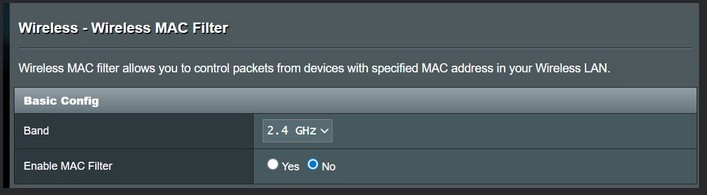
Your config screen shot posted to Imgur suggests that you have MAC filtering enabled on your WiFi network:


While connecting to the WiFi network, perhaps the Kindle is being blocked from the Internet by this setting?


Davoid

173 posts

Master Geek
+1 received by user: 37

Lifetime subscriber

  #3435582 18-Nov-2025 15:36
Send private message

I thought the image showed that I was Not connected to mac filtering?


 1 | 2
View this topic in a long page with up to 500 replies per page Create new topic


Geekzone Live »

Try automatic live updates from Geekzone directly in your browser, without refreshing the page, with Geekzone Live now.


Are you subscribed to our RSS feed? You can download the latest headlines and summaries from our stories directly to your computer or smartphone by using a feed reader.