Geekzone: technology news, blogs, forums
Guest
Welcome Guest.
You haven't logged in yet. If you don't have an account you can register now.


eracode

Smpl Mnmlst
9333 posts

Uber Geek
+1 received by user: 6203

ID Verified
Trusted
Lifetime subscriber

#225975 13-Dec-2017 16:12
Send private message

Today I noticed that no xtra 'Sent' emails were showing on the Apple Mail app on my iPhone. Checked the server settings as well as I could given my limited knowledge and confirmed that they are the same as on my iPad, which is operating just fine.


I called Spark who got me to re-do all the IMAP server settings etc without success and then they gave up and put me through to Apple (I think in Oz). 


Apple did much the same thing and then escalated it to a more techy person (I think in the US).


After 90 minutes total on the phone, Apple came back after a long on-hold and told me that the behaviour was 'as expected'. I.E. If you send an email via xtra  from a Macbook or an iPad using Apple Mail, it will show up in other devices' Sent folders - but not on the iPhone Mail app 'sent' box. Only emails sent from the iPhone itself will show up in the iPhone Mail 'sent' box.


Similarly, emails sent from an iPhone show in the phone's Sent box but not other Apple devices' Sent boxes.


This may well totally correct behaviour but it strikes me as odd (because the other devices do sync) and I don't know enough to tell whether I'm being fobbed off. 


The only way to see all sent emails on an iPhone, regardless of sending device, is via Spark xtra webmail.


Would welcome comments and advice.


TLDR: iPhone Mail app does not show Sent messages sent on other Apple devices' Mail apps. T/F?



Sometimes I just sit and think. Other times I just sit.


Create new topic

This is a filtered page: currently showing replies marked as answers. Click here to see full discussion.

RunningMan
9186 posts

Uber Geek
+1 received by user: 4839


  #1919168 13-Dec-2017 16:35
Send private message

SheriffNZ:


Sounds to me like you were being fobbed off.. Sorry I can't be any more help...


This. Fundamental iOS mail features like the sent items shouldn't differ between iOS devices.


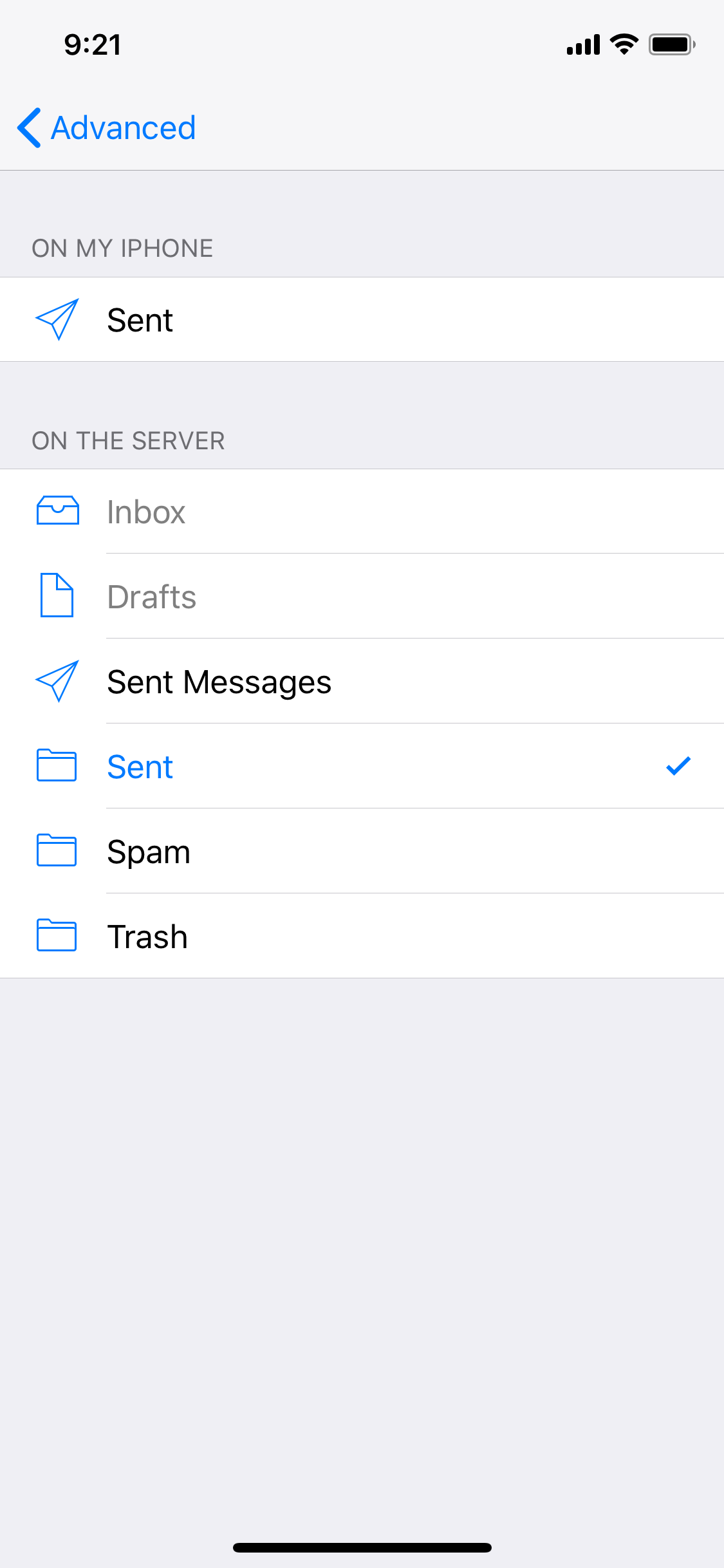
Try Settings-> Accounts & Passwords -> [account name] -> Account -> Advanced -> then check the sent mailbox is the same one that is being used on other devices.


Paul1977
5171 posts

Uber Geek
+1 received by user: 2192


  #1920016 15-Dec-2017 09:28
Send private message

RunningMan:


Try Settings-> Accounts & Passwords -> [account name] -> Account -> Advanced -> then check the sent mailbox is the same one that is being used on other devices.


@eracode The above suggestion works, I just tested it with a Spark account. Change it from "Sent Messages" to "Sent", save the changes and any new sent items will sync.


Click to see full size


EDIT: It's quite pathetic that neither Spark nor Apple could sort this out for you.


EDIT 2: After doing this the old "Sent Messages" folder seems to disappear from the folder view, so move everything out of it first.


Create new topic


Geekzone Live »

Try automatic live updates from Geekzone directly in your browser, without refreshing the page, with Geekzone Live now.


Are you subscribed to our RSS feed? You can download the latest headlines and summaries from our stories directly to your computer or smartphone by using a feed reader.