Geekzone: technology news, blogs, forums
Guest
Welcome Guest.
You haven't logged in yet. If you don't have an account you can register now.


PJ48

302 posts

Ultimate Geek
+1 received by user: 106

Lifetime subscriber

#307033 13-Sep-2023 18:03
Send private message

I am hoping some clever person out there can help me. I would like to use my iPhone in the new Standby mode in IOS 17 as a bedside alarm clock that will automatically turn on Radio NZ and play the live stream as an alarm in the morning.


I think I can work out how to set an automation that would open the Radio NZ app when I stop the alarm, or even to open the app at the same time instead of an alarm, but can't work how to instruct the app to then just play the live stream with no interaction from me?


Any wise help gratefully accepted, or any other solutions to achieve the same goal!


Create new topic

This is a filtered page: currently showing replies marked as answers. Click here to see full discussion.

alasta
6889 posts

Uber Geek
+1 received by user: 3363

Trusted
Subscriber

  #3127378 13-Sep-2023 19:45
Send private message

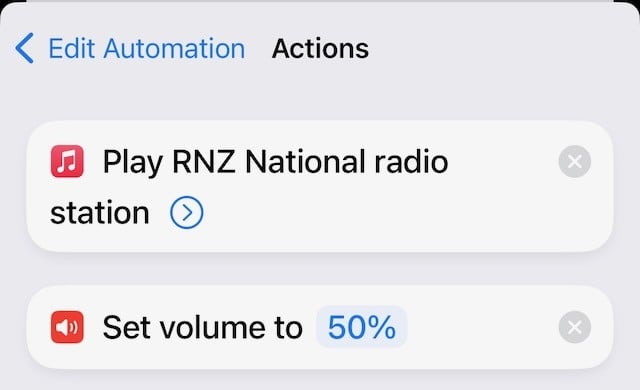
Do you have to use the RNZ app, or could you use Apple Music to play RNZ National? I have set up the latter in shortcuts to do exactly what you're suggesting:


Create new topic


Geekzone Live »

Try automatic live updates from Geekzone directly in your browser, without refreshing the page, with Geekzone Live now.


Are you subscribed to our RSS feed? You can download the latest headlines and summaries from our stories directly to your computer or smartphone by using a feed reader.