Geekzone: technology news, blogs, forums
Guest
Welcome Guest.
You haven't logged in yet. If you don't have an account you can register now.


Geektastic

18009 posts

Uber Geek
+1 received by user: 8465

Trusted
Lifetime subscriber

#318086 13-Dec-2024 20:06
Send private message

I just got Apple Intelligence on my iPhone.

So far I’m not especially impressed.

I wrote a long email to my mother and used the proofread function to correct the usual errors. Once it’s finished, your text is in a blue highlighted area on screen. Try as I might, I couldn’t get rid of that overlay.

I figured it must be a new thing to show text it had worked on. I then took a photo to attach to the long email.

So it deleted all the highlighted text and replaced it with the photo. 🤬🤬🤬

I was tempted to throw the phone across the room. I’m finding technology is becoming more a hindrance than a help these days.

Does anyone know how I can get rid of the blue overlay in future so that I can continue to add to whatever I’ve written?





Create new topic
eracode
Smpl Mnmlst
9333 posts

Uber Geek
+1 received by user: 6201

ID Verified
Trusted
Lifetime subscriber

  #3320297 13-Dec-2024 22:37
Send private message

Can you replicate that in a test piece of text?

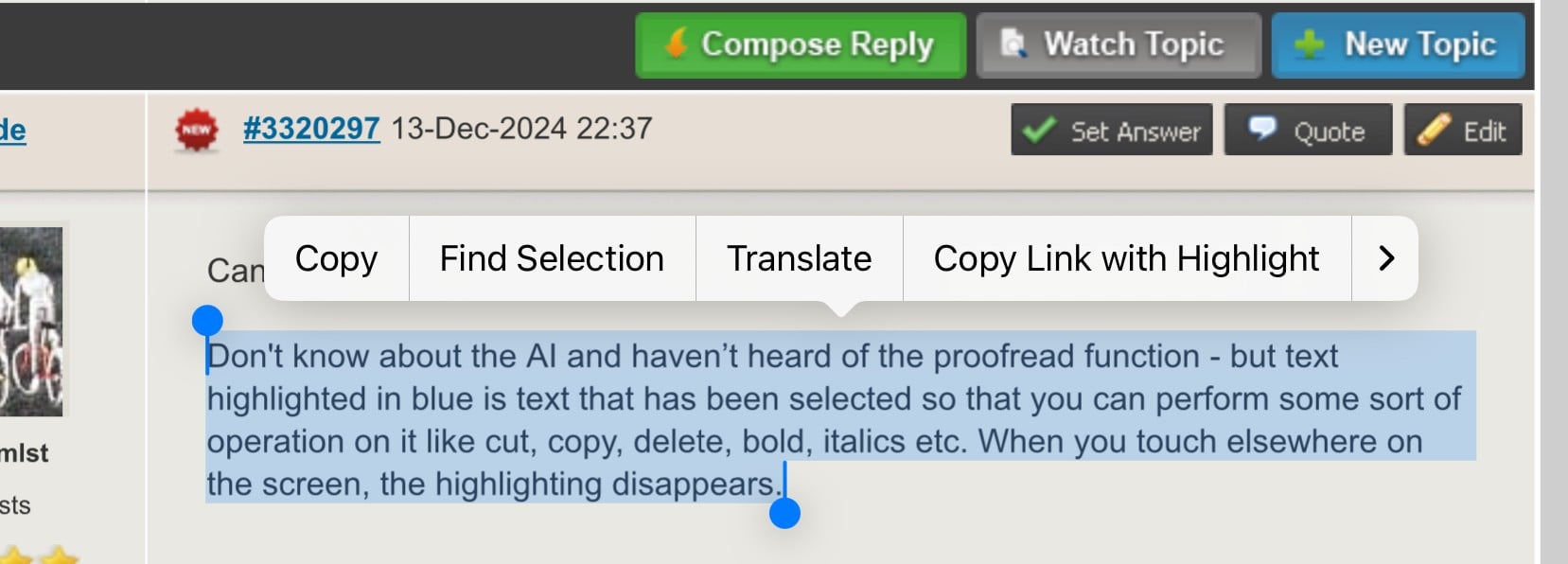
Don't know about the AI and haven’t heard of the proofread function - but text highlighted in blue is text that has been selected so that you can perform some sort of operation on it like cut, copy, delete, bold, italics etc. When you touch elsewhere on the screen, the highlighting disappears.


Did it look like this?


Sometimes I just sit and think. Other times I just sit.


lxsw20
3689 posts

Uber Geek
+1 received by user: 2174

Subscriber

  #3320299 13-Dec-2024 22:57
Send private message

Apple Intelligence is in beta, turn it off if you don't want it. Simples. 


MadEngineer
4591 posts

Uber Geek
+1 received by user: 2570

Trusted

  #3320304 13-Dec-2024 23:45
Send private message

Geektastic: 

So it deleted all the highlighted text and replaced it with the photo. 🤬🤬🤬

I was tempted to throw the phone across the room. 
You should have.  Or at least given it a shake.  It would have then come up with an option to undo.


You're not on Atlantis anymore, Duncan Idaho.


eracode
Smpl Mnmlst
9333 posts

Uber Geek
+1 received by user: 6201

ID Verified
Trusted
Lifetime subscriber

  #3321645 17-Dec-2024 14:08
Send private message

@Geektastic Did you get to the bottom of this?


Sometimes I just sit and think. Other times I just sit.


johno1234
3352 posts

Uber Geek
+1 received by user: 2843


  #3321659 17-Dec-2024 16:23
Send private message

MadEngineer:


Geektastic: 

So it deleted all the highlighted text and replaced it with the photo. 🤬🤬🤬

I was tempted to throw the phone across the room. 
You should have.  Or at least given it a shake.  It would have then come up with an option to undo.


That was going to be my question... does shake cause an undo? Like a ctrl-Z on a PC?


Geektastic

18009 posts

Uber Geek
+1 received by user: 8465

Trusted
Lifetime subscriber

  #3321700 17-Dec-2024 20:06
Send private message

There was no undo. There was only do or not do.

I haven’t solved it really. Text selection is frustrating on iPhones even before the Apple Intelligence thing came along. I’m forever finding it’s selected bits I don’t want or not selected bits I do and no matter what I can’t get it to ‘let go’ of the selections sometimes or allow me to alter them.

Probably better hope for a new Nokia 7110.


Shop now for Dyson appliances (affiliate link).
Eva888
2762 posts

Uber Geek
+1 received by user: 2426

Lifetime subscriber

  #3321781 18-Dec-2024 08:14
Send private message

Geektastic: There was no undo. There was only do or not do.

I haven’t solved it really. Text selection is frustrating on iPhones even before the Apple Intelligence thing came along. I’m forever finding it’s selected bits I don’t want or not selected bits I do and no matter what I can’t get it to ‘let go’ of the selections sometimes or allow me to alter them.

Probably better hope for a new Nokia 7110.


This happened to me yesterday on a web page. Trying to select a sentence and ended up with the entire paragraph then it would not de-select. Infuriating. Seems it doesn’t always happen.


Thinking about it now and wondering if I was charging at the time. If a cable is attached it goes silly so note if that’s when it happens. 


MadEngineer
4591 posts

Uber Geek
+1 received by user: 2570

Trusted

  #3321790 18-Dec-2024 08:55
Send private message

That’s usually indicative of a dodgy charger which can interfere with the touch sensor


You're not on Atlantis anymore, Duncan Idaho.

Eva888
2762 posts

Uber Geek
+1 received by user: 2426

Lifetime subscriber

  #3321956 18-Dec-2024 11:48
Send private message

Will try with an original apple to see if it helps. 


TwoSeven
1712 posts

Uber Geek
+1 received by user: 304

Subscriber

  #3321967 18-Dec-2024 12:55
Send private message

Not sure if that is apple intelligence or just normal selected text.


To me blue highlight with the selection circles in the top left, bottom right corners indicate selected text - one has to then choose an action (copy, paste etc.) or tap elsewhere to deselect it.  On my iDevices the selection box is yellow not blue, but it maybe I am using a different theme.  On my iPhone (15 pro max, IOS 18.2) which is set up with Apple Intelligence, I have to press the Apple Intelligence button to do stuff (for example, in notes, it brings up the proof, rewrite dialog) - it allows to view the original text, see changes and keep (done menu).


Software Engineer
   (the practice of real science, engineering and management)
A.I.  (Automation rebranded)
Gender Neutral
   (a person who believes in equality and who does not believe in/use stereotypes. Examples such as gender, binary, nonbinary, male/female etc.)


 ...they/their/them...


Kiwifan
181 posts

Master Geek
+1 received by user: 127

Lifetime subscriber

  #3322055 18-Dec-2024 16:50
Send private message

It’s quite odd. If I highlight txt here on GZ it’s normal but if I try on FB it copies all the txt and I can’t edit it. Running the latest update from Apple on an iPad Air. 


Create new topic


Geekzone Live »

Try automatic live updates from Geekzone directly in your browser, without refreshing the page, with Geekzone Live now.


Are you subscribed to our RSS feed? You can download the latest headlines and summaries from our stories directly to your computer or smartphone by using a feed reader.