Geekzone: technology news, blogs, forums
Guest
Welcome Guest.
You haven't logged in yet. If you don't have an account you can register now.


decibel

335 posts

Ultimate Geek
+1 received by user: 224


#310595 4-Nov-2023 15:05
Send private message

For some time I have had a Qotom box running OPNsense (23.7.7) behind a Fritzbox from 2 degrees. (now Vocus)
This makes it all double-NATed and though it all works OK, it is a bit messy.


Trying to do away with the Fritzbox has proved harder than I had hoped.
I followed the advice of @l43a2  , @monolithNZZ and others with these settings -


WAN Connection Type: DHCP (Automatic IP/Dynamic IP/IP over Ethernet)
    802.1Q: Enabled
    VLAN ID (802.1Q): 10
    802.1P (Priority): 0
    IP Version: IPv4 or IPv6
    MTU Size: 1492 or 1500


The options in OPNsense are - 
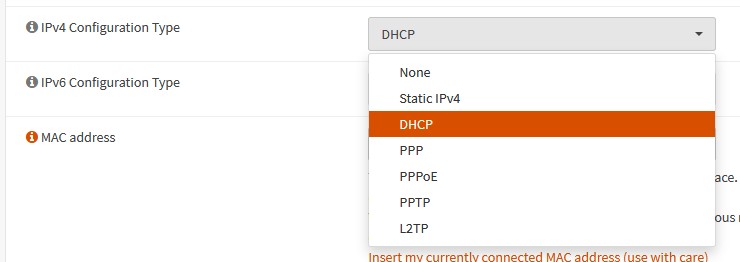


I even tried entering my public IP address (I have static IPv4 and v6 addresses) but to no avail.


Is anyone here using OPNsense (or pfsense) on Vocus?


View this topic in a long page with up to 500 replies per page Create new topic

This is a filtered page: currently showing replies marked as answers. Click here to see full discussion.

Ruphus
469 posts

Ultimate Geek
+1 received by user: 181


  #3155909 4-Nov-2023 18:51
Send private message

After you created the VLAN in OPNsense, did you update the WAN assignment to use the new VLAN?


shanes
272 posts

Ultimate Geek
+1 received by user: 84

Lifetime subscriber

  #3155931 4-Nov-2023 19:25
Send private message

decibel:


Ruphus:


After you created the VLAN in OPNsense, did you update the WAN assignment to use the new VLAN?


Yes, this is set under "Interfaces" > "Other types" > "VLAN"  and then added a new VLAN  with the Parent set to the WAN's ethernet port.


I am assuming that this is the only place where this needs to be set.


Have you set the new VLAN as the wan Device under "Interfaces" > "Assignments"


decibel

335 posts

Ultimate Geek
+1 received by user: 224


  #3156250 5-Nov-2023 14:36
Send private message

Thank you everyone; as several of you suspected, I had not updated the WAN assignment to use the new VLAN.


Also, had to nudge it to auto-detect the new upstream gateway.


All go and WAF remains high.


View this topic in a long page with up to 500 replies per page Create new topic


Geekzone Live »

Try automatic live updates from Geekzone directly in your browser, without refreshing the page, with Geekzone Live now.


Are you subscribed to our RSS feed? You can download the latest headlines and summaries from our stories directly to your computer or smartphone by using a feed reader.
