Geekzone: technology news, blogs, forums
Guest
Welcome Guest.
You haven't logged in yet. If you don't have an account you can register now.


Scotty1986

315 posts

Ultimate Geek
+1 received by user: 73


#159932 17-Dec-2014 17:00
Send private message

Hi all, I signed up to MyRepublic after reading about the Fibre TV feature they have. Its just a Geo-unblocking feature. I brought a Roku 3 and waited for everything to fall into place. It has not happened. The smart DNS is done on MR's end. I use the supplied ASUS N56U. My Xbox One and PS4 work fine with Netflix, but my Xbox 360 and Roku 3 do not. I have logged a ticket with support, but I'm not expecting much as nobody they asked had heard of a Roku.

If I use a geo unblocking service will it work with MR's smart DNS system? I am now willing to pay for one so I can get everything to work.


Create new topic
Killerkiwi2005
374 posts

Ultimate Geek
+1 received by user: 85

Trusted

  #1199350 17-Dec-2014 17:04
Send private message

You need to block the DNS from your router

http://support.unblock-us.com/customer/portal/articles/323038-setup-roku-players

Just use your ISP DNS instead of unblock-us and try that


Scotty1986

315 posts

Ultimate Geek
+1 received by user: 73


  #1199352 17-Dec-2014 17:09
Send private message

I'm not sure I follow, I have not signed up to any unblocking service yet. Only using the automatic MR DNS setting

timbosan
2199 posts

Uber Geek
+1 received by user: 294

Subscriber

  #1199358 17-Dec-2014 17:20
Send private message

To fix the Roku, look at the details in this thread:

http://www.geekzone.co.nz/forums.asp?forumid=151&topicid=159797


Killerkiwi2005
374 posts

Ultimate Geek
+1 received by user: 85

Trusted

  #1199361 17-Dec-2014 17:29
Send private message

Scotty1986: I'm not sure I follow, I have not signed up to any unblocking service yet. Only using the automatic MR DNS setting


The roku netflix DNS is hardcoded and can NOT be changed via software you have to block it from your router

Scotty1986

315 posts

Ultimate Geek
+1 received by user: 73


  #1199374 17-Dec-2014 17:41
Send private message


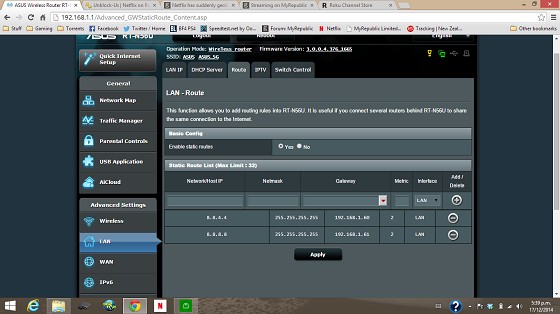
This it my modem page, does the IP address I route need to be the same as the IP of the roku? Currently still not showing Netflix app and cannot add it from there website. Could it be conflicting with MR Smart DNS?

Jase2985
13730 posts

Uber Geek
+1 received by user: 6202

ID Verified
Lifetime subscriber

  #1199420 17-Dec-2014 18:52
Send private message

you need to make your image bigger as its really hard to read


Shop on-line at New World now for your groceries (affiliate link).
Scotty1986

315 posts

Ultimate Geek
+1 received by user: 73


  #1199460 17-Dec-2014 19:43
Send private message

Click image to enlarge 

Click to see full size

deadlyllama
1283 posts

Uber Geek
+1 received by user: 476

Trusted

  #1199463 17-Dec-2014 19:45
Send private message

That's a pretty rubbish service for something done at ISP level, which said ISP charges extra for. Orcon's no extra charge unblocking service catches requests to Google DNS. My Roku 3 works with no changes to the router settings.

myfullflavour
896 posts

Ultimate Geek
+1 received by user: 382

Trusted
Full Flavour

  #1199508 17-Dec-2014 20:31
Send private message

Roku is the most popular streaming device in the US. If MR were taking the global mode product seriously, they'd have it working out of the box.

freitasm
BDFL - Memuneh
80646 posts

Uber Geek
+1 received by user: 41030

Administrator
ID Verified
Trusted
Geekzone
Lifetime subscriber

  #1199706 18-Dec-2014 09:58
Send private message

Moved to MyRepublic forum.


Referral links: Quic Broadband (free setup code: R587125ERQ6VE) | Samsung | AliExpress | Wise | Sharesies 


Support Geekzone by subscribing (browse ads-free), or making a one-off or recurring donation through PressPatron.


wasabi2k
2102 posts

Uber Geek
+1 received by user: 860


  #1199778 18-Dec-2014 10:34
Send private message

deadlyllama: That's a pretty rubbish service for something done at ISP level, which said ISP charges extra for. Orcon's no extra charge unblocking service catches requests to Google DNS. My Roku 3 works with no changes to the router settings.


No ISP should EVER intercept or mangle with anything - especially DNS - unless it is something that can be explicitly turned off by the customer. 

If they sell you a service and state they will intercept DNS and click here to accept fine.

If they intercept DNS requests to Google by default - HELL NO.


Shop now for Dell laptops and other devices (affiliate link).
deadlyllama
1283 posts

Uber Geek
+1 received by user: 476

Trusted

  #1200392 19-Dec-2014 09:56
Send private message

wasabi2k:
deadlyllama: That's a pretty rubbish service for something done at ISP level, which said ISP charges extra for. Orcon's no extra charge unblocking service catches requests to Google DNS. My Roku 3 works with no changes to the router settings.


No ISP should EVER intercept or mangle with anything - especially DNS - unless it is something that can be explicitly turned off by the customer. 

If they sell you a service and state they will intercept DNS and click here to accept fine.

If they intercept DNS requests to Google by default - HELL NO.


You can ring up Orcon and get them to turn Global Mode off for your account.  Global Mode is well advertised during the signup process. They only intercept DNS packets for e.g. netflix lookups, as far as I can tell, other DNS to 8.8.8.8 appears to be unmolested.

ISPs selling residential services intercept and mangle all the time.  Many block incoming and sometimes outgoing SMTP, and I remember (10 years ago?) blocking incoming SMB was quite common.  Residential broadband is usually sold at a very small profit margin, and this sort of thing is common to cut down support costs.

I'm very happy with this sort of low impact, proactive firewalling being on by default.  Misconfigured SMTP services at homes and small businesses used to be a tremendous source of spam.  As long as they'll turn it off when you ask, that's fine.

As an aside: given the choice between my outbound DNS being mangled until I ask for it to be turned off, and being on CGNAT unless I pay extra, I'll take the former over the latter any day.

wasabi2k
2102 posts

Uber Geek
+1 received by user: 860


  #1200398 19-Dec-2014 10:02
Send private message

deadlyllama:
wasabi2k:
deadlyllama: That's a pretty rubbish service for something done at ISP level, which said ISP charges extra for. Orcon's no extra charge unblocking service catches requests to Google DNS. My Roku 3 works with no changes to the router settings.


No ISP should EVER intercept or mangle with anything - especially DNS - unless it is something that can be explicitly turned off by the customer. 

If they sell you a service and state they will intercept DNS and click here to accept fine.

If they intercept DNS requests to Google by default - HELL NO.


You can ring up Orcon and get them to turn Global Mode off for your account.  Global Mode is well advertised during the signup process. They only intercept DNS packets for e.g. netflix lookups, as far as I can tell, other DNS to 8.8.8.8 appears to be unmolested.

ISPs selling residential services intercept and mangle all the time.  Many block incoming and sometimes outgoing SMTP, and I remember (10 years ago?) blocking incoming SMB was quite common.  Residential broadband is usually sold at a very small profit margin, and this sort of thing is common to cut down support costs.

I'm very happy with this sort of low impact, proactive firewalling being on by default.  Misconfigured SMTP services at homes and small businesses used to be a tremendous source of spam.  As long as they'll turn it off when you ask, that's fine.

As an aside: given the choice between my outbound DNS being mangled until I ask for it to be turned off, and being on CGNAT unless I pay extra, I'll take the former over the latter any day.


I'm with you on the SMTP/SMB filtering on residential connections - edge use cases that open potential for abuse.

Mangling/redirecting DNS is far more insidious and difficult to detect - see ISPs in the US that do that and inject ads/cookies/etc into HTTP.

Create new topic


Geekzone Live »

Try automatic live updates from Geekzone directly in your browser, without refreshing the page, with Geekzone Live now.


Are you subscribed to our RSS feed? You can download the latest headlines and summaries from our stories directly to your computer or smartphone by using a feed reader.