Geekzone: technology news, blogs, forums
Guest
Welcome Guest.
You haven't logged in yet. If you don't have an account you can register now.


Technikhaus

54 posts

Master Geek
+1 received by user: 22

ID Verified
Trusted

#245320 29-Jan-2019 12:29
Send private message

Hey all!


So recently I moved to a house where I could get Gb Fibre :Party!:


Where we were previously, we were only able to get ADSL1 or Wireless, so we went wireless.


Now that we can get Fibre I decided to use the Unifi Security Gateway 3P, which I've read can quite happily get 700Mb+ on fibre connections.


The crappy part is I'm just not getting anywhere near that speed! Connected into GE1 on the ONT, Cat5E cable directly to the USG and this is the best I can get:
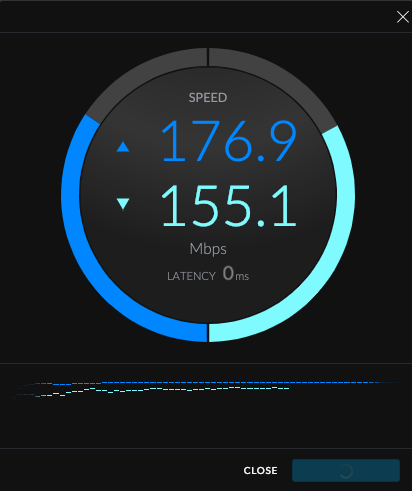


I called up 2Degrees, but because I'm not using their Fritz! Box, they can't do anything to help cry


It's all setup pretty simply, nothing crazy, DPI and QOS/SmartQueues are both disabled, so shouldn't be limited by that.
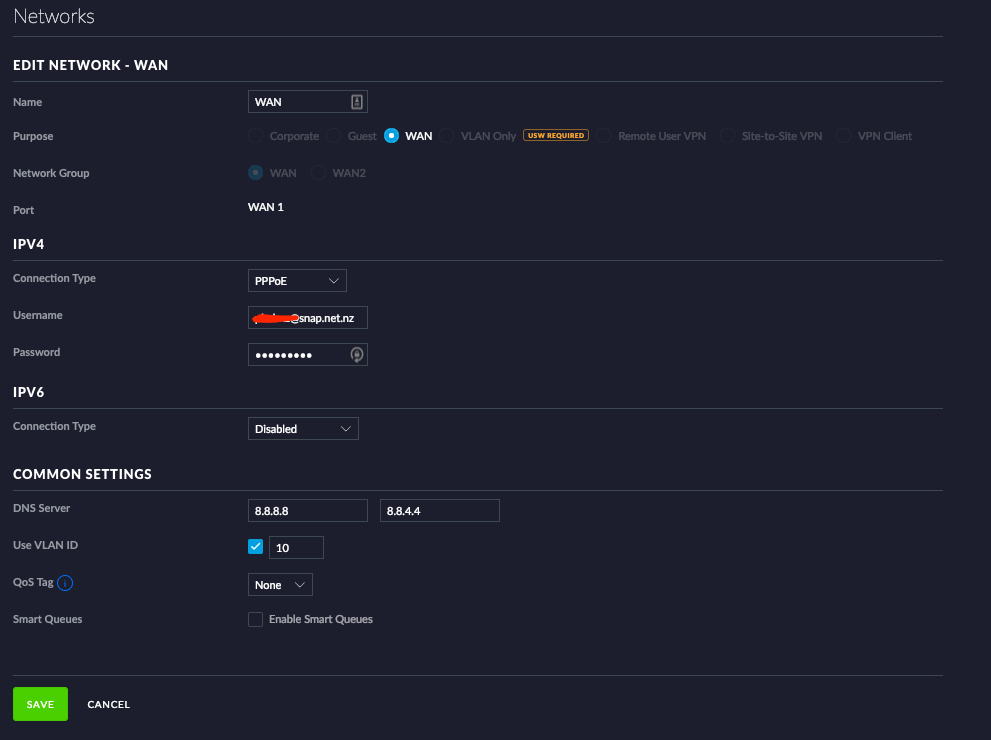


Any suggestions would be greatly appreciated please!



Quic NZ Referral link & use R718095EZEOOC at checkout for free setup


Create new topic
RunningMan
9184 posts

Uber Geek
+1 received by user: 4833


  #2169558 29-Jan-2019 12:34
Send private message

How are you measuring that speed?


Might pay to use the ISP DNS not Google as well to ensure you hit a local CDN.


wratterus
1687 posts

Uber Geek
+1 received by user: 678


  #2169559 29-Jan-2019 12:36
Send private message

Yeah, I've not tried one but as the internals are pretty similar to an ER-Lite3 (I think) I'd expect with QOS disabled you should be good, it could be possible there is a hardware offloading issue of some sort - I'm sure there will be someone on here running a USG on gigabit fiber who can comment. 


As mentioned, ignore that speedtest for now - download the speedtest app in Win10 and test to your closest 2degrees server then check the results. 


michaelmurfy
meow
13579 posts

Uber Geek
+1 received by user: 10910

Moderator
ID Verified
Trusted
Lifetime subscriber

  #2169561 29-Jan-2019 12:38
Send private message

Yes the USG can achieve Gigabit. And no, don't use that Speedtest as it isn't accurate.


Test via Ethernet, using a fast PC and you'll be fine.


Again, do not use the UniFi speedtest to determine speed as it is limited on the CPU of the USG itself. Packet processing is done in hardware on the USG.


Michael Murphy | https://murfy.nz
Referral Links: Quic Broadband (use R122101E7CV7Q for free setup)

Are you happy with what you get from Geekzone? Please consider supporting us by subscribing.
Opinions are my own and not the views of my employer.


Technikhaus

54 posts

Master Geek
+1 received by user: 22

ID Verified
Trusted

  #2169563 29-Jan-2019 12:50
Send private message

Thanks for the replies,


Plugged in, it's better but still not what I'm hoping for:


This is from a MacBook Pro, I have no windows machines laying around right now...


Quic NZ Referral link & use R718095EZEOOC at checkout for free setup


wratterus
1687 posts

Uber Geek
+1 received by user: 678


  #2169564 29-Jan-2019 12:51
Send private message

What are the specs on the MacBook?


danza
112 posts

Master Geek
+1 received by user: 45


  #2169605 29-Jan-2019 13:27
Send private message

Check the config tree for hardware offload etc.

See here and see which one you need to enable and what command to check
https://help.ubnt.com/hc/en-us/articles/115006567467-EdgeRouter-Hardware-Offloading


Stream your favourite shows now on Apple TV (affiliate link).
geekiegeek
2513 posts

Uber Geek
+1 received by user: 625
Inactive user


  #2169611 29-Jan-2019 13:36
Send private message

Technikhaus:


Thanks for the replies,


Plugged in, it's better but still not what I'm hoping for:


This is from a MacBook Pro, I have no windows machines laying around right now...


Is this via a USB or USB-C dongle? if so that might be your bottleneck. I get around 800 on my gig connection with a Edgerouter 4 and MacBook Pro via a USB-C dongle. 


Technikhaus

54 posts

Master Geek
+1 received by user: 22

ID Verified
Trusted

  #2169654 29-Jan-2019 15:00
Send private message

wratterus:


What are the specs on the MacBook?


2017 Pro, i7/16GB


danza: Check the config tree for hardware offload etc.

See here and see which one you need to enable and what command to check
https://help.ubnt.com/hc/en-us/articles/115006567467-EdgeRouter-Hardware-Offloading


Checked that and it was enabled, disabling it knocked it down to around 110Mb


geekiegeek:


Is this via a USB or USB-C dongle? if so that might be your bottleneck. I get around 800 on my gig connection with a Edgerouter 4 and MacBook Pro via a USB-C dongle. 


USB-C dongle, but I currently don't have anything with native Gb Ethernet available, so I may just have to leave it until I do.


Thanks for all of the advice guys!


Quic NZ Referral link & use R718095EZEOOC at checkout for free setup


michaelmurfy
meow
13579 posts

Uber Geek
+1 received by user: 10910

Moderator
ID Verified
Trusted
Lifetime subscriber

  #2169655 29-Jan-2019 15:02
Send private message

Technikhaus:


USB-C dongle, but I currently don't have anything with native Gb Ethernet available, so I may just have to leave it until I do.


Theres your problem! Case closed.


Also a tip - using Cloudflare DNS (https://1.1.1.1) is faster than Google DNS on 2degrees.


Michael Murphy | https://murfy.nz
Referral Links: Quic Broadband (use R122101E7CV7Q for free setup)

Are you happy with what you get from Geekzone? Please consider supporting us by subscribing.
Opinions are my own and not the views of my employer.


sorceror
163 posts

Master Geek
+1 received by user: 47


  #2171934 2-Feb-2019 17:55
Send private message

michaelmurfy:


Technikhaus:


USB-C dongle, but I currently don't have anything with native Gb Ethernet available, so I may just have to leave it until I do.


Theres your problem! Case closed.


Also a tip - using Cloudflare DNS (https://1.1.1.1) is faster than Google DNS on 2degrees.


lol how is that case closed, USB-C has plenty of bandwidth. Newish MacBooks Pros don't have any other option anyway.


RunningMan
9184 posts

Uber Geek
+1 received by user: 4833


  #2171979 2-Feb-2019 19:06
Send private message

USB-C may have the bandwidth, but many of the adapters (or their drivers) don't. There's reports of some only getting to 100 Mb/s. https://www.apple.com/ca_smb_en/shop/reviews/HJKF2ZM/A/belkin-usb-c-to-gigabit-ethernet-adapter


Stream your favourite shows now on Apple TV (affiliate link).
gajan
304 posts

Ultimate Geek
+1 received by user: 208

Trusted
Spark NZ
Lifetime subscriber

  #2171989 2-Feb-2019 19:42
Send private message

Agree it can vary depending on the USB-C dongle used - using a cheapish 3SIXT on a 2017 MBP i5 (ER4 / Spark) - maybe I'm lucky with this one getting ~ 930Mbps;


My comments and remarks are not necessarily of my employer.


Talkiet
4819 posts

Uber Geek
+1 received by user: 3934

Trusted

  #2171995 2-Feb-2019 19:59
Send private message

Just a comment. I have a Ubiquiti Amplifi HD which says it gets good (900+) speeds on Spark FibreMax, but in real world tests it's terrible - maybe 150-180Mbps on many threads. Swap in a Huawei 659b and I get 6-800 on the same downloads.


I have seen several routers in the last few weeks that SHOULD get good speeds, but just don't. If possible, borrow a known good unit that someone has tested on a similar connection (same RSP/same LFC, same protocol - IPoE or PPPoE) ... That should tell you for sure whether to look at the PC/dongle or the router.


N


Please note all comments are from my own brain and don't necessarily represent the position or opinions of my employer, previous employers, colleagues, friends or pets.


vulcannz
436 posts

Ultimate Geek
+1 received by user: 136
Inactive user


  #2172123 3-Feb-2019 10:39
Send private message

Try dropping your WAN MTU down to 1420. Make sure packet fragmentation is disabled if possible (I've no idea with that gear).


Create new topic


Geekzone Live »

Try automatic live updates from Geekzone directly in your browser, without refreshing the page, with Geekzone Live now.


Are you subscribed to our RSS feed? You can download the latest headlines and summaries from our stories directly to your computer or smartphone by using a feed reader.