Geekzone: technology news, blogs, forums
Guest
Welcome Guest.
You haven't logged in yet. If you don't have an account you can register now.


steblin

8 posts

Wannabe Geek


#253120 26-Jul-2019 18:55
Send private message

Just moved from Flip ADSL to Orcon VDSL, using the router provided and connected via LAN cable. So far the speeds I'm getting are on par / slightly below my previous ADSL connection.

On the Orcon map showing VDSL coverage I noticed we were towards the edge, so just looking for some advice on whether this is just what's expected? Any diagnostics that can be ran to give an idea on internal wiring / distance from exchange etc. Would prefer to do as much as I can myself before bothering support.

Also we're renting an older house, so not sure if VDSL more impacted by the quality of internal wiring?

Appreciate the help!

View this topic in a long page with up to 500 replies per page Create new topic
 1 | 2
Spyware
3818 posts

Uber Geek
+1 received by user: 1366

Lifetime subscriber

  #2284373 26-Jul-2019 18:59
Send private message

If the line only supported a 10/1 adsl connection (line length is likely over 2 km) then its not suitable for vdsl.


Jase2985
13730 posts

Uber Geek
+1 received by user: 6202

ID Verified
Lifetime subscriber

  #2284376 26-Jul-2019 19:04
Send private message

https://www.chorus.co.nz/tools-support/broadband-tools/broadband-checker


go there


see what it says for your address as the current speed, then check your neighbors and see what they get, if they are all about the same you will likely be SOOL and would likely be better back on ADSL


steblin

8 posts

Wannabe Geek


  #2284383 26-Jul-2019 19:17
Send private message

Jase2985:

https://www.chorus.co.nz/tools-support/broadband-tools/broadband-checker


go there


see what it says for your address as the current speed, then check your neighbors and see what they get, if they are all about the same you will likely be SOOL and would likely be better back on ADSL


Great link, thanks for that (I've used the Chorus map before, but not seen this)

Yeah says address is VDSL capable and potential speed is 13 down, but current is 11, which matches the ADSL current, so looks like just physics not on my side.

Appreciate the help all!


RunningMan
9185 posts

Uber Geek
+1 received by user: 4836


  #2284386 26-Jul-2019 19:30
Send private message

You need to check your speed against your neighbour's speed - looking at your own address just tells you something you already know. If you're getting about the same as various close neighbours, not much you can do. If you're a lot lower, then there's probably room for improvement.


steblin

8 posts

Wannabe Geek


  #2284389 26-Jul-2019 19:42
Send private message

Hmm interesting, sorry just assumed this would be the normal estimated speed. Looking at my neighbors either side their current ADSL speed is about 5 mbps higher than me, some of them 6-7 higher. The house directly across the street is the only one with similar numbers.

Thoughts?

RunningMan
9185 posts

Uber Geek
+1 received by user: 4836


  #2284397 26-Jul-2019 20:06
Send private message

Can you post the VDSL line stats from your modem?


Suspect that a master filter instal that cleans up the line by bypassing any dodgy internal wiring in the house would be useful though.


HP


Shop now for HP laptops and other devices (affiliate link).
Jase2985
13730 posts

Uber Geek
+1 received by user: 6202

ID Verified
Lifetime subscriber

  #2284398 26-Jul-2019 20:06
Send private message

keep looking around and see if you can find someone on VDSL


The 13 that chorus says vs the 11 you see is likely the overhead.


can you post the connection stats from your modem please


steblin

8 posts

Wannabe Geek


  #2284411 26-Jul-2019 20:52
Send private message

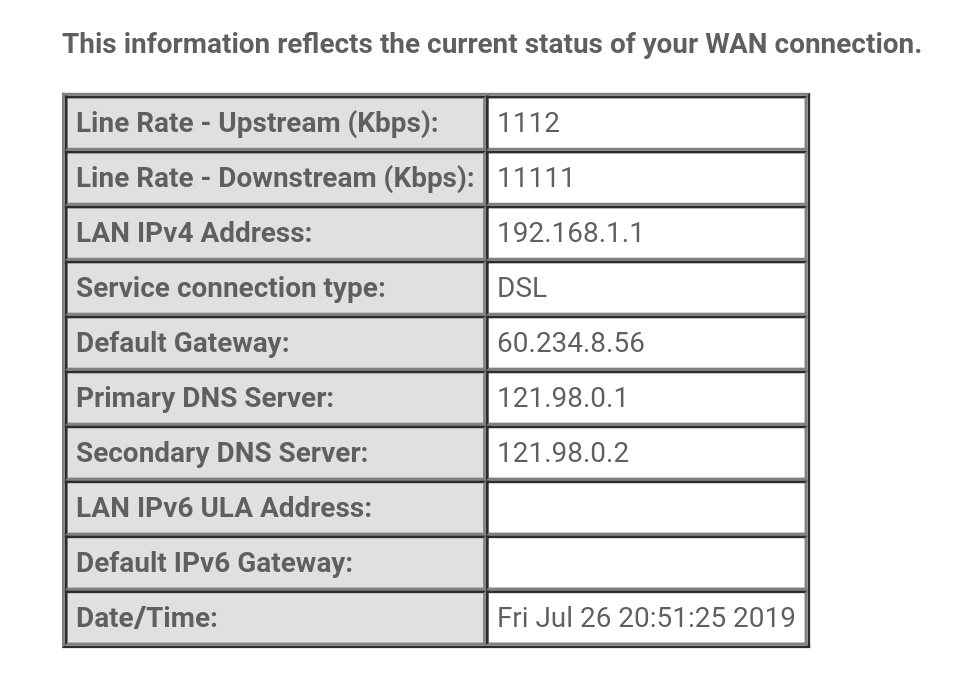
Current stats attached

Jase2985
13730 posts

Uber Geek
+1 received by user: 6202

ID Verified
Lifetime subscriber

  #2284412 26-Jul-2019 20:55
Send private message

@steblin nope


steblin

8 posts

Wannabe Geek


  #2284420 26-Jul-2019 21:17
Send private message


Haha, whoops

steblin

8 posts

Wannabe Geek


  #2284421 26-Jul-2019 21:21
Send private message


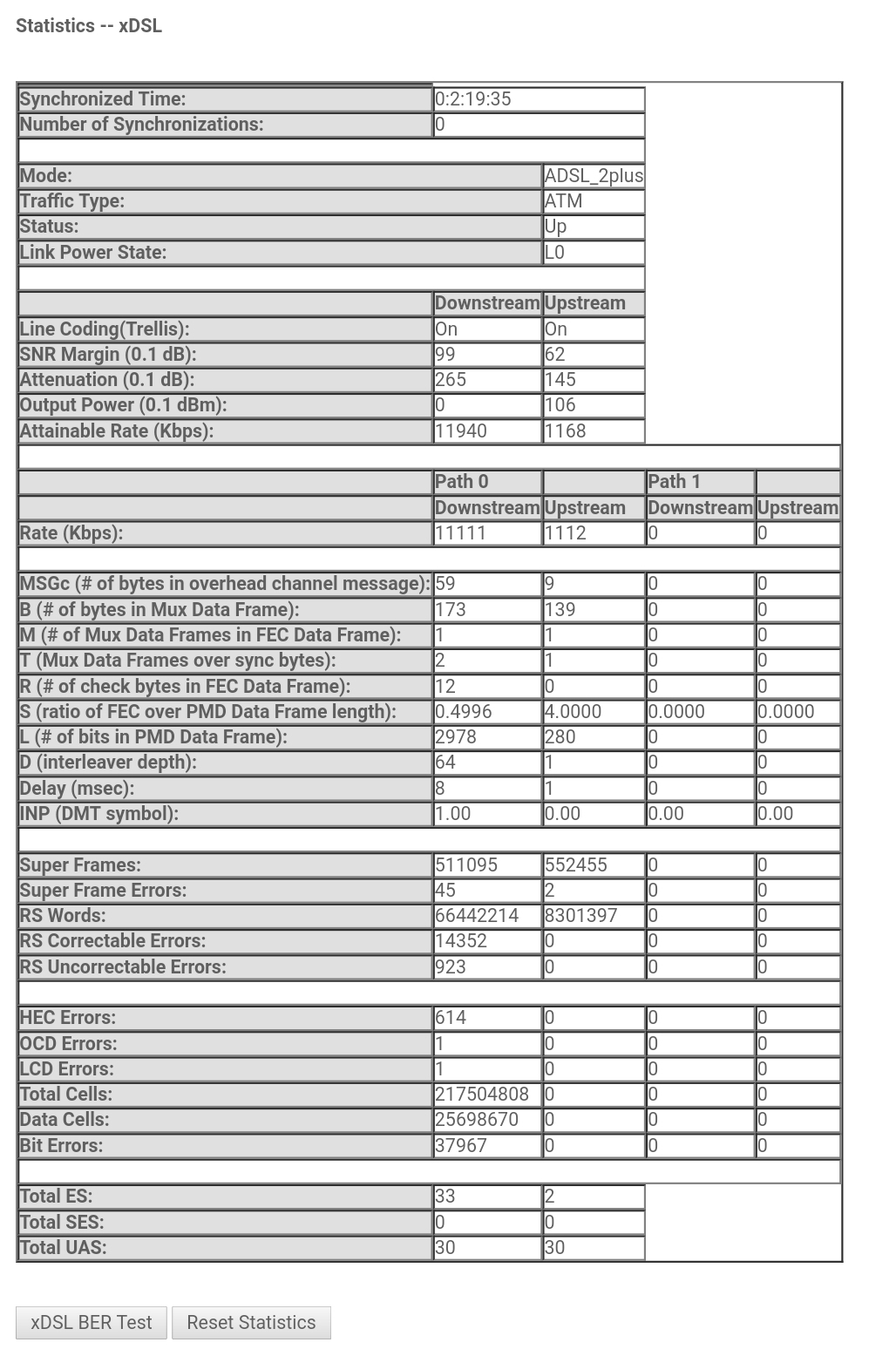
xDSL statistics


Shop now at Mighty Ape (affiliate link).
Linux
12178 posts

Uber Geek
+1 received by user: 8472

Trusted
Lifetime subscriber

  #2284424 26-Jul-2019 21:29
Send private message

Mode shows ADSL2+

coffeebaron
6304 posts

Uber Geek
+1 received by user: 3567

Trusted
Lifetime subscriber

  #2284436 26-Jul-2019 22:12
Send private message

Based on those ADSL stats, VDSL would be very bad. Getting internal wiring checked and splitter installed would give you a better picture of what's achievable, especially as surrounding addresses show some better speed than yours.


Rural IT and Broadband support.


Broadband troubleshooting and master filter installs.
Starlink installer - one month free: https://www.starlink.com/?referral=RC-32845-88860-71 
Wi-Fi and networking
Cel-Fi supply and installer - boost your mobile phone coverage legally


Need help in Auckland, Waikato or BoP? Click my email button, or email me direct: [my user name] at geekzonemail dot com


steblin

8 posts

Wannabe Geek


  #2284439 26-Jul-2019 22:20
Send private message

Yeah tried enabling the VDSL wan interface and wouldn't connect.

For my own knowledge, what is it that stands out in those stats that would make VDSL so poor?

halper86
555 posts

Ultimate Geek
+1 received by user: 156

ID Verified

  #2284440 26-Jul-2019 22:22
Send private message

Linux: Mode shows ADSL2+


I also see that the connection type is ATM, for VDSL it should be PTM.


 1 | 2
View this topic in a long page with up to 500 replies per page Create new topic


Geekzone Live »

Try automatic live updates from Geekzone directly in your browser, without refreshing the page, with Geekzone Live now.


Are you subscribed to our RSS feed? You can download the latest headlines and summaries from our stories directly to your computer or smartphone by using a feed reader.