Geekzone: technology news, blogs, forums
Guest
Welcome Guest.
You haven't logged in yet. If you don't have an account you can register now.


run1985

5 posts

Wannabe Geek


#311891 24-Feb-2024 10:32
Send private message

Hi all


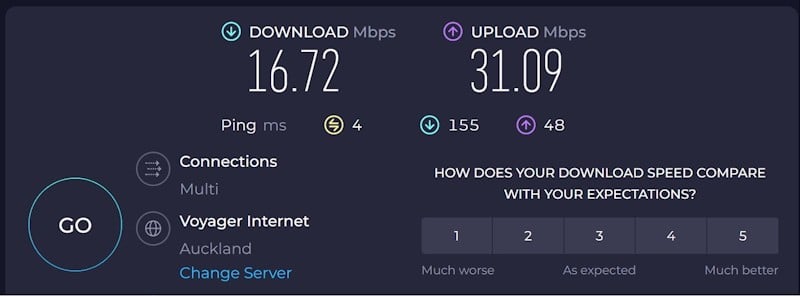
I recently upgrade from 2D HF1000 to 2000. Before(when using 1000), as most of time I used it for 1080P video stream, it works  alright... Then now I upgrade to 2000, so I expect to take it to 4K video stream as they put in their ads.  But after using for a month, I feel sometime, the network is not stable. And yesterday, I did a speed test(never do that before) on speedtest.net, the result comes confused me, showing download speed is around 17mbps-20mbps, I just wonder if this is right? Because I think literly it should be close 2000mbps? I am not sure my understanding is right for "Hyperfibre 2000 means download speed should be around 2000mbps",or it should be caculate by another way?  So I wonder if there is anyone else is using 2D Hyperfibre 2000 can give me an idea if this is right. Thanks in advance.


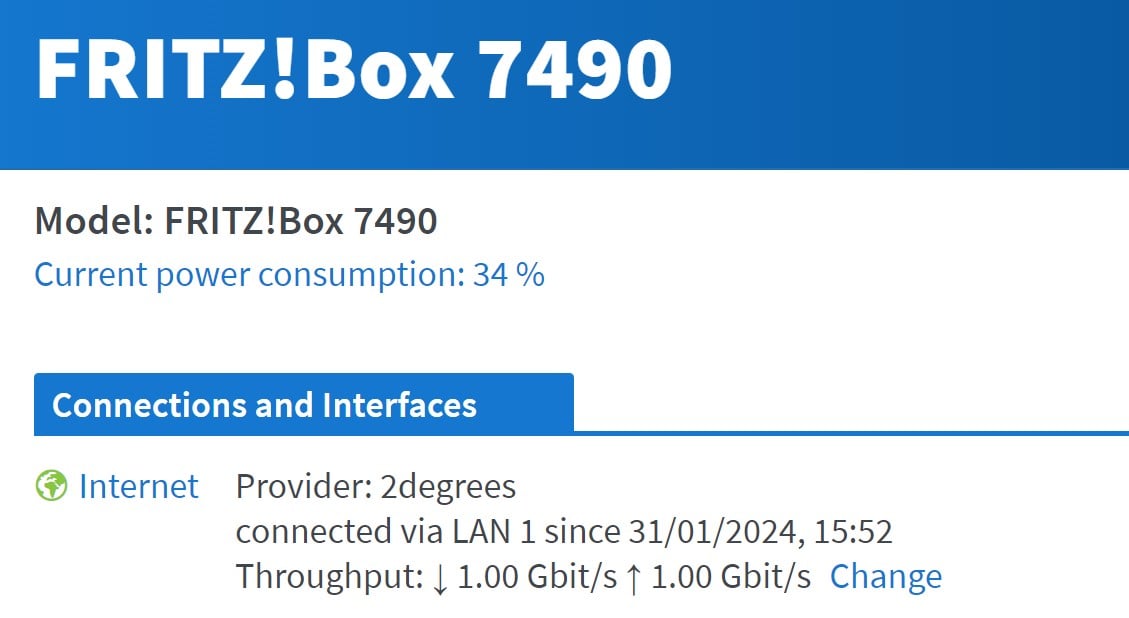
BTW, the router is Fritz 7490


Filter this topic showing only the reply marked as answer View this topic in a long page with up to 500 replies per page Create new topic
 1 | 2
Spyware
3818 posts

Uber Geek
+1 received by user: 1366

Lifetime subscriber

  #3199383 24-Feb-2024 10:38
Send private message

I thought the Fritz 7490 only had gigabit ports?? Note: 4K streams can be at bit-rates of 15 Mbps or less so I'm not sure why you would need hyperfibre.


Spark Max Fibre using Mikrotik CCR1009-8G-1S-1S+, CRS125-24G-1S, Unifi UAP, U6-Pro, UAP-AC-M-Pro, Apple TV 4K (2022), Apple TV 4K (2017), iPad Air 1st gen, iPad Air 4th gen, iPhone 13, SkyNZ3151 (the white box). If it doesn't move then it's data cabled.


run1985

5 posts

Wannabe Geek


  #3199385 24-Feb-2024 10:46
Send private message

Thanks for reply. Yes, Fritz 7490 only supports Max 1G. So the result should be no greater than 1000mbps? (like 800-900?)


Spyware
3818 posts

Uber Geek
+1 received by user: 1366

Lifetime subscriber

  #3199400 24-Feb-2024 11:36
Send private message

Please confirm that your speedtest is NOT over wifi. Speedtest result looks like a 2.4 GHz wifi connection through a few walls.


Spark Max Fibre using Mikrotik CCR1009-8G-1S-1S+, CRS125-24G-1S, Unifi UAP, U6-Pro, UAP-AC-M-Pro, Apple TV 4K (2022), Apple TV 4K (2017), iPad Air 1st gen, iPad Air 4th gen, iPhone 13, SkyNZ3151 (the white box). If it doesn't move then it's data cabled.


quickymart
14940 posts

Uber Geek
+1 received by user: 13954

ID Verified

  #3199405 24-Feb-2024 12:04
Send private message

That really looks like a test over wifi, with something interfering with it. What do you get if you connect with an ethernet cable and test again?


RunningMan
9186 posts

Uber Geek
+1 received by user: 4840


  #3199412 24-Feb-2024 12:21
Send private message

You went to Hyperfiber 2000 in order to get 4K video?. 4K video would work just fine on the slowest 50Mb/s fibre plans. You've got some other internal network issue like your router or Wifi to resolve.


richms
29100 posts

Uber Geek
+1 received by user: 10216

Trusted
Lifetime subscriber

  #3199485 24-Feb-2024 13:39
Send private message

We have had 6 simultanious 4k or 1440p streams going out on a single 950/500 connection in the past without affecting gameplay at all.


Those speed tests are below "its not working right" and down into the "its totally broken" territory.


Is this a 2 degrees owned fritzbox? Because if they have provisioned you a hyper fiber connection, knowing you have only got the fritz that is IMO dishonest of them to try to sell it.


Also its not working right. Check your ethernet cables are getting a good gigabit link, and check that you dont have silly numbers in the internet speed options on the fritzbox like 20 that will throttle it down.


Richard rich.ms


Shop now for Lenovo laptops and other devices (affiliate link).
thingy
4 posts

Wannabe Geek


  #3199490 24-Feb-2024 13:59
Send private message

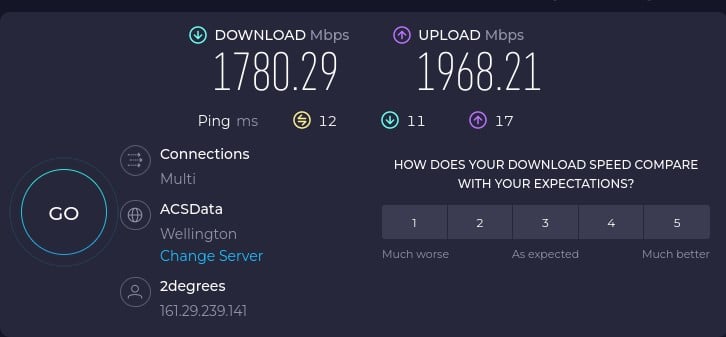
Here's my HF 2K connection with 2 Degrees:


This is via a direct Ethernet Connection to a 2.5Gbps port on my little NUC (configure for VLAN 10 and DHCP)


Note the 2Degrees Orbi router provided with the 2K HF connection only does 1200Mbps and only has 1GB ports. So no point using it for anything.

thingy
4 posts

Wannabe Geek


  #3199505 24-Feb-2024 14:08
Send private message

Might also be that a switch to 5ghz wifi vs 2.4ghz with the new router is even weaker through walls so signal is even worst?


Check your wifi signal strength:


https://www.lifewire.com/how-to-measure-your-wifi-signal-strength-818303

Jase2985
13732 posts

Uber Geek
+1 received by user: 6206

ID Verified
Lifetime subscriber

  #3199509 24-Feb-2024 14:16
Send private message

@run1985 update on testing method please 


nztim
4013 posts

Uber Geek
+1 received by user: 2711

ID Verified
Trusted
TEAMnetwork
Subscriber

  #3199513 24-Feb-2024 14:24
Send private message

I am having trouble stomaching reading this thread.


HyperFibre requires a whole network upgrade, including at router with at least 2x 2.5G ethernet ports. 


You will need a PC with 2.5G ethernet port on your device too (to get the full 2000mbps) or a Wifi 6E on to get about 1700mbps - that too will too will require ethernet backhaul and a laptop/device which support 6GHZ 160MHZ wide channels.


TBH just go back to 900/500 it will be plenty for your needs.


Unless you like paying over $120 for your broadband.


Any views expressed on these forums are my own and don't necessarily reflect those of my employer. 


Jase2985
13732 posts

Uber Geek
+1 received by user: 6206

ID Verified
Lifetime subscriber

  #3199514 24-Feb-2024 14:28
Send private message

nztim:


I am having trouble stomaching reading this thread.


HyperFibre requires a whole network upgrade, including at router with at least 2x 2.5G ethernet ports. 


You will need a PC with 2.5G ethernet port on your device too (to get the full 2000mbps) or a Wifi 6E on to get about 1700mbps - that too will too will require ethernet backhaul and a laptop/device which support 6GHZ 160MHZ wide channels.


TBH just go back to 900/500 it will be plenty for your needs.


Unless you like paying over $120 for your broadband.


thats not 100% correct, you dont need your whole network to be more than 1Gig, having hyperfibre allows you to have a dedicated 1gig link to more than one device. 


Shop now for Dell laptops and other devices (affiliate link).
nztim
4013 posts

Uber Geek
+1 received by user: 2711

ID Verified
Trusted
TEAMnetwork
Subscriber

  #3199515 24-Feb-2024 14:48
Send private message

Jase2985:


nztim:


I am having trouble stomaching reading this thread.


HyperFibre requires a whole network upgrade, including at router with at least 2x 2.5G ethernet ports. 


You will need a PC with 2.5G ethernet port on your device too (to get the full 2000mbps) or a Wifi 6E on to get about 1700mbps - that too will too will require ethernet backhaul and a laptop/device which support 6GHZ 160MHZ wide channels.


TBH just go back to 900/500 it will be plenty for your needs.


Unless you like paying over $120 for your broadband.


thats not 100% correct, you dont need your whole network to be more than 1Gig, having hyperfibre allows you to have a dedicated 1gig link to more than one device. 


For a single device to take advantage of HyperFibre you do


Any views expressed on these forums are my own and don't necessarily reflect those of my employer. 


thingy
4 posts

Wannabe Geek


  #3199517 24-Feb-2024 14:53
Send private message

nztim:


...


HyperFibre requires a whole network upgrade, including at router with at least 2x 2.5G ethernet ports. 


...


Yeah nah, I just have a single 2.5Gbps nic and then setup the inbuilt Wifi as an AP


Jase2985
13732 posts

Uber Geek
+1 received by user: 6206

ID Verified
Lifetime subscriber

  #3199521 24-Feb-2024 15:19
Send private message

nztim:


For a single device to take advantage of HyperFibre you do


correct, but you said "HyperFibre requires a whole network upgrade" which is not correct


michaelmurfy
meow
13580 posts

Uber Geek
+1 received by user: 10912

Moderator
ID Verified
Trusted
Lifetime subscriber

  #3199523 24-Feb-2024 15:26
Send private message

Jase2985:


nztim: HyperFibre requires a whole network upgrade, including at router with at least 2x 2.5G ethernet ports.


thats not 100% correct, you dont need your whole network to be more than 1Gig, having hyperfibre allows you to have a dedicated 1gig link to more than one device.


It's somewhat correct if you want to fully take advantage of Hyperfibre (as in have a router with the capacity to route 2.5Gbit) but anything after that I agree, you can have Gigabit to devices provided the switch is uplinking at 2.5Gbit. I'm now thinking of going to Hyperfibre and I know my router likely won't be able to do full Hyperfibre speeds but double the upstream makes sense to me and anything more is a bonus (my router only has Gigabit but a LAC to the switch so thinking of using a SFP+ port on the switch so the router has a multi-gigabit connection). It's a shame UFB isn't symmetrical Gigabit.


thingy: Yeah nah, I just have a single 2.5Gbps nic and then setup the inbuilt Wifi as an AP


Erm what? You suggesting you've connected your computer straight to the ONT and are literally also using that computer as a makeshift router? That's incredibly insecure if you have.


Michael Murphy | https://murfy.nz
Referral Links: Quic Broadband (use R122101E7CV7Q for free setup)

Are you happy with what you get from Geekzone? Please consider supporting us by subscribing.
Opinions are my own and not the views of my employer.


 1 | 2
Filter this topic showing only the reply marked as answer View this topic in a long page with up to 500 replies per page Create new topic


Geekzone Live »

Try automatic live updates from Geekzone directly in your browser, without refreshing the page, with Geekzone Live now.


Are you subscribed to our RSS feed? You can download the latest headlines and summaries from our stories directly to your computer or smartphone by using a feed reader.