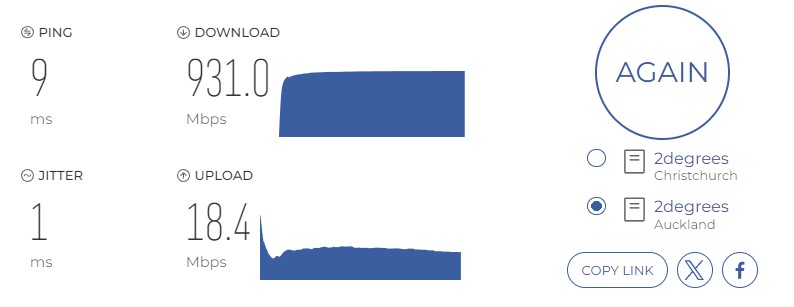
ID Verified
 Trusted
Hi all
This is relevant to anyone on here that is in the tech department for 2degrees (and I can give you the fault # in a PM).
So this happened....
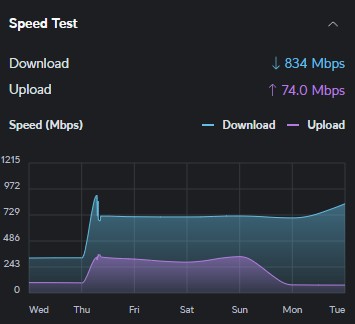
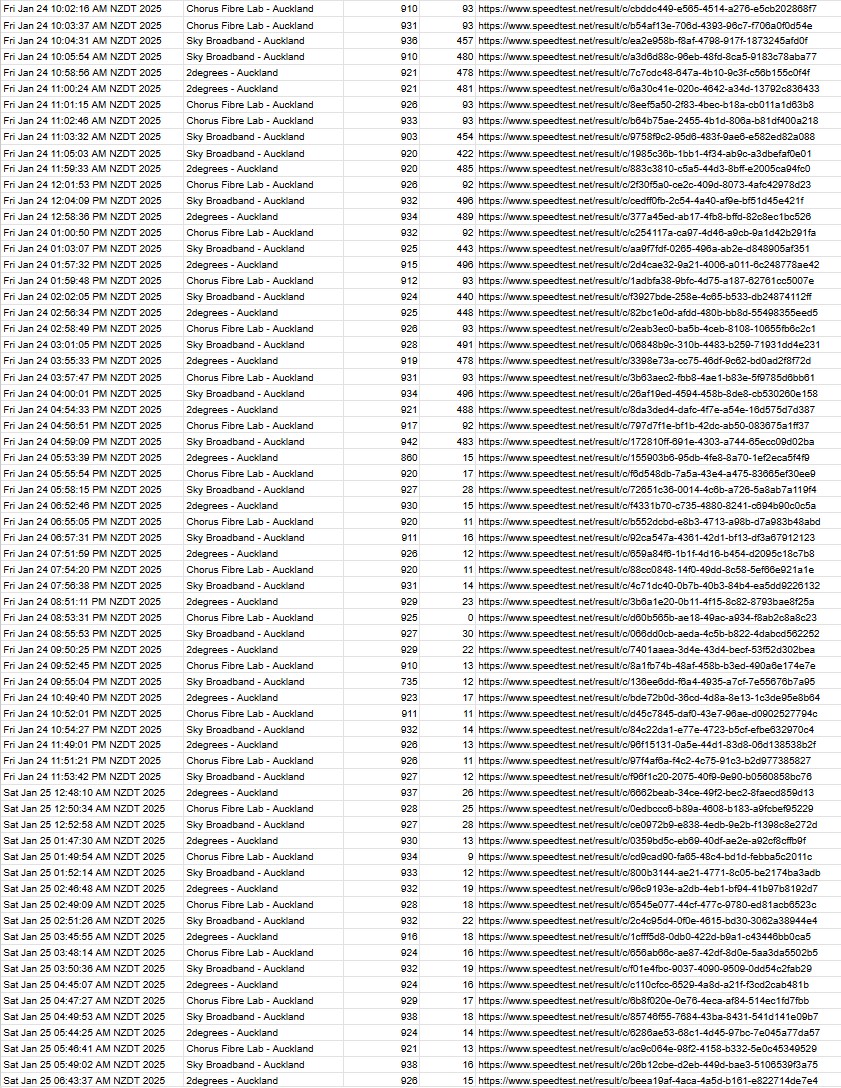
On last Thursday I went from a 100/300 plan to a 500/900. And all was fine until Somewhere between Sunday 1:30AM and Monday 1:30AM (gap between daily tests is 24hrs). The Download was excellent but the upload went to 1/10th of what it should be. I made no internal changes.
So after 2 calls and about 3hrs on the phone to service desk (who were technically quite capable and eventually reached the end of what they could do) this is now a service call. Here some details of what I did and what I see:
I have tested from a PC in my network, from the UDM Pro edge router device and from a laptop directly connected to the ONT (instead of the router). All show the same behaviour. I have exchanged and re-seated all cables and restarted all devices in several different sequences.
Excerpt of results:
Tested by Cloudflare: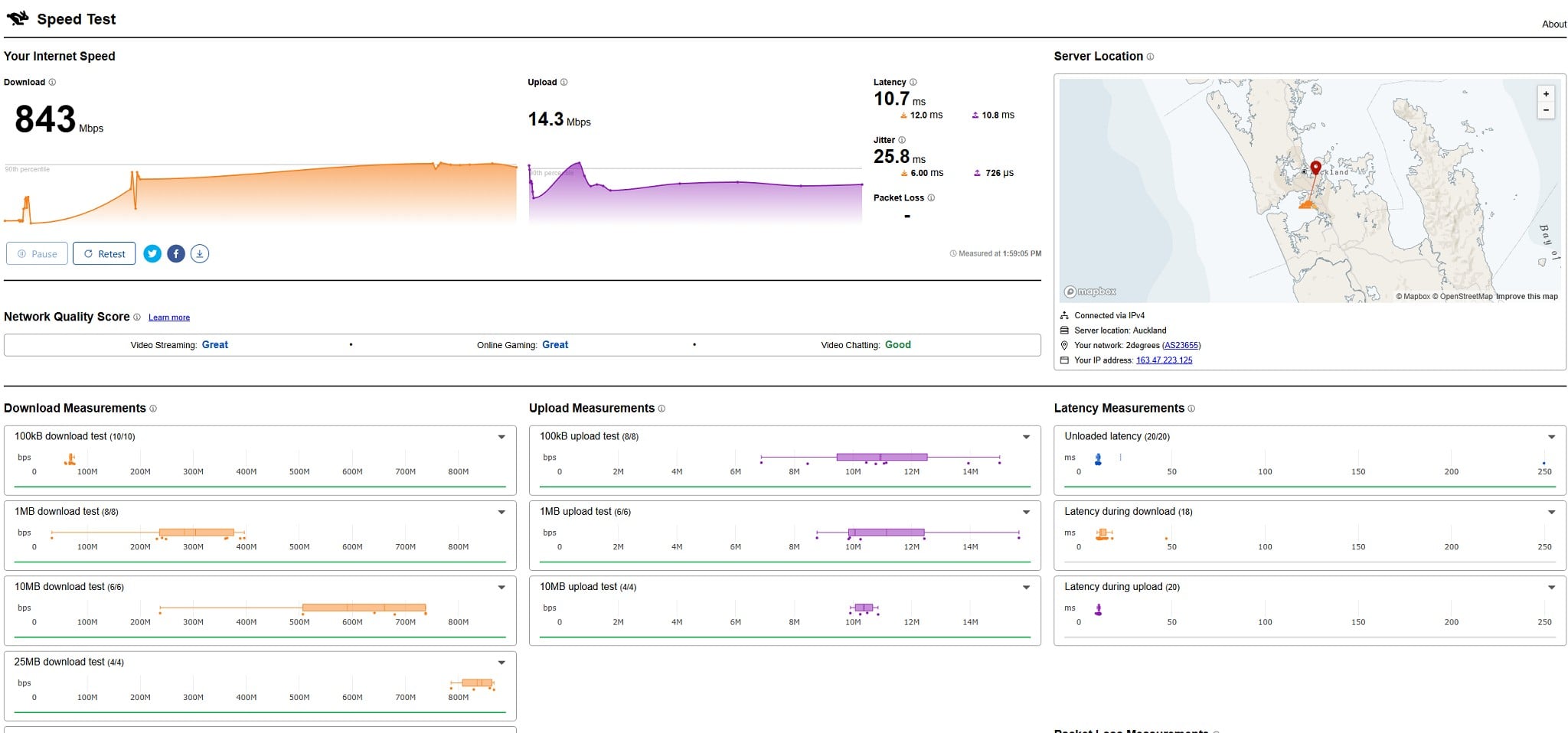
Test by Fast.com
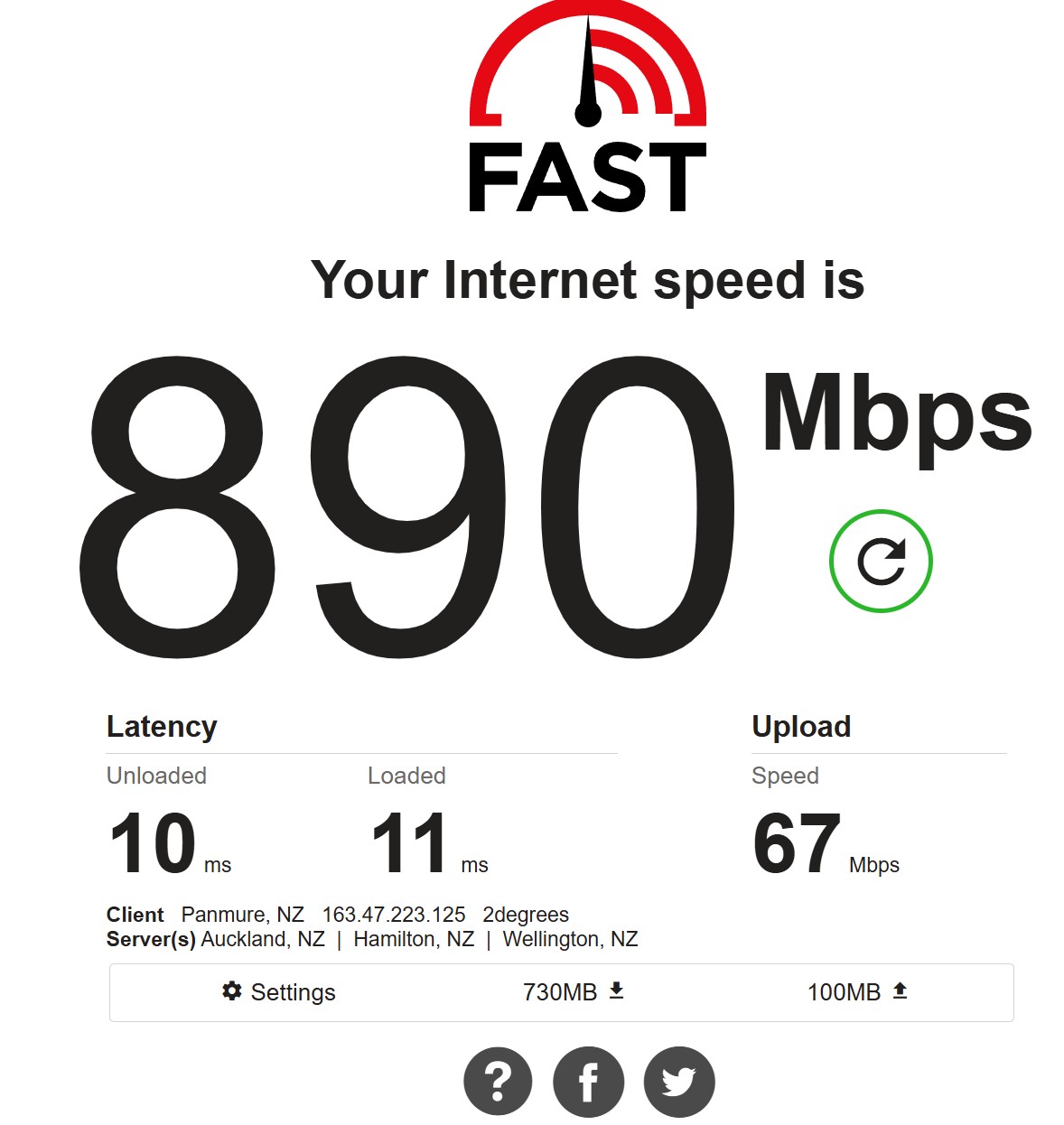
And Test by Speedtest.net (CLI) directly on router

./speedtest -s 5749
Speedtest by Ookla
Server: 2degrees - Auckland (id: 5749)
ISP: 2degrees
Idle Latency: 9.47 ms (jitter: 0.15ms, low: 9.41ms, high: 9.62ms)
Download: 930.76 Mbps (data used: 1.3 GB)
11.71 ms (jitter: 6.42ms, low: 9.43ms, high: 246.81ms)
Upload: 30.48 Mbps (data used: 40.6 MB)
9.53 ms (jitter: 2.21ms, low: 9.40ms, high: 236.63ms)
Packet Loss: 0.0%
Result URL: https://www.speedtest.net/result/c/b42105ec-5280-47fb-945d-dd9ba1cae6ae ------------------------------------------------------------------------------------ Now the interesting bit is.... The chorus line test tool uses iperf to test the connection and that shows an excellent connection!
iperf3 -c akl4.linetest.nz -V -p 5001 -P 10 -t 20 -R
iperf 3.16
Linux UDMPRO 4.19.152-ui-alpine #4.19.152 SMP Tue Dec 24 22:57:14 CST 2024 aarch64
Control connection MSS 1448
Time: Wed, 22 Jan 2025 00:56:09 GMT
Connecting to host akl4.linetest.nz, port 5001
Reverse mode, remote host akl4.linetest.nz is sending
Cookie: t3p5hdkqt6ga7isyat3lovr3jhmzx62dizie
TCP MSS: 1448 (default)
[ 5] local 163.47.223.125 port 52298 connected to 60.234.3.9 port 5001
[ 7] local 163.47.223.125 port 52300 connected to 60.234.3.9 port 5001
[ 9] local 163.47.223.125 port 52302 connected to 60.234.3.9 port 5001
[ 11] local 163.47.223.125 port 52304 connected to 60.234.3.9 port 5001
[ 13] local 163.47.223.125 port 52306 connected to 60.234.3.9 port 5001
[ 15] local 163.47.223.125 port 52308 connected to 60.234.3.9 port 5001
[ 17] local 163.47.223.125 port 52310 connected to 60.234.3.9 port 5001
[ 19] local 163.47.223.125 port 52312 connected to 60.234.3.9 port 5001
[ 21] local 163.47.223.125 port 52314 connected to 60.234.3.9 port 5001
[ 23] local 163.47.223.125 port 52316 connected to 60.234.3.9 port 5001
Starting Test: protocol: TCP, 10 streams, 131072 byte blocks, omitting 0 seconds, 20 second test, tos 0
[ ID] Interval Transfer Bitrate
[ 5] 0.00-1.00 sec 16.5 MBytes 138 Mbits/sec
[ 7] 0.00-1.00 sec 17.8 MBytes 149 Mbits/sec
[ 9] 0.00-1.00 sec 13.4 MBytes 112 Mbits/sec
[ 11] 0.00-1.00 sec 12.1 MBytes 102 Mbits/sec
[ 13] 0.00-1.00 sec 9.75 MBytes 81.7 Mbits/sec
[ 15] 0.00-1.00 sec 8.75 MBytes 73.3 Mbits/sec
[ 17] 0.00-1.00 sec 10.1 MBytes 84.8 Mbits/sec
[ 19] 0.00-1.00 sec 8.12 MBytes 68.1 Mbits/sec
[ 21] 0.00-1.00 sec 6.88 MBytes 57.6 Mbits/sec
[ 23] 0.00-1.00 sec 4.75 MBytes 39.8 Mbits/sec
[SUM] 0.00-1.00 sec 108 MBytes 906 Mbits/sec
- - - - - - - - - - - - - - - - - - - - - - - - -
[ 5] 1.00-2.00 sec 10.6 MBytes 89.1 Mbits/sec
[ 7] 1.00-2.00 sec 18.9 MBytes 158 Mbits/sec
[ 9] 1.00-2.00 sec 12.4 MBytes 104 Mbits/sec
[ 11] 1.00-2.00 sec 8.38 MBytes 70.3 Mbits/sec
[ 13] 1.00-2.00 sec 7.25 MBytes 60.8 Mbits/sec
[ 15] 1.00-2.00 sec 9.62 MBytes 80.7 Mbits/sec
[ 17] 1.00-2.00 sec 15.1 MBytes 127 Mbits/sec
[ 19] 1.00-2.00 sec 15.1 MBytes 127 Mbits/sec
[ 21] 1.00-2.00 sec 9.25 MBytes 77.6 Mbits/sec
[ 23] 1.00-2.00 sec 5.12 MBytes 43.0 Mbits/sec
[SUM] 1.00-2.00 sec 112 MBytes 937 Mbits/sec
- - - - - - - - - - - - - - - - - - - - - - - - -
[ 5] 2.00-3.00 sec 8.88 MBytes 74.5 Mbits/sec
[ 7] 2.00-3.00 sec 17.4 MBytes 146 Mbits/sec
[ 9] 2.00-3.00 sec 11.4 MBytes 95.5 Mbits/sec
[ 11] 2.00-3.00 sec 9.12 MBytes 76.6 Mbits/sec
[ 13] 2.00-3.00 sec 10.0 MBytes 83.9 Mbits/sec
[ 15] 2.00-3.00 sec 6.50 MBytes 54.5 Mbits/sec
[ 17] 2.00-3.00 sec 16.0 MBytes 134 Mbits/sec
[ 19] 2.00-3.00 sec 13.1 MBytes 110 Mbits/sec
[ 21] 2.00-3.00 sec 9.62 MBytes 80.7 Mbits/sec
[ 23] 2.00-3.00 sec 8.62 MBytes 72.4 Mbits/sec
[SUM] 2.00-3.00 sec 111 MBytes 928 Mbits/sec
- - - - - - - - - - - - - - - - - - - - - - - - -
[ 5] 3.00-4.00 sec 7.12 MBytes 59.7 Mbits/sec
[ 7] 3.00-4.00 sec 18.8 MBytes 157 Mbits/sec
[ 9] 3.00-4.00 sec 10.6 MBytes 89.1 Mbits/sec
[ 11] 3.00-4.00 sec 8.62 MBytes 72.3 Mbits/sec
[ 13] 3.00-4.00 sec 9.38 MBytes 78.6 Mbits/sec
[ 15] 3.00-4.00 sec 9.25 MBytes 77.6 Mbits/sec
[ 17] 3.00-4.00 sec 15.2 MBytes 128 Mbits/sec
[ 19] 3.00-4.00 sec 12.8 MBytes 107 Mbits/sec
[ 21] 3.00-4.00 sec 10.5 MBytes 88.1 Mbits/sec
[ 23] 3.00-4.00 sec 9.75 MBytes 81.8 Mbits/sec
[SUM] 3.00-4.00 sec 112 MBytes 939 Mbits/sec
- - - - - - - - - - - - - - - - - - - - - - - - -
[ 5] 4.00-5.00 sec 3.38 MBytes 28.3 Mbits/sec
[ 7] 4.00-5.00 sec 16.5 MBytes 138 Mbits/sec
[ 9] 4.00-5.00 sec 12.4 MBytes 104 Mbits/sec
[ 11] 4.00-5.00 sec 9.00 MBytes 75.5 Mbits/sec
[ 13] 4.00-5.00 sec 12.4 MBytes 104 Mbits/sec
[ 15] 4.00-5.00 sec 11.6 MBytes 97.5 Mbits/sec
[ 17] 4.00-5.00 sec 11.2 MBytes 94.4 Mbits/sec
[ 19] 4.00-5.00 sec 14.1 MBytes 118 Mbits/sec
[ 21] 4.00-5.00 sec 12.2 MBytes 103 Mbits/sec
[ 23] 4.00-5.00 sec 9.12 MBytes 76.5 Mbits/sec
[SUM] 4.00-5.00 sec 112 MBytes 939 Mbits/sec
- - - - - - - - - - - - - - - - - - - - - - - - -
[ 5] 5.00-6.00 sec 4.75 MBytes 39.8 Mbits/sec
[ 7] 5.00-6.00 sec 14.0 MBytes 117 Mbits/sec
[ 9] 5.00-6.00 sec 13.4 MBytes 112 Mbits/sec
[ 11] 5.00-6.00 sec 8.50 MBytes 71.3 Mbits/sec
[ 13] 5.00-6.00 sec 12.5 MBytes 105 Mbits/sec
[ 15] 5.00-6.00 sec 10.4 MBytes 87.0 Mbits/sec
[ 17] 5.00-6.00 sec 12.9 MBytes 108 Mbits/sec
[ 19] 5.00-6.00 sec 14.4 MBytes 121 Mbits/sec
[ 21] 5.00-6.00 sec 12.2 MBytes 103 Mbits/sec
[ 23] 5.00-6.00 sec 8.00 MBytes 67.1 Mbits/sec
[SUM] 5.00-6.00 sec 111 MBytes 931 Mbits/sec
- - - - - - - - - - - - - - - - - - - - - - - - -
[ 5] 6.00-7.00 sec 8.12 MBytes 68.2 Mbits/sec
[ 7] 6.00-7.00 sec 9.50 MBytes 79.8 Mbits/sec
[ 9] 6.00-7.00 sec 13.8 MBytes 115 Mbits/sec
[ 11] 6.00-7.00 sec 6.88 MBytes 57.7 Mbits/sec
[ 13] 6.00-7.00 sec 12.6 MBytes 106 Mbits/sec
[ 15] 6.00-7.00 sec 15.9 MBytes 133 Mbits/sec
[ 17] 6.00-7.00 sec 11.6 MBytes 97.6 Mbits/sec
[ 19] 6.00-7.00 sec 12.6 MBytes 106 Mbits/sec
[ 21] 6.00-7.00 sec 11.8 MBytes 98.7 Mbits/sec
[ 23] 6.00-7.00 sec 7.38 MBytes 61.9 Mbits/sec
[SUM] 6.00-7.00 sec 110 MBytes 925 Mbits/sec
- - - - - - - - - - - - - - - - - - - - - - - - -
[ 5] 7.00-8.00 sec 10.0 MBytes 83.9 Mbits/sec
[ 7] 7.00-8.00 sec 9.38 MBytes 78.6 Mbits/sec
[ 9] 7.00-8.00 sec 15.6 MBytes 131 Mbits/sec
[ 11] 7.00-8.00 sec 8.12 MBytes 68.2 Mbits/sec
[ 13] 7.00-8.00 sec 11.9 MBytes 99.6 Mbits/sec
[ 15] 7.00-8.00 sec 15.2 MBytes 128 Mbits/sec
[ 17] 7.00-8.00 sec 10.6 MBytes 89.1 Mbits/sec
[ 19] 7.00-8.00 sec 12.9 MBytes 108 Mbits/sec
[ 21] 7.00-8.00 sec 10.2 MBytes 86.0 Mbits/sec
[ 23] 7.00-8.00 sec 7.00 MBytes 58.7 Mbits/sec
[SUM] 7.00-8.00 sec 111 MBytes 931 Mbits/sec
- - - - - - - - - - - - - - - - - - - - - - - - -
[ 5] 8.00-9.00 sec 9.62 MBytes 80.7 Mbits/sec
[ 7] 8.00-9.00 sec 10.4 MBytes 87.0 Mbits/sec
[ 9] 8.00-9.00 sec 12.4 MBytes 104 Mbits/sec
[ 11] 8.00-9.00 sec 12.8 MBytes 107 Mbits/sec
[ 13] 8.00-9.00 sec 10.4 MBytes 87.0 Mbits/sec
[ 15] 8.00-9.00 sec 15.1 MBytes 127 Mbits/sec
[ 17] 8.00-9.00 sec 10.4 MBytes 87.0 Mbits/sec
[ 19] 8.00-9.00 sec 13.4 MBytes 112 Mbits/sec
[ 21] 8.00-9.00 sec 10.2 MBytes 85.9 Mbits/sec
[ 23] 8.00-9.00 sec 6.12 MBytes 51.3 Mbits/sec
[SUM] 8.00-9.00 sec 111 MBytes 928 Mbits/sec
- - - - - - - - - - - - - - - - - - - - - - - - -
[ 5] 9.00-10.00 sec 10.1 MBytes 85.0 Mbits/sec
[ 7] 9.00-10.00 sec 10.4 MBytes 87.1 Mbits/sec
[ 9] 9.00-10.00 sec 11.1 MBytes 93.4 Mbits/sec
[ 11] 9.00-10.00 sec 13.5 MBytes 113 Mbits/sec
[ 13] 9.00-10.00 sec 8.25 MBytes 69.2 Mbits/sec
[ 15] 9.00-10.00 sec 13.8 MBytes 115 Mbits/sec
[ 17] 9.00-10.00 sec 10.0 MBytes 83.9 Mbits/sec
[ 19] 9.00-10.00 sec 14.5 MBytes 122 Mbits/sec
[ 21] 9.00-10.00 sec 13.1 MBytes 110 Mbits/sec
[ 23] 9.00-10.00 sec 7.00 MBytes 58.7 Mbits/sec
[SUM] 9.00-10.00 sec 112 MBytes 938 Mbits/sec
- - - - - - - - - - - - - - - - - - - - - - - - -
[ 5] 10.00-11.00 sec 11.0 MBytes 92.2 Mbits/sec
[ 7] 10.00-11.00 sec 10.6 MBytes 89.1 Mbits/sec
[ 9] 10.00-11.00 sec 11.1 MBytes 93.3 Mbits/sec
[ 11] 10.00-11.00 sec 11.5 MBytes 96.4 Mbits/sec
[ 13] 10.00-11.00 sec 12.0 MBytes 101 Mbits/sec
[ 15] 10.00-11.00 sec 10.6 MBytes 89.1 Mbits/sec
[ 17] 10.00-11.00 sec 7.00 MBytes 58.7 Mbits/sec
[ 19] 10.00-11.00 sec 16.4 MBytes 137 Mbits/sec
[ 21] 10.00-11.00 sec 13.2 MBytes 111 Mbits/sec
[ 23] 10.00-11.00 sec 8.38 MBytes 70.2 Mbits/sec
[SUM] 10.00-11.00 sec 112 MBytes 938 Mbits/sec
- - - - - - - - - - - - - - - - - - - - - - - - -
[ 5] 11.00-12.00 sec 11.5 MBytes 96.5 Mbits/sec
[ 7] 11.00-12.00 sec 7.88 MBytes 66.1 Mbits/sec
[ 9] 11.00-12.00 sec 16.8 MBytes 141 Mbits/sec
[ 11] 11.00-12.00 sec 15.8 MBytes 132 Mbits/sec
[ 13] 11.00-12.00 sec 9.00 MBytes 75.5 Mbits/sec
[ 15] 11.00-12.00 sec 10.0 MBytes 83.9 Mbits/sec
[ 17] 11.00-12.00 sec 9.12 MBytes 76.6 Mbits/sec
[ 19] 11.00-12.00 sec 11.6 MBytes 97.5 Mbits/sec
[ 21] 11.00-12.00 sec 12.4 MBytes 104 Mbits/sec
[ 23] 11.00-12.00 sec 7.75 MBytes 65.0 Mbits/sec
[SUM] 11.00-12.00 sec 112 MBytes 938 Mbits/sec
- - - - - - - - - - - - - - - - - - - - - - - - -
[ 5] 12.00-13.00 sec 11.6 MBytes 97.5 Mbits/sec
[ 7] 12.00-13.00 sec 7.00 MBytes 58.7 Mbits/sec
[ 9] 12.00-13.00 sec 18.6 MBytes 156 Mbits/sec
[ 11] 12.00-13.00 sec 14.6 MBytes 123 Mbits/sec
[ 13] 12.00-13.00 sec 12.2 MBytes 103 Mbits/sec
[ 15] 12.00-13.00 sec 10.6 MBytes 89.1 Mbits/sec
[ 17] 12.00-13.00 sec 9.62 MBytes 80.8 Mbits/sec
[ 19] 12.00-13.00 sec 11.2 MBytes 94.4 Mbits/sec
[ 21] 12.00-13.00 sec 11.8 MBytes 98.6 Mbits/sec
[ 23] 12.00-13.00 sec 4.50 MBytes 37.8 Mbits/sec
[SUM] 12.00-13.00 sec 112 MBytes 939 Mbits/sec
- - - - - - - - - - - - - - - - - - - - - - - - -
[ 5] 13.00-14.00 sec 10.9 MBytes 91.2 Mbits/sec
[ 7] 13.00-14.00 sec 8.75 MBytes 73.4 Mbits/sec
[ 9] 13.00-14.00 sec 12.9 MBytes 108 Mbits/sec
[ 11] 13.00-14.00 sec 15.0 MBytes 126 Mbits/sec
[ 13] 13.00-14.00 sec 13.0 MBytes 109 Mbits/sec
[ 15] 13.00-14.00 sec 12.6 MBytes 106 Mbits/sec
[ 17] 13.00-14.00 sec 9.12 MBytes 76.6 Mbits/sec
[ 19] 13.00-14.00 sec 11.2 MBytes 94.4 Mbits/sec
[ 21] 13.00-14.00 sec 11.1 MBytes 93.3 Mbits/sec
[ 23] 13.00-14.00 sec 6.12 MBytes 51.4 Mbits/sec
[SUM] 13.00-14.00 sec 111 MBytes 929 Mbits/sec
- - - - - - - - - - - - - - - - - - - - - - - - -
[ 5] 14.00-15.00 sec 12.9 MBytes 108 Mbits/sec
[ 7] 14.00-15.00 sec 9.00 MBytes 75.2 Mbits/sec
[ 9] 14.00-15.00 sec 14.2 MBytes 119 Mbits/sec
[ 11] 14.00-15.00 sec 12.9 MBytes 108 Mbits/sec
[ 13] 14.00-15.00 sec 12.5 MBytes 104 Mbits/sec
[ 15] 14.00-15.00 sec 11.2 MBytes 94.0 Mbits/sec
[ 17] 14.00-15.00 sec 9.25 MBytes 77.3 Mbits/sec
[ 19] 14.00-15.00 sec 15.0 MBytes 125 Mbits/sec
[ 21] 14.00-15.00 sec 8.12 MBytes 67.9 Mbits/sec
[ 23] 14.00-15.00 sec 6.00 MBytes 50.1 Mbits/sec
[SUM] 14.00-15.00 sec 111 MBytes 928 Mbits/sec
- - - - - - - - - - - - - - - - - - - - - - - - -
[ 5] 15.00-16.01 sec 13.0 MBytes 108 Mbits/sec
[ 7] 15.00-16.01 sec 8.25 MBytes 68.8 Mbits/sec
[ 9] 15.00-16.01 sec 11.2 MBytes 93.9 Mbits/sec
[ 11] 15.00-16.01 sec 12.6 MBytes 105 Mbits/sec
[ 13] 15.00-16.01 sec 13.8 MBytes 115 Mbits/sec
[ 15] 15.00-16.01 sec 11.2 MBytes 93.7 Mbits/sec
[ 17] 15.00-16.01 sec 9.12 MBytes 76.0 Mbits/sec
[ 19] 15.00-16.01 sec 14.1 MBytes 118 Mbits/sec
[ 21] 15.00-16.01 sec 13.0 MBytes 108 Mbits/sec
[ 23] 15.00-16.01 sec 6.62 MBytes 55.2 Mbits/sec
[SUM] 15.00-16.01 sec 113 MBytes 943 Mbits/sec
- - - - - - - - - - - - - - - - - - - - - - - - -
[ 5] 16.01-17.00 sec 12.9 MBytes 109 Mbits/sec
[ 7] 16.01-17.00 sec 12.0 MBytes 102 Mbits/sec
[ 9] 16.01-17.00 sec 9.88 MBytes 83.7 Mbits/sec
[ 11] 16.01-17.00 sec 13.1 MBytes 111 Mbits/sec
[ 13] 16.01-17.00 sec 14.0 MBytes 119 Mbits/sec
[ 15] 16.01-17.00 sec 11.2 MBytes 95.5 Mbits/sec
[ 17] 16.01-17.00 sec 10.5 MBytes 89.1 Mbits/sec
[ 19] 16.01-17.00 sec 10.2 MBytes 86.9 Mbits/sec
[ 21] 16.01-17.00 sec 10.4 MBytes 88.0 Mbits/sec
[ 23] 16.01-17.00 sec 5.50 MBytes 46.6 Mbits/sec
[SUM] 16.01-17.00 sec 110 MBytes 930 Mbits/sec
- - - - - - - - - - - - - - - - - - - - - - - - -
[ 5] 17.00-18.00 sec 14.0 MBytes 117 Mbits/sec
[ 7] 17.00-18.00 sec 9.00 MBytes 75.5 Mbits/sec
[ 9] 17.00-18.00 sec 14.6 MBytes 123 Mbits/sec
[ 11] 17.00-18.00 sec 14.2 MBytes 119 Mbits/sec
[ 13] 17.00-18.00 sec 9.88 MBytes 82.8 Mbits/sec
[ 15] 17.00-18.00 sec 12.8 MBytes 107 Mbits/sec
[ 17] 17.00-18.00 sec 7.62 MBytes 63.9 Mbits/sec
[ 19] 17.00-18.00 sec 14.1 MBytes 119 Mbits/sec
[ 21] 17.00-18.00 sec 8.62 MBytes 72.4 Mbits/sec
[ 23] 17.00-18.00 sec 6.00 MBytes 50.4 Mbits/sec
[SUM] 17.00-18.00 sec 111 MBytes 930 Mbits/sec
- - - - - - - - - - - - - - - - - - - - - - - - -
[ 5] 18.00-19.00 sec 14.0 MBytes 118 Mbits/sec
[ 7] 18.00-19.00 sec 8.62 MBytes 72.4 Mbits/sec
[ 9] 18.00-19.00 sec 11.6 MBytes 97.6 Mbits/sec
[ 11] 18.00-19.00 sec 15.5 MBytes 130 Mbits/sec
[ 13] 18.00-19.00 sec 9.12 MBytes 76.6 Mbits/sec
[ 15] 18.00-19.00 sec 14.9 MBytes 125 Mbits/sec
[ 17] 18.00-19.00 sec 6.62 MBytes 55.6 Mbits/sec
[ 19] 18.00-19.00 sec 7.25 MBytes 60.9 Mbits/sec
[ 21] 18.00-19.00 sec 14.4 MBytes 121 Mbits/sec
[ 23] 18.00-19.00 sec 9.75 MBytes 81.9 Mbits/sec
[SUM] 18.00-19.00 sec 112 MBytes 938 Mbits/sec
- - - - - - - - - - - - - - - - - - - - - - - - -
[ 5] 19.00-20.00 sec 10.4 MBytes 86.9 Mbits/sec
[ 7] 19.00-20.00 sec 8.62 MBytes 72.2 Mbits/sec
[ 9] 19.00-20.00 sec 12.2 MBytes 103 Mbits/sec
[ 11] 19.00-20.00 sec 13.5 MBytes 113 Mbits/sec
[ 13] 19.00-20.00 sec 14.2 MBytes 119 Mbits/sec
[ 15] 19.00-20.00 sec 13.6 MBytes 114 Mbits/sec
[ 17] 19.00-20.00 sec 9.00 MBytes 75.4 Mbits/sec
[ 19] 19.00-20.00 sec 8.62 MBytes 72.2 Mbits/sec
[ 21] 19.00-20.00 sec 11.0 MBytes 92.1 Mbits/sec
[ 23] 19.00-20.00 sec 9.75 MBytes 81.6 Mbits/sec
[SUM] 19.00-20.00 sec 111 MBytes 929 Mbits/sec
- - - - - - - - - - - - - - - - - - - - - - - - -
Test Complete. Summary Results:
[ ID] Interval Transfer Bitrate Retr
[ 5] 0.00-20.00 sec 213 MBytes 89.3 Mbits/sec 1091 sender
[ 5] 0.00-20.00 sec 211 MBytes 88.6 Mbits/sec receiver
[ 7] 0.00-20.00 sec 236 MBytes 99.1 Mbits/sec 1320 sender
[ 7] 0.00-20.00 sec 233 MBytes 97.6 Mbits/sec receiver
[ 9] 0.00-20.00 sec 262 MBytes 110 Mbits/sec 1518 sender
[ 9] 0.00-20.00 sec 260 MBytes 109 Mbits/sec receiver
[ 11] 0.00-20.00 sec 238 MBytes 99.9 Mbits/sec 1165 sender
[ 11] 0.00-20.00 sec 236 MBytes 98.9 Mbits/sec receiver
[ 13] 0.00-20.00 sec 226 MBytes 94.6 Mbits/sec 1061 sender
[ 13] 0.00-20.00 sec 224 MBytes 94.0 Mbits/sec receiver
[ 15] 0.00-20.00 sec 236 MBytes 99.2 Mbits/sec 1405 sender
[ 15] 0.00-20.00 sec 235 MBytes 98.6 Mbits/sec receiver
[ 17] 0.00-20.00 sec 212 MBytes 88.7 Mbits/sec 1598 sender
[ 17] 0.00-20.00 sec 210 MBytes 88.2 Mbits/sec receiver
[ 19] 0.00-20.00 sec 252 MBytes 106 Mbits/sec 1375 sender
[ 19] 0.00-20.00 sec 251 MBytes 105 Mbits/sec receiver
[ 21] 0.00-20.00 sec 222 MBytes 92.9 Mbits/sec 1468 sender
[ 21] 0.00-20.00 sec 220 MBytes 92.3 Mbits/sec receiver
[ 23] 0.00-20.00 sec 144 MBytes 60.5 Mbits/sec 666 sender
[ 23] 0.00-20.00 sec 143 MBytes 60.1 Mbits/sec receiver
[SUM] 0.00-20.00 sec 2.19 GBytes 940 Mbits/sec 12667 sender
[SUM] 0.00-20.00 sec 2.17 GBytes 932 Mbits/sec receiver
rcv_tcp_congestion cubic
iperf Done.
iperf3 -c akl4.linetest.nz -V -p 5001 -u -b 500000000
iperf 3.16
Linux UDMPRO 4.19.152-ui-alpine #4.19.152 SMP Tue Dec 24 22:57:14 CST 2024 aarch64
Control connection MSS 1448
Setting UDP block size to 1448
Time: Wed, 22 Jan 2025 00:57:10 GMT
Connecting to host akl4.linetest.nz, port 5001
Cookie: ldcc5c6reroj6ges4gghanaenqrotnaeu5xl
Target Bitrate: 500000000
[ 5] local 163.47.223.125 port 36046 connected to 60.234.3.9 port 5001
Starting Test: protocol: UDP, 1 streams, 1448 byte blocks, omitting 0 seconds, 10 second test, tos 0
[ ID] Interval Transfer Bitrate Total Datagrams
[ 5] 0.00-1.00 sec 59.6 MBytes 500 Mbits/sec 43142
[ 5] 1.00-2.00 sec 59.6 MBytes 500 Mbits/sec 43157
[ 5] 2.00-3.00 sec 59.6 MBytes 500 Mbits/sec 43183
[ 5] 3.00-4.00 sec 59.6 MBytes 500 Mbits/sec 43149
[ 5] 4.00-5.00 sec 59.6 MBytes 500 Mbits/sec 43157
[ 5] 5.00-6.00 sec 59.6 MBytes 500 Mbits/sec 43172
[ 5] 6.00-7.00 sec 59.6 MBytes 500 Mbits/sec 43146
[ 5] 7.00-8.00 sec 59.6 MBytes 500 Mbits/sec 43161
[ 5] 8.00-9.00 sec 59.6 MBytes 500 Mbits/sec 43176
[ 5] 9.00-10.00 sec 59.6 MBytes 500 Mbits/sec 43166
- - - - - - - - - - - - - - - - - - - - - - - - -
Test Complete. Summary Results:
[ ID] Interval Transfer Bitrate Jitter Lost/Total Datagrams
[ 5] 0.00-10.00 sec 596 MBytes 500 Mbits/sec 0.000 ms 0/431609 (0%) sender
[ 5] 0.00-10.00 sec 583 MBytes 489 Mbits/sec 0.030 ms 0/431609 (0%) receiver
CPU Utilization: local/sender 99.1% (69.0%u/30.1%s), remote/receiver 3.6% (1.1%u/2.4%s)
--------------------------------------------------------------------
My problem now is, that this seems to be traffic shaping of some sort that focusses on internet traffic but omits iperf traffic (or the destinations). I just cannot tell if that is on Chorus side or 2degrees side or how to explain that to the support team. I did already stretch their know how. So I'm hoping there's an expert here that can support getting to the bottom of this weird behaviour.
Thanks in advance!
Oliver
P.S. I have emailed this to 2degrees and it will hopefully find its way back to the ticket.