Geekzone: technology news, blogs, forums
Guest
Welcome Guest.
You haven't logged in yet. If you don't have an account you can register now.


DumKopf

75 posts

Master Geek
+1 received by user: 12


#322663 9-Sep-2025 23:36
Send private message

I recommended a mate join 2degrees recently, all up and running he reported getting 300/500mbps on the speed test. That's odd, I do a speed test to show that it's just him. I'm also pulling about 300/500mb, check my UniFi daily speed tests, been getting 300/500mb for some weeks now.


So I post these odd results in another thread, and someone else is reporting the same issue.


So far, confirmed problems in:


  • Hamilton
  • Cambridge
  • Raglan

Another contact I have on 2degrees running the same hardware in Auckland is getting full speed, so it might just be isolated to Tuatahi. There's a mixture of ONT models, so doesn't seem to be this. All of us have reported this to 2degrees, but have not received an adequate response. Is there a cover up? 2degrees has shipped me a new router, same issue. Restarted the ONT many times.


Their line test tool is reporting the following:


Starting Test: protocol: UDP, 1 streams, 8192 byte blocks, omitting 0 seconds, 10 second test
[ ID] Interval           Transfer     Bandwidth       Jitter    Lost/Total Datagrams
[  2]   0.00-1.00   sec  30.0 MBytes   252 Mbits/sec  0.191 ms  9791/13634 (72%)  
[  2]   1.00-2.00   sec  25.7 MBytes   216 Mbits/sec  0.210 ms  11056/14345 (77%)  
[  2]   2.00-3.00   sec  25.8 MBytes   217 Mbits/sec  0.212 ms  11204/14508 (77%)  
[  2]   3.00-4.00   sec  25.6 MBytes   215 Mbits/sec  0.213 ms  11194/14474 (77%)  
[  2]   4.00-5.00   sec  25.9 MBytes   218 Mbits/sec  0.186 ms  11171/14489 (77%)  
[  2]   5.00-6.00   sec  25.4 MBytes   213 Mbits/sec  0.214 ms  11243/14491 (78%)  
[  2]   6.00-7.00   sec  25.7 MBytes   215 Mbits/sec  0.211 ms  11238/14522 (77%)  
[  2]   7.00-8.00   sec  25.6 MBytes   215 Mbits/sec  0.216 ms  11199/14474 (77%)  
[  2]   8.00-9.00   sec  25.6 MBytes   215 Mbits/sec  0.203 ms  11222/14500 (77%)  
[  2]   9.00-10.00  sec  25.6 MBytes   215 Mbits/sec  0.217 ms  11205/14487 (77%)  
- - - - - - - - - - - - - - - - - - - - - - - - -
Test Complete. Summary Results:
[ ID] Interval           Transfer     Bandwidth       Jitter    Lost/Total Datagrams
[  2]   0.00-10.00  sec  1.11 GBytes   951 Mbits/sec  0.415 ms  111596/145104 (77%)  
[  2] Sent 145104 datagrams
CPU Utilization: local/receiver 6.5% (2.2%u/4.3%s), remote/sender 14.2% (1.9%u/12.4%s)


Bandwidth is reporting 951 Mbits/sec, but throughput is 252 Mbits/sec, 77% loss.


Anyone in Waikato able to do a Speedtest so we can start compiling results?


Filter this topic showing only the reply marked as answer Create new topic
bensmithnz
26 posts

Geek
+1 received by user: 5

Trusted

  #3413116 10-Sep-2025 06:03
Send private message

I'm glad I stumbled across this thread.


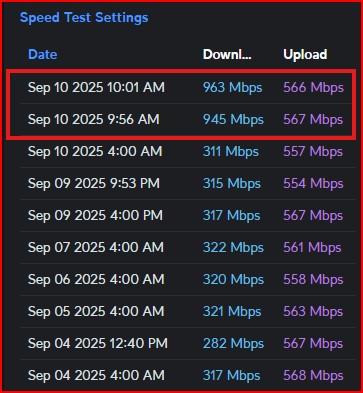
I have had a support call with 2 Degrees open for 4 weeks now on this exact matter. I also run a Unifi system here at home (Waikato). I noticed the drop in download speed to 300/500 on August 8th. Prior to this date was 900/500 and post 300/500.


2 Degrees havent done anything of significance with my support call up until yesterday.Every 3-4 days I had a new text message saying there is an update and to phone in and I get asked the same questions around:


  1. Do I use a VPN
  2. Can you confirm what spec ethernet cable you're using
  3. Are you hard wired into the router directly.


I have obliged and provided the answers each time, and submitted the required


  1. Speedtest results
  2. Orbi + UniOS Speedtests from the built in UI
  3. Linetest results
  4. Fast.com results


These results were on both their Orbi router (that they shipped me to test on) and my UniFi system. I am aware I am running a non-supported setup, hence there is no complaining from me on having to repeat tests with my Unifi system and then pluggin in their Orbi router to prove the issue exists on their supported hardware.


Yesterday, I was told there were some new ONT settings being pushed down to my ONT, unfortuantely this has not resolved the issue, and I still sit on 300/500.


@DumKopf - Happy to help here where I can. I suspect there several of us, not getting the speed throughput we're paying for, and also interesting it seems to be prominent in the Waikato region.


Linux
12173 posts

Uber Geek
+1 received by user: 8469

Trusted
Lifetime subscriber

  #3413117 10-Sep-2025 06:29
Send private message

@Cxf are you aware of any issues in the Waikato region?


Thanks


Cxf

Cxf
72 posts

Master Geek
+1 received by user: 52

2degrees

  #3413175 10-Sep-2025 08:04
Send private message

I'll dig into it further.


Gouda
17 posts

Geek
+1 received by user: 2


  #3413242 10-Sep-2025 08:48
Send private message

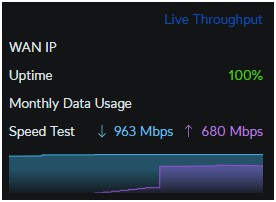
Appears to be fixed now! My connection dropped out at 8:30am this morning, this is the result I got when it came back up:


I would be interested to know what exactly the problem was, and why after a month of back and forth between multiple impacted customers and support staff it was miraculously resolved 9 hours after a post on Geekzone. 


muppet
2642 posts

Uber Geek
+1 received by user: 1660

Trusted

  #3413271 10-Sep-2025 09:54
Send private message

Gouda:


Why after a month of back and forth between multiple impacted customers and support staff it was miraculously resolved 9 hours after a post on Geekzone. 


Probably someone with clue read the thread.


Linux
12173 posts

Uber Geek
+1 received by user: 8469

Trusted
Lifetime subscriber

  #3413272 10-Sep-2025 10:01
Send private message

@DumKopf Look at the post by @Cxf this morning 8:04am they work for 2degrees that is why I tagged them into this thread


Shop now for Lenovo laptops and other devices (affiliate link).
Linux
12173 posts

Uber Geek
+1 received by user: 8469

Trusted
Lifetime subscriber

  #3413273 10-Sep-2025 10:02
Send private message

@bensmithnz Is your speed issue resolved now?


bensmithnz
26 posts

Geek
+1 received by user: 5

Trusted

  #3413274 10-Sep-2025 10:04
Send private message


Can also confirm that the issue has been resolved. For the unsung hero in this thread......reveal yourself :) 


DumKopf

75 posts

Master Geek
+1 received by user: 12


  #3413276 10-Sep-2025 10:06
Send private message

Omg it’s fixed for me!


Never got asked by CfX to move my router, restart, hold my hand on my head while balancing on one foot. Just fixed.


Thanks!!


bensmithnz
26 posts

Geek
+1 received by user: 5

Trusted

  #3413279 10-Sep-2025 10:10
Send private message

DumKopf:


Omg it’s fixed for me!


Never got asked by CfX to move my router, restart, hold my hand on my head while balancing on one foot. Just fixed.


Thanks!!


Yet again Geekzone to the rescue - glad it's resolved for us all. Props to you for also posting here as well, else we might all have been suffering in isolation.


richms
29098 posts

Uber Geek
+1 received by user: 10207

Trusted
Lifetime subscriber

  #3413285 10-Sep-2025 10:28
Send private message

Now get onto them for a credit for the month of substandard service that they provided. Good luck. 


Richard rich.ms


Shop on-line at New World now for your groceries (affiliate link).
DumKopf

75 posts

Master Geek
+1 received by user: 12


  #3413288 10-Sep-2025 10:32
Send private message

So glad there is still some life in 2Degrees, as usual it's the call center that is the ISP let down.


Took me talking to one other person, who shared the same issue to figure out there is an issue that must be quite widespread. How could this have been going on for months, for what seems like a pretty widespread customer issue as I quickly compiled 4 people within hours that were experiencing the same just through a public forum.


Instead of support, we ALL have experiences of talking to many representatives telling us all to restart devices. How was there no correlation made. It was obvious no one was reading through the thread I was presenting them with the same questions throughout one of them suggesting I "move my router". I realise they must get inundated with the same old "dumb" user issues. But there must be some escalation process.


I was already researching other ISPs as I knew I'd get shitty support, easier to switch to someone else than ringing them. But I'd been with 2degrees and Snap for over a decade, so I put an afternoon aside and ended up I sent 6 emails, had 2 phone calls, with 5 different support people to no avail. Surely it's better for them to work out the problem than have many people complaining about the same thing. Surely after asking for a linetest diagnostic and it showing clean upload with 77% datagram loss (!!) that something is wrong here and maybe we should escalate.


Thank you so much Cxf for being available, so odd that your info has to come from a public forum.


Here is the line test working properly for prosperity.


Starting Test: protocol: UDP, 1 streams, 8192 byte blocks, omitting 0 seconds, 10 second test


[ ID] Interval Transfer Bandwidth Jitter Lost/Total Datagrams


[ 2] 0.00-1.01 sec 2.94 MBytes 24.4 Mbits/sec 0.044 ms 0/376 (0%)


[ 2] 1.01-2.01 sec 0.00 Bytes 0.00 bits/sec 0.044 ms 0/0 (0%)


[ 2] 2.01-3.01 sec 0.00 Bytes 0.00 bits/sec 0.044 ms 0/0 (0%)


[ 2] 3.01-4.01 sec 0.00 Bytes 0.00 bits/sec 0.044 ms 0/0 (0%)


[ 2] 4.01-5.01 sec 0.00 Bytes 0.00 bits/sec 0.044 ms 0/0 (0%)


[ 2] 5.01-6.01 sec 0.00 Bytes 0.00 bits/sec 0.044 ms 0/0 (0%)


[ 2] 6.01-7.01 sec 0.00 Bytes 0.00 bits/sec 0.044 ms 0/0 (0%)


[ 2] 7.01-8.00 sec 0.00 Bytes 0.00 bits/sec 0.044 ms 0/0 (0%)


[ 2] 8.00-9.01 sec 0.00 Bytes 0.00 bits/sec 0.044 ms 0/0 (0%)


[ 2] 9.01-10.00 sec 0.00 Bytes 0.00 bits/sec 0.044 ms 0/0 (0%)


- - - - - - - - - - - - - - - - - - - - - - - - -


Test Complete. Summary Results:


[ ID] Interval Transfer Bandwidth Jitter Lost/Total Datagrams


[ 2] 0.00-10.00 sec 1.11 GBytes 951 Mbits/sec 0.044 ms 0/376 (0%)


[ 2] Sent 376 datagrams


CPU Utilization: local/receiver 0.5% (0.3%u/0.2%s), remote/sender 15.3% (1.9%u/13.4%s)

Cxf

Cxf
72 posts

Master Geek
+1 received by user: 52

2degrees

  #3413289 10-Sep-2025 10:34
Send private message

Thanks for sharing the historical speedtest result @bensmithnz that change in speed related to the catalyst of this issue, a planned firmware upgrade of our Hamilton BNG on 7th August.


The QoS profile was running an adaptation-rule, which was working fine prior to the upgrade. We've implemented a change to hard set the LFC's UFB product PIR/CIR as a fix/workaround this morning.


Glad to hear it's all working as normal again now.


Filter this topic showing only the reply marked as answer Create new topic


Geekzone Live »

Try automatic live updates from Geekzone directly in your browser, without refreshing the page, with Geekzone Live now.


Are you subscribed to our RSS feed? You can download the latest headlines and summaries from our stories directly to your computer or smartphone by using a feed reader.