Geekzone: technology news, blogs, forums
Guest
Welcome Guest.
You haven't logged in yet. If you don't have an account you can register now.


PhillyJ

8 posts

Wannabe Geek


#323448 3-Dec-2025 15:58
Send private message

Hi, 


I recently signed up to 4Gb Fibre with 2degree's. Everything turned up, ONT was changed and speed tested by the tech etc. I bought a TP-link 10Gb NIC from PB, installed, updated drivers etc, connected to the 2nd 10Gb port on the Router and only getting around 1800mb down and 530ish up. 


Logged in to the router to do a speed test, pretty much 4000mb down and up on the router. 


Looked at my network adapter config, changed that from auto-negotiate to 10Gb Full Duplex. Ran test - Even worse up and down 1600 and 260mb down.


Swapped out my Cat6A cable for a brand new one. Same results. Not expecting anything different thought i give CAT7 Cable a try, still same result, more than confident its not the cable as tested both between ONT and Router and 4000gb on tap!


I logged back into to the router to see if the individual LAN ports had any kind of config that maybe was set to 2.5gb and couldn't even find anything of much help at all with LAN Port settings, certainly no speed options like on the Network adapter in windows.


Im fairly sure i went through every single tab and menu option trying to find something obvious and nothing jumped out. I figured the NIC driver could be the issue and found an alternative driver that flashes the card as well, installed this and got marginal improvement when the NIC was set to auto negotiate speed but it still feels like the router is throttling the 2nd 10gb Ethernet port. I haven't tried a SFP+ so not sure but as far as i can tell, i should be getting my full 4000mb out of that port and at least 2500 up and down out of the 2.5gb ports, but im not. Even trying the LAN port on my Motherboard, playing around that that Im still not getting any faster up that 530mb -ish and locked down around 1000mb as expected,  so Im ruling out the new NIC is the problem. 


This has to be a router thing, anyone had this issue trying to get your bought and paid for 4Gb both ways ?


View this topic in a long page with up to 500 replies per page Create new topic
 1 | 2
nztim
4012 posts

Uber Geek
+1 received by user: 2710

ID Verified
Trusted
TEAMnetwork
Subscriber

  #3439873 3-Dec-2025 16:23
Send private message

My guess its Microsoft Windows bottleneck, get live Linux cd and run a speed test to see if things are any better


Any views expressed on these forums are my own and don't necessarily reflect those of my employer. 


PhillyJ

8 posts

Wannabe Geek


  #3440249 4-Dec-2025 17:09
Send private message

Great idea!  Thanks mate, I'll give it a try. 


Talkiet
4819 posts

Uber Geek
+1 received by user: 3934

Trusted

  #3440298 5-Dec-2025 00:01
Send private message

Do you have any packet inspection / live AV / etc features enabled on the router? Lots of routers are unable to get anywhere near line speed when you turn on features that push packets through the CPU.


Cheers - N


Please note all comments are from my own brain and don't necessarily represent the position or opinions of my employer, previous employers, colleagues, friends or pets.


richms
29097 posts

Uber Geek
+1 received by user: 10205

Trusted
Lifetime subscriber

  #3440300 5-Dec-2025 01:15
Send private message

Have you tried other PCIe slots to rule out a lane shortage affecting it? Some boards do goofy things with spreading out the meager amount that they have among slots and you can end up with something running on a single lane despite the slot being bigger depending what you have in m.2 slots and if you are using the sata ports.


Richard rich.ms

noroad
1025 posts

Uber Geek
+1 received by user: 675

Trusted

  #3440301 5-Dec-2025 05:57
Send private message

PhillyJ:


This has to be a router thing, anyone had this issue trying to get your bought and paid for 4Gb both ways ?


As someone who has spent a lot of time over several years doing HF speedtests I can almost guarantee the "issue" will be with the machine you are testing with. There are bottlenecks that people never knew existed on motherboards and o/s that are very difficult to overcome. You need at least pcie x4 gen 3 to feed a 10G nic. Machines that people think are super fast that won't ever achieve consistent tests above 2G are very common. It is also very common for 2.5/5G/10G cards/adapters to overheat and become unstable. Patch leads also become critical where as in the 2.5G and below world they matter a lot less. I have a dedicated machine with 10G fibre interfaces running linux that is the only one that I know consistently achieves the 4Gig+ speedtests on my home network.


yitz
2238 posts

Uber Geek
+1 received by user: 594


  #3440309 5-Dec-2025 08:31
Send private message

Bring back USB connection ports on routers 😂


Shop now for Dyson appliances (affiliate link).
cddt
1964 posts

Uber Geek
+1 received by user: 1903


  #3440318 5-Dec-2025 09:13
Send private message

noroad:


As someone who has spent a lot of time over several years doing HF speedtests I can almost guarantee the "issue" will be with the machine you are testing with. There are bottlenecks that people never knew existed on motherboards and o/s that are very difficult to overcome. You need at least pcie x4 gen 3 to feed a 10G nic. Machines that people think are super fast that won't ever achieve consistent tests above 2G are very common. It is also very common for 2.5/5G/10G cards/adapters to overheat and become unstable. Patch leads also become critical where as in the 2.5G and below world they matter a lot less. I have a dedicated machine with 10G fibre interfaces running linux that is the only one that I know consistently achieves the 4Gig+ speedtests on my home network.


In the past I've also seen consistently different results on the same machine, same OS, from different browsers (if a browser-based test is used). 


My referral links: BigPipeMercury


MaxineN
Max
2049 posts

Uber Geek
+1 received by user: 1662

ID Verified
Trusted
Subscriber

  #3440319 5-Dec-2025 09:18
Send private message

cddt:


noroad:


As someone who has spent a lot of time over several years doing HF speedtests I can almost guarantee the "issue" will be with the machine you are testing with. There are bottlenecks that people never knew existed on motherboards and o/s that are very difficult to overcome. You need at least pcie x4 gen 3 to feed a 10G nic. Machines that people think are super fast that won't ever achieve consistent tests above 2G are very common. It is also very common for 2.5/5G/10G cards/adapters to overheat and become unstable. Patch leads also become critical where as in the 2.5G and below world they matter a lot less. I have a dedicated machine with 10G fibre interfaces running linux that is the only one that I know consistently achieves the 4Gig+ speedtests on my home network.


In the past I've also seen consistently different results on the same machine, same OS, from different browsers (if a browser-based test is used). 


It's why you should always use the windows application. It's consistently consistent.


If you're on Linux or Mac the speedtest-cli is just as good.


I would not be surprised if there is some TCP tuning issue on OPs machine or a limitation of the testing methodology.


Ramblings from a mysterious lady who's into tech. Warning I may often create zingers.


noroad
1025 posts

Uber Geek
+1 received by user: 675

Trusted

  #3440325 5-Dec-2025 10:00
Send private message

yitz:


Bring back USB connection ports on routers 😂


That would do the opposite of solve the consistency and performance issue


xpd

xpd
Geek of Coastguard
14115 posts

Uber Geek
+1 received by user: 4574

Retired Mod
ID Verified
Trusted
Lifetime subscriber

  #3440327 5-Dec-2025 10:04
Send private message


XPD / Gavin


LinkTree


yitz
2238 posts

Uber Geek
+1 received by user: 594


  #3440428 5-Dec-2025 14:23
Send private message

xpd:


Very efficient because they went straight from Windows TCP/IP stack to driver ATM encapsulation - no 10/100 BASE-T in between.


Anyway... back to the OP and testing of OS environments.


Shop now on AliExpress (affiliate link).
WanaGo
153 posts

Master Geek
+1 received by user: 7


  #3440494 5-Dec-2025 17:00
Send private message

I got Hyperfibre2 a couple of years ago when it first came out, and also got a 10GBE NIC from PBTech to support the 10GBE LAN.


Was no end of troubles, and it turned out to be the drivers for the NIC, and the crappy Chipset. It was an Asus flavour, not the TP-Link one you went with, but potentially the same driver, I dont remember now.


I ended up returning it, and got a better 10GBE NIC off Amazon, and its been flawless.


I do recall there being something about the Auto-Speed, and fixing it to 10GBE instead of letting it figure it out, did help. I am using CAT 7 cables, so it wasnt a cable issue, it was all about the driver and the chipset.


Might not be the issue for you, but just wanted to share.


WanaGo


PhillyJ

8 posts

Wannabe Geek


  #3440703 6-Dec-2025 13:54
Send private message

WanaGo:


I got Hyperfibre2 a couple of years ago when it first came out, and also got a 10GBE NIC from PBTech to support the 10GBE LAN.


Was no end of troubles, and it turned out to be the drivers for the NIC, and the crappy Chipset. It was an Asus flavour, not the TP-Link one you went with, but potentially the same driver, I dont remember now.


I ended up returning it, and got a better 10GBE NIC off Amazon, and its been flawless.


I do recall there being something about the Auto-Speed, and fixing it to 10GBE instead of letting it figure it out, did help. I am using CAT 7 cables, so it wasnt a cable issue, it was all about the driver and the chipset.


Might not be the issue for you, but just wanted to share.


Thanks, mate! What NIC specifically did you end up buying ? 


PhillyJ

8 posts

Wannabe Geek


  #3440704 6-Dec-2025 14:00
Send private message

nztim:


My guess its Microsoft Windows bottleneck, get live Linux cd and run a speed test to see if things are any better


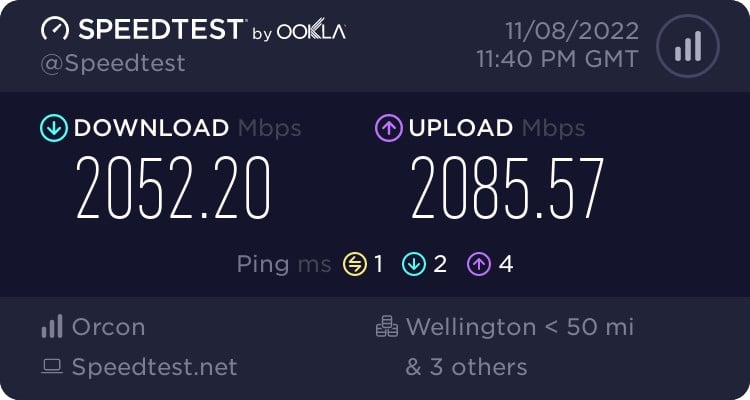
So just did this and got around 2000mb up and down, but not my wanted 4kmb.......


Mehrts
1112 posts

Uber Geek
+1 received by user: 984

Trusted

  #3440706 6-Dec-2025 14:19
Send private message

PhillyJ:


...but not my wanted 4kmb.......


Kilomegabits 😅


Gb is a better unit.


 1 | 2
View this topic in a long page with up to 500 replies per page Create new topic


Geekzone Live »

Try automatic live updates from Geekzone directly in your browser, without refreshing the page, with Geekzone Live now.


Are you subscribed to our RSS feed? You can download the latest headlines and summaries from our stories directly to your computer or smartphone by using a feed reader.