Geekzone: technology news, blogs, forums
Guest
Welcome Guest.
You haven't logged in yet. If you don't have an account you can register now.


JaseNZ

2576 posts

Uber Geek
+1 received by user: 1489

ID Verified
Lifetime subscriber

#190862 14-Jan-2016 17:33
Send private message

I know this is another thread about somebody leaving sky however I have not seen anything that has been put together in a thread with some decent options in moving on.

I have been with them for a good ten years but enough is enough. Same stuff over and over and now there are better options out there for far less money.

I currently have sports but not to worried about loosing it as I only really use it to watch the V8's and Indy Cars.

Two of the main things I need to know are.

1. Which is the best free view decoder/recorder I should be looking at.
2. What would be the best streaming box that has Netflix as well as Lightbox etc.

Everything would be run through a AV Denon unit into my Panasonic 55" Plasma.


Thats about everything I can think of at the moment.


Ding Ding Ding Ding Ding : Ice cream man , Ice cream man


View this topic in a long page with up to 500 replies per page Create new topic
 1 | 2 | 3 | 4 | 5 | 6
Jase2985
13730 posts

Uber Geek
+1 received by user: 6202

ID Verified
Lifetime subscriber

  #1471232 14-Jan-2016 18:40
Send private message

I brought the T2200 to replace MySky

my sky term finishes in about a weeks time


ObidiahSlope
260 posts

Ultimate Geek
+1 received by user: 66


  #1471238 14-Jan-2016 18:47
Send private message

Freeview terrestrial is better than satellite.

You need to find out if you are in a terrestrial coverage area.

http://www.freeviewnz.tv/get-freeview/get-freeview/

If you are you will need a UHF aerial. I recommend you use RG6 cable between the aerial and your gear


Obsequious hypocrite

NonprayingMantis
6434 posts

Uber Geek
+1 received by user: 1528


  #1471240 14-Jan-2016 18:51
Send private message

For Netflix plus lightbox, best bet is probably a chromecast.

It's also excellent for lots of other things, like YouTube.


JimmyH
2898 posts

Uber Geek
+1 received by user: 1554


  #1471245 14-Jan-2016 19:05
Send private message

Mspec:

1. Which is the best free view decoder/recorder I should be looking at.


Depends what you want to do, whether you are in a Freeview UHF coverage area or need to go satellite, and what your budget is.

If you are in a UHF area, I am a big fan of the Panasonic DVD recorders. Twin tuner, adequate hard drive (500gb), good remote and good picture. Plus it's DLNA capable, so you can view recorded content across a network in another room (say on a media player or another Panasonic in the bedroom), and you can burn material to DVD-R or DVD-RW to free up space on the machine, to keep or to view elsewhere (but only after downscaling to standard definition).

Satellite, I'm afraid I don't know much about.


2. What would be the best streaming box that has Netflix as well as Lightbox etc.


A laptop with an HDMI out will do this, if you have one. Otherwise a Chromecast, a small form factor PC (I got a BeeBox from PB Tech for $364 incl an SSD and Windows 10 in their black Friday sales), and (I understand) a PS3 are all good options.

Again, depends on budget, and whether you have a wired network to the TV etc.

Edit: messed up formatting

JaseNZ

2576 posts

Uber Geek
+1 received by user: 1489

ID Verified
Lifetime subscriber

  #1471258 14-Jan-2016 19:13
Send private message

I do have a htpc setup which has plenty of grunt with an i5 in it. I just tried the netflix app (from windows app store) but it just keeps crashing.

All of our media center is hard wired.

Chromecast looks promising.


Ding Ding Ding Ding Ding : Ice cream man , Ice cream man


davidcole
6099 posts

Uber Geek
+1 received by user: 1465

Trusted

  #1471338 14-Jan-2016 21:08
Send private message

Mspec: I do have a htpc setup which has plenty of grunt with an i5 in it. I just tried the netflix app (from windows app store) but it just keeps crashing.

All of our media center is hard wired.

Chromecast looks promising.


Chromecast is cheap but if you like remotes it might annoy. Or if in a family situation and take your phone with you to work..

I see recommendations for Samsung smart blue ray players. Probably around $200.


Previously known as psycik

Home Assistant: Gigabyte AMD A8 Brix, Home Assistant with Aeotech ZWave Controller, Raspberry PI, Wemos D1 Mini, Zwave, Shelly Humidity and Temperature sensors
Media:Chromecast v2, ATV4 4k, ATV4, HDHomeRun Dual
Server
Host Plex Server 3x3TB, 4x4TB using MergerFS, Samsung 850 evo 512 GB SSD, Proxmox Server with 1xW10, 2xUbuntu 22.04 LTS, Backblaze Backups, usenetprime.com fastmail.com Sharesies Trakt.TV Sharesight 


Shop now for Dell laptops and other devices (affiliate link).
Dunnersfella
4100 posts

Uber Geek
+1 received by user: 887


  #1471342 14-Jan-2016 21:16
Send private message

Blu-ray players, TV's, 'smart boxes' and consoles give reliable high definition results.
When Netflix connects to a laptop or PC it doesn't automatically know what resolution the computer is capable of, so often it won't offer the quality of a blu-ray player, TV etc etc.
I've got an Apple TV 3, PS3, XBox One, MacMini and 1 x plasma that get Netflix, and to be fair the ones I never use are the TV and MacMini.

bigwolfoncampus
60 posts

Master Geek
+1 received by user: 4
Inactive user


  #1471471 15-Jan-2016 00:03
Send private message

i use a mini android hdmi stick cost me 30nzd free shipping hooked up to my tv you will need asdl2 or faster internet i have installed 2 apps and can watch 100's of tv channels from all over the world free right now im watching the usa channel fxx

Yabanize
2351 posts

Uber Geek
+1 received by user: 583


  #1471473 15-Jan-2016 00:18
Send private message

The DishTV AerialBox T2200 as someone mentioned above is a 1TB Freeview PVR, With FreeviewPlus capability which means it can connect to your WiFi or LAN and be able to watch TVNZ and TV3 On Demand in addition to Live and Recorded content. It's RRP is $449

+1 for Chromecast, there are many services that work with it. It has no remote however, you play and control it using an android or iPhone.


Otherwise, Xbox or Playstation?

MediaLight
50 posts

Geek
+1 received by user: 6


  #1471475 15-Jan-2016 02:14
Send private message

i quite like Igloo now i know that you hate repeats and igloo is pretty much that, However!

It does give you the option to pay per view live sports! it also has PVR( Pause Video Record)

In regards to netflix streaming box probably chromecast or firestick


I.T Support | Cloud Hosted Exchange | Online Backups | Co Location | Hosting


Mavarick
213 posts

Master Geek
+1 received by user: 10


  #1471588 15-Jan-2016 08:53
Send private message

There are some neat sat/ terr decoders outta europe, the Vu Duo2 can receive both Sat and Ter with an exta tuner its a linux bassed system with alot of back up, can have internal HDD and can record and view more that Sky depending on the Mux, prime and Ch 9 in Aus are the odd ones out for this


Shop now on AliExpress (affiliate link).
timbosan
2199 posts

Uber Geek
+1 received by user: 294

Subscriber

  #1471615 15-Jan-2016 09:18
Send private message

MediaLight: i quite like Igloo now i know that you hate repeats and igloo is pretty much that, However!

It does give you the option to pay per view live sports! it also has PVR( Pause Video Record)

In regards to netflix streaming box probably chromecast or firestick


Just to be clear, the Igloo boxes are NOT capable of acting as a PVR (which stands for Personal Video Recorder) as they have no ability to record.  They can however pause live TV if you use a USB stick/HDD.

timbosan
2199 posts

Uber Geek
+1 received by user: 294

Subscriber

  #1471627 15-Jan-2016 09:30
Send private message

 
2. What would be the best streaming box that has Netflix as well as Lightbox etc.


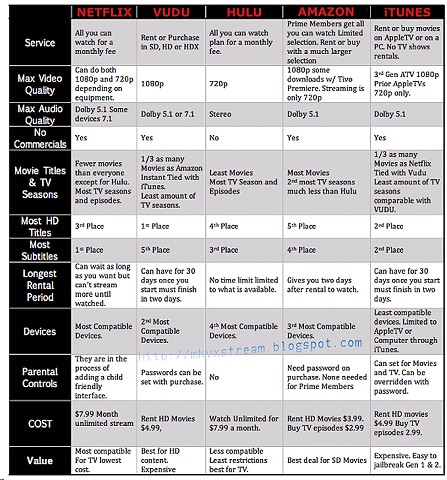
Just to clarify - do you want just Netflix, or other streaming services? Netflix has the most TV content, but not much in the way of movies.  If you want movies, look at Vudu, but that may change your decision on a streaming box.

Here is useful chart I found about online content:


Personally I would utilize the HTPC you already have and load Kodi onto it, then use PlayOn to stream services via Kodi - http://mymediaexperience.com/integrate-netflix-and-hulu-into-xbmc/ Plus you have the best experience if you have any local media, which Apple TV, AFTV etc, don't always give (yes Kodi can run on them but they are either underpowered or have problems with audio, like DTS, 5.1 decoding etc).

For Live TV, rather than get another box, get a HDHomeRun and use Kodi for that too.  If you want to record shows, you can load up TVHeadEnd etc. and integrate that with Kodi too.

Finally, look at using Kodi with FTV (a Kodi add-in) that lets you watch shows from the UK and USA (UK works great, US needs registration for the add-in to work) - https://seo-michael.co.uk/tutorial-how-to-install-setup-ftv-guide-kodi-xbmc/

I
 have tried most of the above, only limitations I have found using Kodi is that streaming from Netflix via Playon limits you to 720p.  If you want 1080p or 4K you have to use either Windows apps, or the web browser.

butlerboy
457 posts

Ultimate Geek
+1 received by user: 53


  #1471762 15-Jan-2016 11:11
Send private message

Mspec: 1. Which is the best free view decoder/recorder I should be looking at.

I'd go for the DishTv T2200 if you can get Freeview UHF reception.


Mspec: 2. What would be the best streaming box that has Netflix as well as Lightbox etc.

I have a Samsung bluray player that has Netflix/Lightbox/TVNZ Ondemand/3Now apps and it works really well. Even TVNZ and 3Now look pretty good, a lot better than when I was using my laptop at any rate.

afe66
3181 posts

Uber Geek
+1 received by user: 1678

Lifetime subscriber

  #1471824 15-Jan-2016 11:53
Send private message

Something is wrong with your pc if Netflix keeps crashing.

I've run the a Netflix app on w8.1 i5 NUC for several years seamlessly.

A.


 1 | 2 | 3 | 4 | 5 | 6
View this topic in a long page with up to 500 replies per page Create new topic


Geekzone Live »

Try automatic live updates from Geekzone directly in your browser, without refreshing the page, with Geekzone Live now.


Are you subscribed to our RSS feed? You can download the latest headlines and summaries from our stories directly to your computer or smartphone by using a feed reader.