Geekzone: technology news, blogs, forums
Guest
Welcome Guest.
You haven't logged in yet. If you don't have an account you can register now.


SheriffNZ

677 posts

Ultimate Geek
+1 received by user: 322


#240661 19-Sep-2018 11:43
Send private message

Hi all


I own a domain name through Metaname and given the amount of spam I’m getting through my current old xtra account, I’m finally biting the bullet and I have signed up for a GSuite account so I can use my domain as my primary email address going forward.


The Gsuite walkthrough asks me to add the MX records to my domains control panel. I’m having a bit of trouble actually finding the control panel, or something that looks applicable on the Metaname website. I emailed Metaname over the weekend and rang them on Monday but to date, I haven’t heard from them.


Are any of you learned people able to help me with this?


Thanks very much.


View this topic in a long page with up to 500 replies per page Create new topic

This is a filtered page: currently showing replies marked as answers. Click here to see full discussion.

michaelmurfy
meow
13579 posts

Uber Geek
+1 received by user: 10910

Moderator
ID Verified
Trusted
Lifetime subscriber

  #2093086 19-Sep-2018 12:10
Send private message

The control panel is in your domain management under DNS:


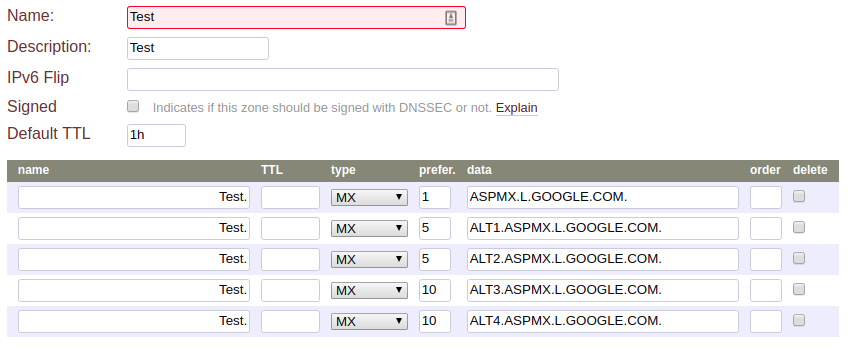
Essentially you're wanting to click on "Managed DNS" and do the following:


Note - in my case I don't use Metaname DNS so it'll look a bit different for you. In the "name" field put a @ and it'll populate your domain name. There are other records to add (such as a cname so you can go to "mail.domain.com") as well as mail security (SPF TXT record, DMARC etc) which is essential. It is pretty straight forward to do DNS management.


Also - for the mx records and CNAME records it is important to finish the domain with a full-stop like I have done above.


Michael Murphy | https://murfy.nz
Referral Links: Quic Broadband (use R122101E7CV7Q for free setup)

Are you happy with what you get from Geekzone? Please consider supporting us by subscribing.
Opinions are my own and not the views of my employer.


View this topic in a long page with up to 500 replies per page Create new topic


Geekzone Live »

Try automatic live updates from Geekzone directly in your browser, without refreshing the page, with Geekzone Live now.


Are you subscribed to our RSS feed? You can download the latest headlines and summaries from our stories directly to your computer or smartphone by using a feed reader.