Geekzone: technology news, blogs, forums
Guest
Welcome Guest.
You haven't logged in yet. If you don't have an account you can register now.


gzt

gzt

18672 posts

Uber Geek
+1 received by user: 7809

Lifetime subscriber

#143781 26-Apr-2014 22:24
Send private message

I signed into an account with google docs and was prompted to send a verification code to my mobile. I did this time. But also there is a 'skip' function which I often use, and I can access the account after using this anyway. What benefit does it provide if it can be skipped?

Create new topic
Dynamic
4015 posts

Uber Geek
+1 received by user: 1851

ID Verified
Trusted
Lifetime subscriber

  #1031835 26-Apr-2014 22:52
Send private message

It may be just for password recovery purposes.  If your gmail account is locked out, and you don;t have access to the 'backup' email account you specified years ago when setting up the gmail address, how do you set a new password or receive a temporary one?  How about to a kn own and recently tested cellphone number...?  :)


“Don't believe anything you read on the net. Except this. Well, including this, I suppose.” Douglas Adams


gzt

gzt

18672 posts

Uber Geek
+1 received by user: 7809

Lifetime subscriber

  #1031836 26-Apr-2014 22:58
Send private message

That makes sense. It is not clear the prompt is to verify the number, it is presented as a security question. But that must be it.

freitasm
BDFL - Memuneh
80646 posts

Uber Geek
+1 received by user: 41029

Administrator
ID Verified
Trusted
Geekzone
Lifetime subscriber

  #1031849 27-Apr-2014 00:50
Send private message

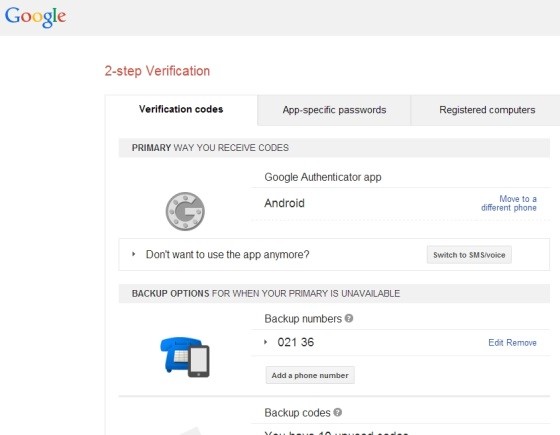
It is for recovery only. If you want better security then go to accounts and enabled Authenticator (2FA). You will also get a table with one time codes that can be used in case your smartphone disappears/lost/no battery.

Twitter can use the mobile for 2FA (you get a SMS whenever you login). Facebook can use either or both the SMS and 2FA. There was a recent discussion where people posted which services they have 2FA enabled.


Referral links: Quic Broadband (free setup code: R587125ERQ6VE) | Samsung | AliExpress | Wise | Sharesies 


Support Geekzone by subscribing (browse ads-free), or making a one-off or recurring donation through PressPatron.



gzt

gzt

18672 posts

Uber Geek
+1 received by user: 7809

Lifetime subscriber

  #1031895 27-Apr-2014 10:11
Send private message

Yep. Known. Unfortunately the only 2nd factor offered by Google is sms.

freitasm
BDFL - Memuneh
80646 posts

Uber Geek
+1 received by user: 41029

Administrator
ID Verified
Trusted
Geekzone
Lifetime subscriber

  #1031911 27-Apr-2014 10:15
Send private message

Actually Google offers Authenticator (an app that runs on Android, iOS, Windows Phone). SMS is not the 2FA, but a backup option.


Referral links: Quic Broadband (free setup code: R587125ERQ6VE) | Samsung | AliExpress | Wise | Sharesies 


Support Geekzone by subscribing (browse ads-free), or making a one-off or recurring donation through PressPatron.


gzt

gzt

18672 posts

Uber Geek
+1 received by user: 7809

Lifetime subscriber

  #1032257 27-Apr-2014 22:20
Send private message

Hmm. I may have been ignoring it due to not having mobile reception all the time. I see also there are some preallocated 2fa codes I can use. This is good.


Shop now on Samsung phones, tablets, TVs and more (affiliate link).
freitasm
BDFL - Memuneh
80646 posts

Uber Geek
+1 received by user: 41029

Administrator
ID Verified
Trusted
Geekzone
Lifetime subscriber

  #1032259 27-Apr-2014 22:26
Send private message

Google Authenticator does not need any data connection. The number is generated on your device based on a key exchanged when you register it.


Referral links: Quic Broadband (free setup code: R587125ERQ6VE) | Samsung | AliExpress | Wise | Sharesies 


Support Geekzone by subscribing (browse ads-free), or making a one-off or recurring donation through PressPatron.


gzt

gzt

18672 posts

Uber Geek
+1 received by user: 7809

Lifetime subscriber

  #1032262 27-Apr-2014 22:32
Send private message

But this is better! : ).

Create new topic


Geekzone Live »

Try automatic live updates from Geekzone directly in your browser, without refreshing the page, with Geekzone Live now.


Are you subscribed to our RSS feed? You can download the latest headlines and summaries from our stories directly to your computer or smartphone by using a feed reader.