Geekzone: technology news, blogs, forums
Guest
Welcome Guest.
You haven't logged in yet. If you don't have an account you can register now.


Paul1977

5171 posts

Uber Geek
+1 received by user: 2192


#288586 10-Jul-2021 16:17
Send private message

Moving from a fully on premises system to 365 with Hybrid Azure AD. Am doing this as an entirely new internal domain. Haven't used Azure AD Connect before and am hitting a roadblock.


  • External domain: domainname.co.nz
  • Internal domain: ad.domainname.co.nz
  • Have registered domainname.co.nz in 365
  • Haven't changed the MX records for the domain as I'm not ready to cut the mail flow over yet.
  • Azure AD admin center lists domainname.co.nz as the primary domain.

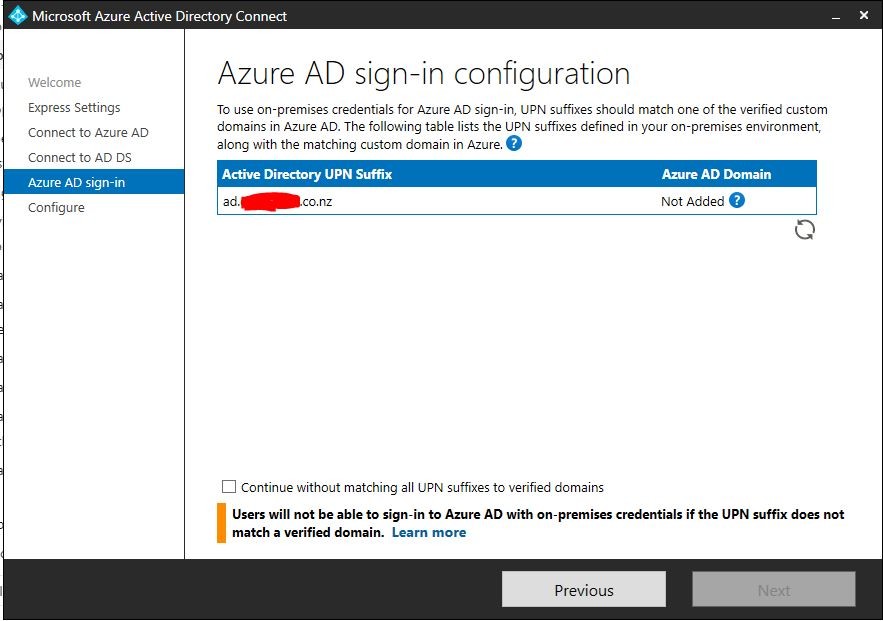
When I attempt to run the Azure AD Connect on a member server I get the below error. Is this because I created the internal domain as a subdomain, or is it because 365 isn't showing the domain as "healthy" (since I haven't updated the MX records)?


Thanks


 Home:                                                           Work:
Home Work


Create new topic
clinty
1201 posts

Uber Geek
+1 received by user: 402

Lifetime subscriber

  #2742187 10-Jul-2021 16:41
Send private message

I'm thinking, based on the warning, it needs to match completely ie ad.domainname.co.nz needs to be verified in 365 as well to match up


or you need to match the two somewhere else prior to joining the member server


But not my area of expertise


Clint


gjm

gjm
810 posts

Ultimate Geek
+1 received by user: 122


  #2742221 10-Jul-2021 17:29
Send private message

it looks like you haven't verified the domain name in Azure which involves adding some .txt records at your registrar. Give it a google, Im sure there are plenty of instructions out there


Do surveys for Beer money (referral link) - Octopus Group 


Link for buying beer (not affiliated, just like beer) - Good George


Kraven
738 posts

Ultimate Geek
+1 received by user: 190


  #2742231 10-Jul-2021 17:58
Send private message

Change the usernames on your on-prem domain to @domainname.co.nz.


You'll need to add the UPN suffix to your on-prem domain and then change all of your users, either in ADUC or using powershell.


Info here:


https://docs.microsoft.com/en-us/microsoft-365/enterprise/prepare-a-non-routable-domain-for-directory-synchronization?view=o365-worldwide


Paul1977

5171 posts

Uber Geek
+1 received by user: 2192


  #2742246 10-Jul-2021 18:46
Send private message

gjm:


it looks like you haven't verified the domain name in Azure which involves adding some .txt records at your registrar. Give it a google, Im sure there are plenty of instructions out there


It’s verified with the appropriate txt record, just haven’t changed the mx records yet. 


Paul1977

5171 posts

Uber Geek
+1 received by user: 2192


  #2742251 10-Jul-2021 18:54
Send private message

Kraven:


Change the usernames on your on-prem domain to @domainname.co.nz.


You'll need to add the UPN suffix to your on-prem domain and then change all of your users, either in ADUC or using powershell.


Info here:


https://docs.microsoft.com/en-us/microsoft-365/enterprise/prepare-a-non-routable-domain-for-directory-synchronization?view=o365-worldwide


Thanks @Kraven I’ll have a look at that.


Is making the internal domain a subdomain of the external domain, as I have, best practice in this scenario?


What I’m reading suggests it is. From what I can tell .local internal domain names aren’t the best idea, and that you generally shouldn’t have the internal domain exactly matching the external one.


I’m at a point in the setup where changing the internal domain name would be easy - just roll back a snapshot and do it again with a different name. Probably 30 minutes work. 


EDIT: Typos


Andib
1395 posts

Uber Geek
+1 received by user: 974

ID Verified
Trusted

  #2742257 10-Jul-2021 19:10
Send private message

The internal domain name doesn't really matter. What does is that the users UPNs match their email addresses as this is what AzureAD uses as their user name.


Having domain.local for on prem ad is fine as long as the users on pre. UPN is a valid domain (usually matching their email address)


<# 
       .DISCLAIMER
       Anything I post is my own and not the views of my past/present/future employer.
#>


Shop on-line at New World now for your groceries (affiliate link).
mrdrifter
589 posts

Ultimate Geek
+1 received by user: 294

ID Verified
Trusted

  #2742271 10-Jul-2021 20:33
Send private message

Andib: The internal domain name doesn't really matter. What does is that the users UPNs match their email addresses as this is what AzureAD uses as their user name.


Having domain.local for on prem ad is fine as long as the users on pre. UPN is a valid domain (usually matching their email address)


This and what Kraven described should fix the issue.


In my experience having your internal and external domain different shouldn't impact AD Connect as long as the UPN still matches the external domain that you are registering in Azure AD. It comes down to the users being able to be matched correctly.


Having ad.domain.com was seen as a 'best practice' (not always a fan of the term) for quite a while and I can see why it was set up that way in on-premises scenarios years back, but over the last few(~10 yrs) years it's really just caused more headaches than anything as people move to Public Cloud, especially when some traditional Infra Architect decides to try replicate traditional IaaS in Public Cloud.


'Best practice' from Microsoft now is to have everything on your public domain and as much as possible move to a zero-trust model. - This is based on being in a session with them and a large client only last week discussing this topic. You can still add subdomains into Azure AD Domain Services if you need to though (IIRC you can have something like 900 subdomains), so migrating servers that were set up this way is still possible.


Paul1977

5171 posts

Uber Geek
+1 received by user: 2192


  #2742337 11-Jul-2021 09:12
Send private message

mrdrifter:


This and what Kraven described should fix the issue.


In my experience having your internal and external domain different shouldn't impact AD Connect as long as the UPN still matches the external domain that you are registering in Azure AD. It comes down to the users being able to be matched correctly.


Having ad.domain.com was seen as a 'best practice' (not always a fan of the term) for quite a while and I can see why it was set up that way in on-premises scenarios years back, but over the last few(~10 yrs) years it's really just caused more headaches than anything as people move to Public Cloud, especially when some traditional Infra Architect decides to try replicate traditional IaaS in Public Cloud.


'Best practice' from Microsoft now is to have everything on your public domain and as much as possible move to a zero-trust model. - This is based on being in a session with them and a large client only last week discussing this topic. You can still add subdomains into Azure AD Domain Services if you need to though (IIRC you can have something like 900 subdomains), so migrating servers that were set up this way is still possible.


@mrdrifter Thanks for that. I’m still reading a lot of things dated quite recently (within last 18 months) saying to use ad.domain.com, and to not match the external domain.com, but nothing official from Microsoft with a recent date.

But your saying that if starting from scratch (which I’m easily able to do) I should just create the internal domain as domain.com so it matches the external Azure registered domain and be done with it?


I don’t suppose you could point me to something recent from Microsoft regarding this, particularly any downsides? Other than split DNS (which doesn’t seem like a big issue to me) can it cause any problems?


jaymz
1136 posts

Uber Geek
+1 received by user: 76


  #2743196 12-Jul-2021 15:47
Send private message

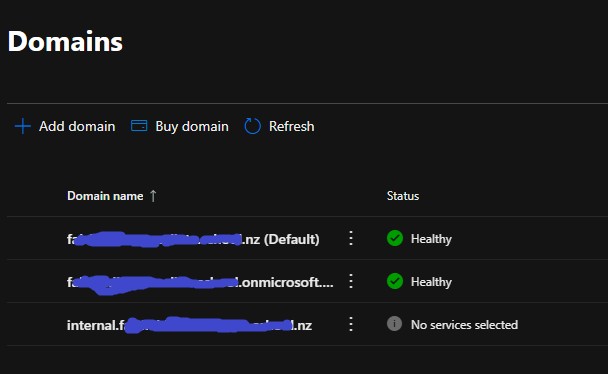
This error is caused by the Azure AD Connect wizard being unable to match your on premise UPN to one located in your Microsoft365 tenant.


For reference, this is how it should end up looking like for a similar setup to yours.


FYI, you dont need to add any DNS records, simply skip through the wizard and it will end up with "No services added" as the status.


mrdrifter
589 posts

Ultimate Geek
+1 received by user: 294

ID Verified
Trusted

  #2743502 13-Jul-2021 09:33
Send private message

Paul1977:


mrdrifter Thanks for that. I’m still reading a lot of things dated quite recently (within last 18 months) saying to use ad.domain.com, and to not match the external domain.com, but nothing official from Microsoft with a recent date.


But your saying that if starting from scratch (which I’m easily able to do) I should just create the internal domain as domain.com so it matches the external Azure registered domain and be done with it?


I don’t suppose you could point me to something recent from Microsoft regarding this, particularly any downsides? Other than split DNS (which doesn’t seem like a big issue to me) can it cause any problems?


That's the fun thing with Microsoft, much like the Enterprise Landing Zone Reference Architecture, one person within Microsoft publishes something, but not all of them agree with it, or at least with parts of it. Much like any framework, you need to take parts that work for your specific scenario. Many of the articles will says how to do something as MS need to cater for so many different approaches and scenarios, but they won't say one thing or another is 'the way to do it' unless they have been in an assessed your specific scenario.


I would say of the last 20 clients I've worked with only 3 are using a separate ad.domain.com type setup and these are only for their IaaS workloads. This has been driven by existing configurations for on-prem such as splitting out VM's, Users, and DaaS/Citrix/Virtual Desktop. This has also had the joy of causing fun with split DNS which just gets worse when trying to design and manage in a hybrid cloud model, split DNS never seems like a big deal when setting it up the first time, but trying to back things out later on, has caused pain for every client I've ever worked with that has used it.


For most of these scenarios, we have kept the VM's on the matching domain/subdomain either with an Azure hosted DC(s) (via trust relationship) or using AAD DS (natively a subdomain of the external domain) - rather than reconfiguring each individual server and having to re-join to a 'new' domain (end goal is usually to refactor these applications to cloud native). Users we are typically mapping to directly to AAD with their UPN being their email address (particularly fun when they are currently name @ local or some rubbish). A few clients are now moving away from ageing hosted Desktop as a Service offerings to Windows Virtual Desktop - typically when the organisation hasn't yet moved their users to a laptop, or they have some other requirement.


Create new topic


Geekzone Live »

Try automatic live updates from Geekzone directly in your browser, without refreshing the page, with Geekzone Live now.


Are you subscribed to our RSS feed? You can download the latest headlines and summaries from our stories directly to your computer or smartphone by using a feed reader.