Geekzone: technology news, blogs, forums
Guest
Welcome Guest.
You haven't logged in yet. If you don't have an account you can register now.


lchiu7

6521 posts

Uber Geek
+1 received by user: 543

Trusted

#181371 13-Oct-2015 08:52
Send private message

Coincidentally yesterday I decided to flash Marshmallow on my Nexus 7 (2013) from the Google images.

Since the device already had an unlocked bootloader, it wasn't too hard. In fact the hardest part was getting ADB drivers for Windows 10 since while the N7 showed up as a device for media, ADB could not see it. In the end I had to find a different set of ADB drivers for Windows 10.

Then this morning I received the popup notification that Marshmallow was available on my N5 (bought in Australia) and since it had gone okay on the N7 I agreed and 45 minutes later it's up and running. This is my second (the first being the N7) experience of this release so I can't comment much but on the surface it looks pretty similar to Lollipop. But what I am hoping for is the apparent increase in battery life through smarter power management etc, things that plague me on the N5.




Staying in Wellington. Check out my AirBnB in the Wellington CBD.  https://www.airbnb.co.nz/h/wellycbd  PM me and mention GZ to get a 15% discount and no AirBnB charges.


Create new topic
reven
3748 posts

Uber Geek
+1 received by user: 874

Trusted

  #1404787 13-Oct-2015 09:03
Send private message

Me too, I've always been what seems like the last to receive an OTA update, but Android marshmellow just was pushed and successfully installed on my Nexus5.  Hoping better battery life is as good as its advertised, but I doubt it.


ilovemusic
1469 posts

Uber Geek
+1 received by user: 307


  #1404789 13-Oct-2015 09:04
Send private message

updating n5 now...

lchiu7

6521 posts

Uber Geek
+1 received by user: 543

Trusted

  #1404792 13-Oct-2015 09:06
Send private message

Seem to be hitting NZ earlier :-)  I can't work out the battery optimization screen. It shows Google Play services greyed out under No optimized but when I choose All apps, then the screen shows all my apps Optimzing battery use. Does that mean they weren't before?

[UPDATE]

OK - I get it now. It's a screen that allows you to set what you want each app's optimization strategy to be. And the default is on for all app apart from Play Services


Staying in Wellington. Check out my AirBnB in the Wellington CBD.  https://www.airbnb.co.nz/h/wellycbd  PM me and mention GZ to get a 15% discount and no AirBnB charges.


Zippity
683 posts

Ultimate Geek
+1 received by user: 132


  #1404802 13-Oct-2015 09:20
Send private message

Currently upgrading my N5 :)

Back of case got quite warm........

JamesL
956 posts

Ultimate Geek
+1 received by user: 342
Inactive user


  #1404829 13-Oct-2015 10:16
Send private message

My wife received the OTA update this morning, was quite surprised.

Its my old N5 which always seemed like last in the world to get an OTA.

nzkiwiman
2585 posts

Uber Geek
+1 received by user: 390

Subscriber

  #1404971 13-Oct-2015 12:26
Send private message

I am jealous :-)


Move to New Zealand's best fibre broadband service (affiliate link). Free setup code: R587125ERQ6VE. Note that to use Quic Broadband you must be comfortable with configuring your own router.
BigMal
998 posts

Ultimate Geek
+1 received by user: 160

ID Verified
Trusted

  #1405018 13-Oct-2015 13:48
Send private message

I manually updated mine the moment it came out because I'm impatient.

The changes to battery life are brilliant IMO.

lchiu7

6521 posts

Uber Geek
+1 received by user: 543

Trusted

  #1405045 13-Oct-2015 14:37
Send private message

BigMal: I manually updated mine the moment it came out because I'm impatient.

The changes to battery life are brilliant IMO.


I was happy to manually upgrade my N7 since it's not my main device but since my N5 is my daily device, I preferred to let Google do it. That worked well and hopefully the battery life will improve as you say.


Staying in Wellington. Check out my AirBnB in the Wellington CBD.  https://www.airbnb.co.nz/h/wellycbd  PM me and mention GZ to get a 15% discount and no AirBnB charges.


mdf

mdf
3566 posts

Uber Geek
+1 received by user: 1519

Trusted

  #1405980 14-Oct-2015 21:36
Send private message

Got bored waiting and did the manual flash. Seems nice, but I'm holding out for better battery life more than anything. Will need a few days to judge that.

What's your high score on the flappy bird close easter egg thing? I've managed a highscore of 2, against an average of about zero so far.

lchiu7

6521 posts

Uber Geek
+1 received by user: 543

Trusted

  #1407045 15-Oct-2015 07:43
Send private message

BigMal: I manually updated mine the moment it came out because I'm impatient.

The changes to battery life are brilliant IMO.


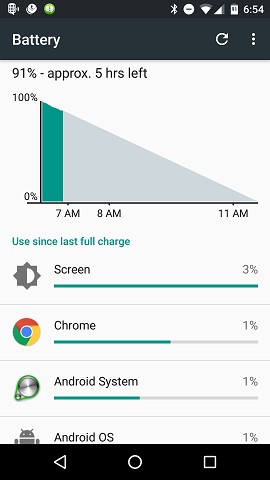
I haven't seen that yet. For example after charging all night and some usage these are my battery status stats.


Not sure I understand that. With 91% battery available it says 5 hours left?


Staying in Wellington. Check out my AirBnB in the Wellington CBD.  https://www.airbnb.co.nz/h/wellycbd  PM me and mention GZ to get a 15% discount and no AirBnB charges.


k14

k14
631 posts

Ultimate Geek
+1 received by user: 94


  #1407060 15-Oct-2015 09:35
Send private message

lchiu7:
BigMal: I manually updated mine the moment it came out because I'm impatient.

The changes to battery life are brilliant IMO.


I haven't seen that yet. For example after charging all night and some usage these are my battery status stats.

Not sure I understand that. With 91% battery available it says 5 hours left?

I am on first day of MM after upgrading my N5 last night. After 2.5 hours being off charge and pretty light use mine is down to 61% left and says 4 hours battery left. Here's hoping this improves! I was very worried last night after the install my phone was painful to use, lag in everything I did. This morning it seems back to normal in this aspect so will wait and see how battery performance goes.

Create new topic


Geekzone Live »

Try automatic live updates from Geekzone directly in your browser, without refreshing the page, with Geekzone Live now.


Are you subscribed to our RSS feed? You can download the latest headlines and summaries from our stories directly to your computer or smartphone by using a feed reader.