Geekzone: technology news, blogs, forums
Guest
Welcome Guest.
You haven't logged in yet. If you don't have an account you can register now.


Linuxluver

5833 posts

Uber Geek
+1 received by user: 1639

Trusted
Subscriber

#56827 25-Jan-2010 10:58
Send private message

I don't really use MS Exchange's calendar, and gmail does all my mail, but I'd like to know if anyone has got HTC Sync up and running.......or is it for the 32A HTC Magic (non-Vodafone) only?


_____________________________________________________________________

I've been on Geekzone over 16 years..... Time flies.... 


Create new topic
Linuxluver

5833 posts

Uber Geek
+1 received by user: 1639

Trusted
Subscriber

  #293762 28-Jan-2010 08:50
Send private message

HTC Sync definitely does NOT work with the Vodafone / Google build of Android. I'm going to try it with one of the Hero ROMs that have been ported to HTC Magic. There is also a Roger's Magic 32A ROM that has been ported to 32B that may be worth trying.


_____________________________________________________________________

I've been on Geekzone over 16 years..... Time flies.... 


Linuxluver

5833 posts

Uber Geek
+1 received by user: 1639

Trusted
Subscriber

  #294008 28-Jan-2010 16:45
Send private message

I've found a Sense UI ROM (Android v1.5) modded for HTC Magic 32B explicitly that includes full Exchange Sync support: Mail, Contacts and Calendar. That works fine on the phone. I'll try it with HTC Sync, too....but so far, so good.

The ROM is "Sapphire Sense by Maxisma". You can find it here
( http://htcpedia.com/forum/showthread.php?p=18089 ) (registration required to download. I took "mmouse01", so use another ID :-p ) .

Installed, it had a couple of issues with the keyboard tutorial not getting out of the way until after a re-boot. 

That done, once you get rid of the bloaty weather / clock / whatever widgets and tune it up a wee bit (disable some animations, etc), it runs very nicely. I might keep my phone on it for a while.

I'll also try some of the new Hero ROMs with Android 2.1. But the v1.5 runs very well.


I've tried this with HTC Sync on my Windows Vista Home Premium system but the HTC Sync on the phone and the HTC Sync on the PC don't see each other. That might not mean much as I have seen several examples of USB connections of various types not working properly on that PC. 


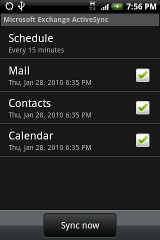
What does work well is the Exchange ActiveSync of Mail, Contacts and Calendar between the phone and the Exchange server (as distinct from a stand-alone MS Outlook / Outlook Express setup in a non-Exchange mail environment).  Looks to me like if you're in an enterprise Exchange environment then you don't need HTC Sync at all.  


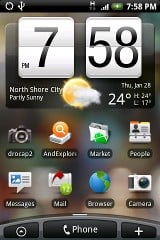
Here are some screen shots of this ROM. It's works very well. I'm amazed at how well it does run.....thought it does have it's moments from time to time of delays loading Sense UI. Mostly, though, it it very usable and responsive. I do have a 64MB Linux swap file on my sdcard and I think this helps. 


These images are scaled to half real size. 


Sense for Sapphire by Maxisma - Home screen   MS Exchange ActiveSync on Android


_____________________________________________________________________

I've been on Geekzone over 16 years..... Time flies.... 


Linuxluver

5833 posts

Uber Geek
+1 received by user: 1639

Trusted
Subscriber

  #294354 29-Jan-2010 14:49
Send private message

rob_nz has suggested the "RoadSync" app for Android as an easy, simple alternative to loading a new and sometimes flakey Android ROM ported from another phone...and it's an excellent suggestion. :-)


_____________________________________________________________________

I've been on Geekzone over 16 years..... Time flies.... 


Create new topic


Geekzone Live »

Try automatic live updates from Geekzone directly in your browser, without refreshing the page, with Geekzone Live now.


Are you subscribed to our RSS feed? You can download the latest headlines and summaries from our stories directly to your computer or smartphone by using a feed reader.