Geekzone: technology news, blogs, forums
Guest
Welcome Guest.
You haven't logged in yet. If you don't have an account you can register now.


LesF

176 posts

Master Geek
+1 received by user: 25


#67805 8-Sep-2010 17:27
Send private message

I am overlooking something, or it is not there; if I poke a USB stick into my tablets USB port (only place I could make it fit) then a brief display pops up to say that the udisk is being mounted.

However, I cannot find any option in apps or settings to unmount the udisk after that.  If I pull the USB stick out, it complains that it was unexpectedly removed.

It is probably not too important, but is there an app to handle auto-mounted devices etc?


--
The device: Android Touch 7 inch, possibly a Gome Flytouch.  Android 1.6 build 1.7.2.


--
Les

Create new topic
Linuxluver
5833 posts

Uber Geek
+1 received by user: 1639

Trusted
Subscriber

  #378057 8-Sep-2010 22:22
Send private message

LesF: I am overlooking something, or it is not there; if I poke a USB stick into my tablets USB port (only place I could make it fit) then a brief display pops up to say that the udisk is being mounted.

However, I cannot find any option in apps or settings to unmount the udisk after that.? If I pull the USB stick out, it complains that it was unexpectedly removed.

It is probably not too important, but is there an app to handle auto-mounted devices etc?


--
The device: Android Touch 7 inch, possibly a Gome Flytouch.? Android 1.6 build 1.7.2.


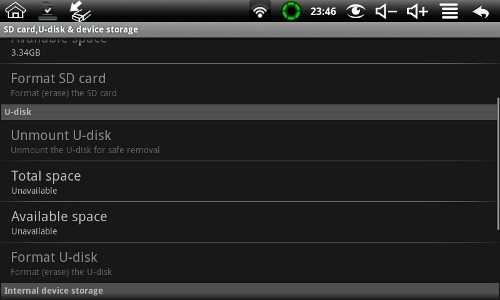
Should be in Menu - Settings - SD card & Storage.

Unmount U-disk


_____________________________________________________________________

I've been on Geekzone over 16 years..... Time flies.... 


LesF

176 posts

Master Geek
+1 received by user: 25


  #378150 9-Sep-2010 10:30
Send private message

Yeah, thats were I expected to find it, but it only has an option to unmount the SD card.


--
Les

Linuxluver
5833 posts

Uber Geek
+1 received by user: 1639

Trusted
Subscriber

  #378152 9-Sep-2010 10:51
Send private message

LesF: Yeah, thats were I expected to find it, but it only has an option to unmount the SD card.


Ok.

The firmware I have on my M001 has Sdcard, U-disk and internal storage sections. 

There may be custom firmware at slatedroid.com that will give you this function. Check it out. From what I've seen far, the vendor firmware systems are not as good as the re-packaged and improved versions done by the better hackers. Granted, the hackers rely on the vendor for anything that has to be compiled....up to a point...but the results speak for themselves.


_____________________________________________________________________

I've been on Geekzone over 16 years..... Time flies.... 


Linuxluver
5833 posts

Uber Geek
+1 received by user: 1639

Trusted
Subscriber

  #378155 9-Sep-2010 10:59
Send private message

Screenshot: 

 U-disk section in sdcard, u-disk settings on M001


_____________________________________________________________________

I've been on Geekzone over 16 years..... Time flies.... 


LesF

176 posts

Master Geek
+1 received by user: 25


  #378546 10-Sep-2010 12:26
Send private message

Heh. It was dodgy firmware from slatedroid that lost the option in the first place (actually it bricked my tablet and caused days of pain) but I guess I will have to try to update it again.

Thanx


--
Les

Create new topic


Geekzone Live »

Try automatic live updates from Geekzone directly in your browser, without refreshing the page, with Geekzone Live now.


Are you subscribed to our RSS feed? You can download the latest headlines and summaries from our stories directly to your computer or smartphone by using a feed reader.