Geekzone: technology news, blogs, forums
Guest
Welcome Guest.
You haven't logged in yet. If you don't have an account you can register now.


TGDelta2455

3 posts

Wannabe Geek


#302544 30-Nov-2022 17:10
Send private message

I have searched around for a similar problem but I couldn't find any that replicated mine... So here goes nothing... 

I am with MyRepublic, in QLD. (Cairns area more specifically) I have had a room mate who we used his Router, Im pretty sure it was a Nighthawk XR1000. Port forwarding worked on that and I was able to play Elite Dangerous with no issues with friends. 


Room mate moved out, I bought a TP Link AX1500, did basic setup, tried to play some Elite, then suddenly theres a constant connection error, but thats okay it would still allow me to play. But after an hour I realized I cant see any of my friends, or join my friends. I can see their icon, but I cannot interact with them. 
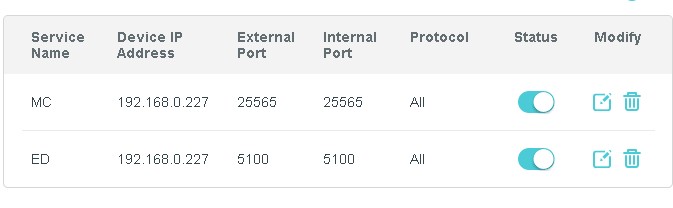
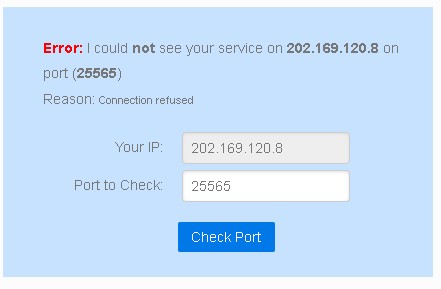
So I assumed it was a port forwarding issue, which it turned out it was (as confirmed by messaging the devs), but whenever I setup portforwarding with/without DMZ, not a single port of mine can be accessed. Using canyouseeme.org literally none of my ports are opened, even if I set the ports to be opened. 

Windows Firewall is off also. 

So at this point, I messaged MyRepublic, which they got me to get a static IP. Didnt work. 
Messaged MyRepublic and now i have the "gamer" package. Still doesnt work. 
Messaged MyRepublic and they told me to get in contact with my router support. Which I did, they said it was my ISP (MyRepublic). Alright then. 
Messaged MyRepublic, told them, screwed around for 5 hours, nothing. 

Alright Ill try another router. Didnt work. 
Maybe two bad routers? Got another one. Didnt work. 
(note, all routers I got were different, I borrowed both, one being a NetComm N300 and the other was another brand, don't remember the model) 


And now as I'm typing this, I'm now buying a "MyRepublic certified" router to see if this will fix my issue. But I don't know. 


So Im at a loss. 

Im not exactly great at networking, I was a student for a while, but doing CISCO certs is somehow more easier to wrap my head around than doing it for a home network. 

Any ideas? Im more than happy to provide any details needed. 


Create new topic
TGDelta2455

3 posts

Wannabe Geek


  #3003737 30-Nov-2022 17:15
Send private message

Just some extra small info I thought of.


Everyone on my network has this issue, not just my PC. 
I do have a static IP/"Gamer" thing for my account. 
MyRepublic has /Assured/ me that Im not on a CGNat. 
I have reinstalled windows, I have tried all settings with both DMZ on AND off. 
Theres no one in my local area that can help me, I work for a small tech store and not even they understand. 
I am on NBN. 


MadEngineer
4614 posts

Uber Geek
+1 received by user: 2596

Trusted

  #3003799 30-Nov-2022 18:21
Send private message

Has IPv6 suddenly kicked in and Windows is now treating the network as public? Do your Windows exceptions allow for that?


You're not on Atlantis anymore, Duncan Idaho.

FreeKills
1 post

Wannabe Geek


  #3003961 1-Dec-2022 10:45
Send private message

From past experience the Minecraft port of 25565 is actually setup to be a UDP port and thus doesn't send a response to canyouseeme.org to confirm receipt of the port query packet. However, despite this port showing as "closed" people have still been able to connect to the server via entering the IP and port number within the client - have you double checked to ensure that it's not actually become join-able since they set up the static to remove you from the CGNAT you would have been on before?


For Elite Dangerous if you visit the Network settings it should show:


  • IPv6: Disabled
  • IPv4 Port Forwarding: On
  • IPv4 Mapped Port Number: 5100


Might be a silly comment, but thought it worth re-checking a few of the basics as the rest sounds/looks like it should really be functional.


quickymart
15014 posts

Uber Geek
+1 received by user: 14101

ID Verified

  #3004059 1-Dec-2022 12:02
Send private message

Wait - you're in Australia? Wouldn't the networks be different between there and here?


xpd

xpd
Geek of Coastguard
14130 posts

Uber Geek
+1 received by user: 4594

Retired Mod
ID Verified
Trusted
Lifetime subscriber

  #3004066 1-Dec-2022 12:15
Send private message

For what he's trying to do, it doesn't matter where he's located, its just network/NAT 101. 


OP - have you put your system on the DMZ directly as a quick test ? If it doesn't work there, I'd be looking back at the ISP.


XPD / Gavin


LinkTree


TGDelta2455

3 posts

Wannabe Geek


  #3006449 6-Dec-2022 16:54
Send private message

xpd:


For what he's trying to do, it doesn't matter where he's located, its just network/NAT 101. 


OP - have you put your system on the DMZ directly as a quick test ? If it doesn't work there, I'd be looking back at the ISP.


I have yeah, Ive tried ONLY DMZ on all PCs in my network and its the same result. 
My ISP is swearing the problem is with my end. Its annoying because theres no way they can try "port testing" on their end. 
I guess Ill wait for their Router to arrive and if it doesnt work, I might have to just give up. 

Is it possible my house could be an issue? Is there some weird and quirky way ports could be affected by location-wise? I wouldnt think so but who knows at this point. 


Move to New Zealand's best fibre broadband service (affiliate link). Free setup code: R587125ERQ6VE. Note that to use Quic Broadband you must be comfortable with configuring your own router.
RunningMan
9253 posts

Uber Geek
+1 received by user: 4884


  #3006498 6-Dec-2022 17:01
Send private message

TGDelta2455:
MyRepublic has /Assured/ me that Im not on a CGNat.


It may pay to double check this, because this would certainly cause the issue you are seeing. Is the WAN address reported by your router the same as the address the game server thinks you are at?


Create new topic


Geekzone Live »

Try automatic live updates from Geekzone directly in your browser, without refreshing the page, with Geekzone Live now.


Are you subscribed to our RSS feed? You can download the latest headlines and summaries from our stories directly to your computer or smartphone by using a feed reader.