Geekzone: technology news, blogs, forums
Guest
Welcome Guest.
You haven't logged in yet. If you don't have an account you can register now.


BogBeast

57 posts

Master Geek


#178965 20-Aug-2015 21:26
Send private message

Thought I would share my recent UFB install with Voyager as our chosen ISP. Being in Chriatchurch the local fibre company is Enable, which makes for an interesting exercise in that they are not allowed to use the Chorus green ducting already underground.

I signed up with Voyager via their website on 7th Aug. We chose the 100/20 unlimited plan with no voice, at $69 per month for two years. Part of this deal is that the customer supplies their own router. As I has been gifted a Linksys WRT1900AC, I saw it as an opportunity to save $10 a month.

Got a call from Enable on 10th Aug to discuss times for the scoping visit, and also for the physical works and final wiring. I was pleasantly suprised at how quick we were slotted in, with the scope visit set down for just two days later on 12th Aug. This was a short visit and the guys from Multimedia Systems, who contract to Enable, were great and more than happy to work in with what I wanted.

The physical works and final wiring were set down for 19th Aug. Less than two weeks from my inital enquiry to go live. I was pretty impressed. The guys turned up about 10:30am and started the work of trenching down our driveway.


As you can see, we are down a 35 metre private driveway which unfortunately, due to the amount of rock in the ground in Rolleston, all had to be dug manually by pick-axe.


Red conduit going in.


Incision cut in the asphalt was made to get the fibre from the fenceline across to the house.


The ETP installation and wiring.


Splicing the fibre from the house to that which was run from the cabinet. They blew over 430 metres of fibre between the cabinet and our house. At 40 metres a minute, it took over ten minutes to arrive once they started the process.


The finished interior work, along with our comms setup.

I have to say that the entire process was quick, painless and very interesting to watch first hand. Enable and their sub-contractor Multimedia Systems were an absolute breeze to deal with. Great communication along the way and more than happy to incorporate the customers requests for the way certain parts were installed.

Voyager have been equally easy to deal with. Before the physical works started, they sent an email with all the user settings and some tips on setting up a third party router. Pain free. The Linksys was simple to get configured and is working well.

More than happy with the speed we are getting too!!




View this topic in a long page with up to 500 replies per page Create new topic
 1 | 2
PeterReader
6028 posts

Uber Geek
+1 received by user: 461

Trusted
Geekzone
Lifetime subscriber

  #1371174 20-Aug-2015 21:26
Send private message

Hello... Our robot found some keywords in your post, so here is an automated reply with some important things to note regarding broadband speeds.


If you are posting regarding DSL speeds please check that


- you have reset your modem and router


- your PC (or other PCs in your LAN) is not downloading large files when you are testing


- you are not being throttled by your ISP due to going over the monthly cap


- your tests are always done on an ethernet connection to the router - do not use wireless for testing


- you read this topic and follow the instructions there.


Make sure you provide information for other users to help you. If you have not already done it, please EDIT your post and add this now:


- Your ISP and plan


- Type of connection (ADSL, ADSL2, VDSL)


- Your modem DSL stats (do not worry about posting Speedtest, we need sync rate, attenuation and noise margin)


- Your general location (or street)


- If you are rural or urban


- If you know your connection is to an exchange, cabinet or conklin


- If your connection is to a ULL or wholesale service


- If you have done an isolation test as per the link above


Most of the problems with speed are likely to be related to internal wiring issues. Read this discussion to find out more about this. Your ISP is not intentionally slowing you down today (unless you are on a managed plan). Also if this is the school holidays it's likely you will notice slower than usual speed due to more users online.


A master splitter is required for VDSL2 and in most cases will improve speeds on DSL connections. Regular disconnections can be a monitored alarm or a set top box trying to connect. If there's an alarm connected to your line even if you don't have an alarm contract it may still try to connect so it's worth checking.


I recommend you read these two blog posts:


- Is your premises phone wiring impacting your broadband performance? (very technical)


- Are you receiving a substandard ULL ADSL2+ connection from your ISP?


I am the Geekzone Robot and I am here to help. I am from the Internet. I do not interact. Do not expect other replies from me.


Referral links: Quic Broadband (free setup code: R587125ERQ6VE) | Samsung | AliExpress | Wise | Sharesies 


Support Geekzone by subscribing (browse ads-free), or making a one-off or recurring donation through PressPatron.


BogBeast

57 posts

Master Geek


  #1371206 20-Aug-2015 21:38
Send private message

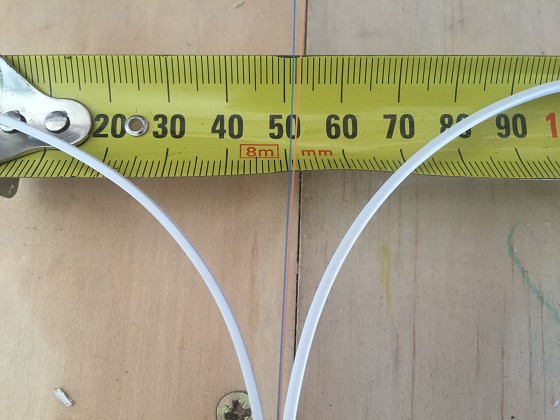
Couldn't edit the original post but thought these two pics may be of interest to some. The size of the actual fibre is extremely small, more so than I had though. The second pic shows the red conduit which the fibre cable is blown through.


Zeon
3926 posts

Uber Geek
+1 received by user: 759

Trusted

  #1371248 20-Aug-2015 23:03
Send private message

Nice post and looks like good quality work. Well done :)


Speedtest 2019-10-14


kingjj
1730 posts

Uber Geek
+1 received by user: 450

ID Verified
Trusted

  #1371534 21-Aug-2015 12:39
Send private message

Great to hear a positive UFB install story! Perhaps I'm just bias but it does appear that Enable have got their act together far more than Chorus when it comes to doing an install properly. We had Multimedia Communications do our install and subsequent re-install and they were great to deal with. Glad to hear Voyager is working out, I wander if they'll get more people on board now that 2Degrees have had some many teething issues.

nickb800
2735 posts

Uber Geek
+1 received by user: 829

Trusted

  #1371549 21-Aug-2015 12:52
Send private message

Great post, thanks for sharing.

I'll hopefully be getting Voyager/Enable UFB by the end of the year. I've been doing prep work myself, digging a trench across the front yard, which they have hopefully placed their conduit into today while I'm at work. I'll be landscaping the front yard soon, probably before they install in my street, and I didn't want them digging up freshly sown soil. Digging 450mm deep in clay wasn't fun though! Will run internal conduit this weekend. 

Would you be able to do me a favour, and measure the dimensions of white box that the fibre comes out of (the one inside your cupboard, with the yellow laser sticker on it)? Would helpful for me in placing the internal conduit, which will feed into that white box.

kingjj
1730 posts

Uber Geek
+1 received by user: 450

ID Verified
Trusted

  #1371589 21-Aug-2015 13:46
Send private message

nickb800: 
Would you be able to do me a favour, and measure the dimensions of white box that the fibre comes out of (the one inside your cupboard, with the yellow laser sticker on it)? Would helpful for me in placing the internal conduit, which will feed into that white box.


OP may be able to specify further but from memory ours (same type of install) is 85x85x35.


Shop now for Lego sets and other gifts (affiliate link).
quickymart
14940 posts

Uber Geek
+1 received by user: 13953

ID Verified

  #1371621 21-Aug-2015 14:17
Send private message

Cripes and I thought my UFB install was difficult - nothing compared to yours! Great thread :)

nickb800
2735 posts

Uber Geek
+1 received by user: 829

Trusted

  #1371660 21-Aug-2015 15:18
Send private message

kingjj:
nickb800: 
Would you be able to do me a favour, and measure the dimensions of white box that the fibre comes out of (the one inside your cupboard, with the yellow laser sticker on it)? Would helpful for me in placing the internal conduit, which will feed into that white box.


OP may be able to specify further but from memory ours (same type of install) is 85x85x35.

The one in the OPs photo looks rectangular, similar in size to a regular electrical switch. I wonder if square ones like yours were used in earlier installs

kingjj
1730 posts

Uber Geek
+1 received by user: 450

ID Verified
Trusted

  #1371899 22-Aug-2015 02:46
Send private message

nickb800:
kingjj:
nickb800: 
Would you be able to do me a favour, and measure the dimensions of white box that the fibre comes out of (the one inside your cupboard, with the yellow laser sticker on it)? Would helpful for me in placing the internal conduit, which will feed into that white box.


OP may be able to specify further but from memory ours (same type of install) is 85x85x35.

The one in the OPs photo looks rectangular, similar in size to a regular electrical switch. I wonder if square ones like yours were used in earlier installs


Looking again at the photos you may well be right. Will compare when I get home.

BogBeast

57 posts

Master Geek


  #1371927 22-Aug-2015 08:52
Send private message

nickb800: Would you be able to do me a favour, and measure the dimensions of white box that the fibre comes out of (the one inside your cupboard, with the yellow laser sticker on it)? Would helpful for me in placing the internal conduit, which will feed into that white box.


Sorry for the delay in getting back to tou. The dimensions in mm are 120x80x30.

nickb800
2735 posts

Uber Geek
+1 received by user: 829

Trusted

  #1371941 22-Aug-2015 09:51
Send private message

BogBeast:
nickb800: Would you be able to do me a favour, and measure the dimensions of white box that the fibre comes out of (the one inside your cupboard, with the yellow laser sticker on it)? Would helpful for me in placing the internal conduit, which will feed into that white box.


Sorry for the delay in getting back to tou. The dimensions in mm are 120x80x30.


Awesome - thank you!


Shop now for Lenovo laptops and other devices (affiliate link).
asjohnstone
76 posts

Master Geek
+1 received by user: 27


  #1387005 14-Sep-2015 08:36
Send private message

I had a similar situation, I came home on Friday to find my fibre connection stapled all the way down the middle of my fence. Looks awful  

sbiddle
30853 posts

Uber Geek
+1 received by user: 9996

Retired Mod
Trusted
Biddle Corp
Lifetime subscriber

  #1387011 14-Sep-2015 08:52
Send private message

asjohnstone: I had a similar situation, I came home on Friday to find my fibre connection stapled all the way down the middle of my fence. Looks awful  


Surely when the job was scoped you would have been told and had to sign off the job using this method?

FWIW stapling it is a perfectly acceptable method of installing the fibre.


asjohnstone
76 posts

Master Geek
+1 received by user: 27


  #1387012 14-Sep-2015 08:58
Send private message

sbiddle:
asjohnstone: I had a similar situation, I came home on Friday to find my fibre connection stapled all the way down the middle of my fence. Looks awful  


Surely when the job was scoped you would have been told and had to sign off the job using this method?

FWIW stapling it is a perfectly acceptable method of installing the fibre.


No, is that supposed to happen ?

No one spoke to me at all about the install or how or when it was going to be done. I just arrived home and it was there.

As long as it works, it's all good I guess, but a conversation would have been nice.

chevrolux
4962 posts

Uber Geek
+1 received by user: 2638
Inactive user


  #1387374 14-Sep-2015 18:35
Send private message

sbiddle:
asjohnstone: I had a similar situation, I came home on Friday to find my fibre connection stapled all the way down the middle of my fence. Looks awful  


Surely when the job was scoped you would have been told and had to sign off the job using this method?

FWIW stapling it is a perfectly acceptable method of installing the fibre.


I find it utterly ridiculous that the governing bodies have decided it is an ok practice.
Something that was extremely frowned upon in the copper world has now been resurrected as 'acceptable practice'.

Oh well, give ten years and when it has all fallen apart I guess they will have to fix it. I guess it's the old thing that there is never any logic in the telco world!

 1 | 2
View this topic in a long page with up to 500 replies per page Create new topic


Geekzone Live »

Try automatic live updates from Geekzone directly in your browser, without refreshing the page, with Geekzone Live now.


Are you subscribed to our RSS feed? You can download the latest headlines and summaries from our stories directly to your computer or smartphone by using a feed reader.