Geekzone: technology news, blogs, forums
Guest
Welcome Guest.
You haven't logged in yet. If you don't have an account you can register now.


thequark

6 posts

Wannabe Geek
+1 received by user: 3


#310511 26-Oct-2023 13:09
Send private message

Hi fellow geeks,


I recently subscribed to @Quic, the connection went live today, and I configured my TP-Link Deco M5 router.


Things went smoothly for IPv4, but I struggled a bit more with IPv6. I finally managed to get it to work, so I thought I'd share my config here, in case other people ever struggle as well. Also, if any expert out there can confirm that this is the correct config, that would be much appreciated.


Configuring TP-Link Deco for Quic


  • Launch the Deco app
  • Click 🀜 More (lower right), then 🌐 Internet Connection

Deco app


  • In the IPv4 tab, optionally enable Ignore Ping from WAN then click IPv4 Connection

Deco App


  • Enter the following parameters (I cannot screenshot that page due to the app's security policy):


    • Internet Connection Type: PPPoE
    • Username: quic @ quic.nz (without the spaces)
    • Password: quic
    • DNS Address: Auto
    • Do not change the Advanced settings
  • Click Save
  • After a few seconds, your IPv4 connection should be up and running.
  • In the IPv6 tab, enable IPv6, then click on IPv6 Connection
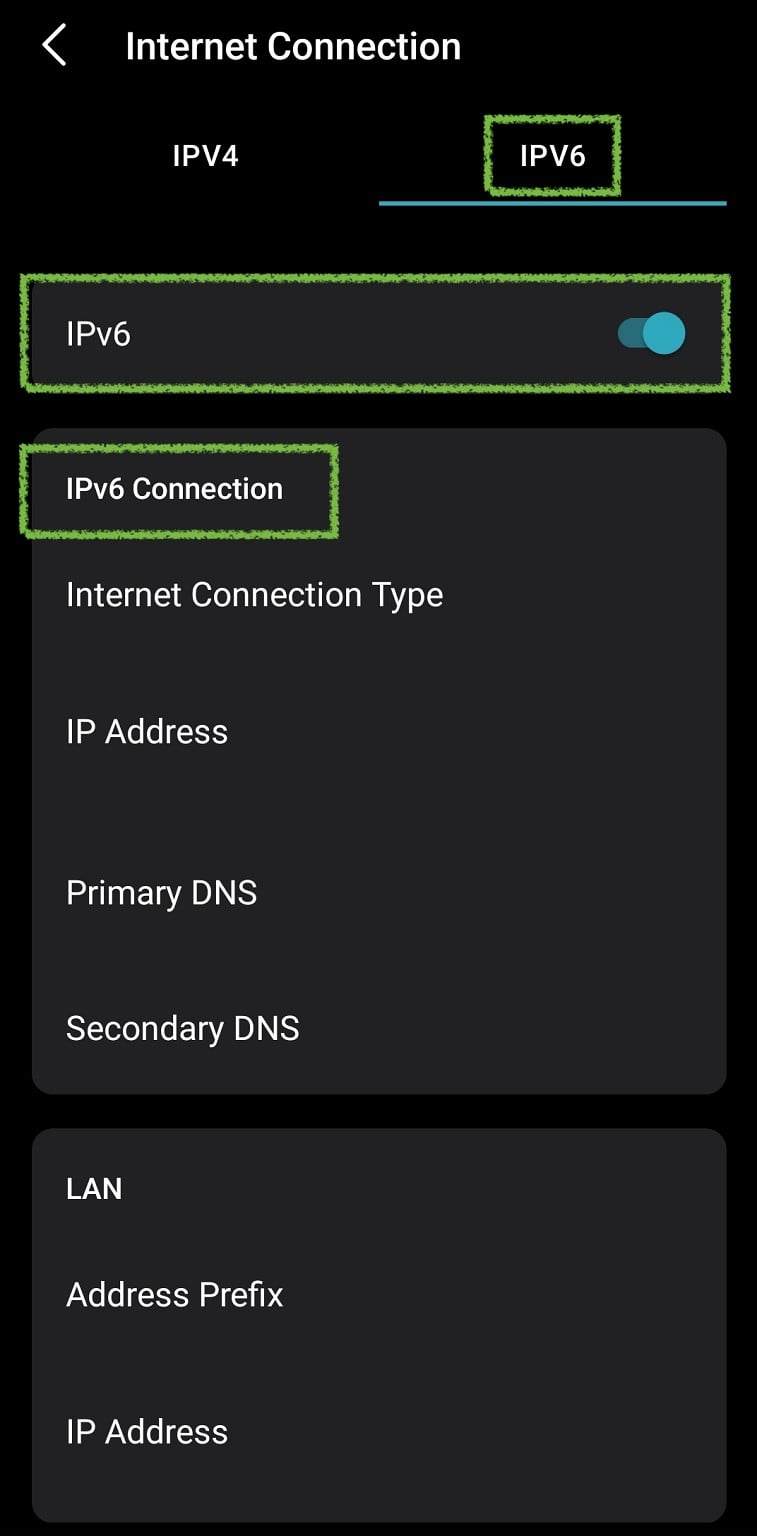
Deco App


  • Enter the following parameters (again, I cannot screenshot that page):


    • Internet Connection Type: PPPoE
    • Sync IPv4 Account: enabled
    • Get IPv6 Address: Stateful
    • Prefix Delegation: enabled
    • DNS Address: Auto
    • Assigned Type: DHCPv6
  • Click Save
  • After a few seconds, your IPv6 connection should be up and running.

You can test your IPv6 connection using https://test-ipv6.com/.


Hope this helps!


View this topic in a long page with up to 500 replies per page Create new topic
 1 | 2
Quinny
930 posts

Ultimate Geek
+1 received by user: 210

Trusted

  #3152376 26-Oct-2023 13:25
Send private message

I'm with Vodafone (now One) and use the Deco X20, no router. I have had to turn IP6 off as some older devices hang with it on. I will try the above, but my deco app looks different.  


bigalow
568 posts

Ultimate Geek
+1 received by user: 112


  #3152465 26-Oct-2023 19:44
Send private message

Quinny:


I'm with Vodafone (now One) and use the Deco X20, no router. I have had to turn IP6 off as some older devices hang with it on. I will try the above, but my deco app looks different.  


different model


but try this https://www.geekzone.co.nz/forums.asp?forumId=81&topicId=310499


OldGeek
989 posts

Ultimate Geek
+1 received by user: 409

ID Verified
Lifetime subscriber

  #3157034 7-Nov-2023 15:36
Send private message

I am running a TP-LINK Archer AX50 router and am not able to get an IPV6 address configured.  Quic say only this on their setup page:


"If you’re wanting to use IPv6, a /56 prefix is delivered to you by DHCPv6-PD."


This is my IPv6 config page:


As can be seen, nothing that appears in the config screen relates to Quics wording.


Any help appreciated.


-- 

OldGeek.


Quic referal code: https://account.quic.nz/refer/581402 and use this code for free setup: R581402E48MJA


thequark

6 posts

Wannabe Geek
+1 received by user: 3


  #3157046 7-Nov-2023 15:53
Send private message

DHCPv6-PD stands for DHCPv6 with Prefix Delegation, so it looks like what you've selected.
Could you please describe a bit more what problem you are having? Perhaps the router is connecting properly but your laptop is not configured for IPv6? Just guessing.

OldGeek
989 posts

Ultimate Geek
+1 received by user: 409

ID Verified
Lifetime subscriber

  #3157047 7-Nov-2023 15:57
Send private message

thequark: DHCPv6-PD stands for DHCPv6 with Prefix Delegation, so it looks like what you've selected.
Could you please describe a bit more what problem you are having? Perhaps the router is connecting properly but your laptop is not configured for IPv6? Just guessing.


Sorry I should have been clearer.  test-ipv6.com reports no IPv6 address.  The router's status page for Internet IPv6 reports an address of 


FE80::BDB7:BB70:DB25:3308/128 but no DNS servers.


-- 

OldGeek.


Quic referal code: https://account.quic.nz/refer/581402 and use this code for free setup: R581402E48MJA


thequark

6 posts

Wannabe Geek
+1 received by user: 3


  #3157054 7-Nov-2023 16:28
Send private message

A few ideas, in random order:
- did you ask @Quic to provide you with an IPv6 subnet upon signing up? I'm not sure that's necessary, but perhaps it is.
- did you activate IPv6 on your computer? For example, on my MacBook I had to open the system settings, network preferences, advanced, TCP/IP, and choose Automatically in the Configure IPv6 drop-down menu.
- did you try saving the config and rebooting everything?
- does IPv4 work normally?
- did you try clicking Disconnect and then Connect in you router's IPv6 UI?
- what is your laptop's IPv6 address? Type "ifconfig" or "ip a" in a terminal on Mac or Linux (not sure about Windows)


Shop now for Dyson appliances (affiliate link).
OldGeek
989 posts

Ultimate Geek
+1 received by user: 409

ID Verified
Lifetime subscriber

  #3157085 7-Nov-2023 18:03
Send private message

thequark: A few ideas, in random order:
- did you ask @Quic to provide you with an IPv6 subnet upon signing up? I'm not sure that's necessary, but perhaps it is.
- did you activate IPv6 on your computer? For example, on my MacBook I had to open the system settings, network preferences, advanced, TCP/IP, and choose Automatically in the Configure IPv6 drop-down menu.
- did you try saving the config and rebooting everything?
- does IPv4 work normally?
- did you try clicking Disconnect and then Connect in you router's IPv6 UI?
- what is your laptop's IPv6 address? Type "ifconfig" or "ip a" in a terminal on Mac or Linux (not sure about Windows)


I asked Quic for some help.  Their response was 'your router, your problem' but made suggestions that did not work.


My local ip addresses are not the issue - I dont have a public IPv6 address.  IPv4 is working normally. Settings have been saved and router rebooted.


-- 

OldGeek.


Quic referal code: https://account.quic.nz/refer/581402 and use this code for free setup: R581402E48MJA


michaelmurfy
meow
13597 posts

Uber Geek
+1 received by user: 10951

Moderator
ID Verified
Trusted
Lifetime subscriber

  #3157107 7-Nov-2023 18:47
Send private message

@OldGeek Try selecting "SLAAC" and see if that works.


With the new network which has IPoE support (coming soon) IPv6 is a whole lot better with them so will likely just work then. Until then however there are some oddities with some routers (my Fortigate router had issues on PPPoE too).


If you can't get it going just turn it off for now and re-evaluate it later when their new network is out of Beta :)


Michael Murphy | https://murfy.nz
Referral Links: Quic Broadband (use R122101E7CV7Q for free setup)

Are you happy with what you get from Geekzone? Please consider supporting us by subscribing.
Opinions are my own and not the views of my employer.


thequark

6 posts

Wannabe Geek
+1 received by user: 3


  #3157112 7-Nov-2023 19:03
Send private message

Could you please copy the suggestions Quic made so we can avoid repetitions and also in case some of these suggestions turn out to be useful for others reading this thread?


I just checked my router, the IP address I get on the router is also a private IP (fe80::48.../128), and I don't get primary or secondary DNS either on the IPv6 side either, but that's okay, the router just uses the IPv4 DNS servers.


However, I do get a public IPv6 /56 subnet prefix for my LAN (2407:8B00:...). This is displayed in a separate section of the configuration, so perhaps you can check your LAN settings? Maybe you need to activate IPv6 on the LAN interface or something.


Maybe also check your firewall(s)? And if you have another router hanging around, maybe give it a shot?


Just throwing random ideas at you because it could be so many different things. Please try to provide as much detail as you can.


OldGeek
989 posts

Ultimate Geek
+1 received by user: 409

ID Verified
Lifetime subscriber

  #3157118 7-Nov-2023 20:10
Send private message

Given that the Quic network is evolving in the future I will take the advice of @michaelmurfy and simply await developments.  A public IPv6 address is simply future-proofing for me so there is no critical requirement for it - but as I had one with Sky Broadband (with their router) I would not like to move on without one.


Many thanks to all - there is no simple and obvious tweak which I was hoping for.


-- 

OldGeek.


Quic referal code: https://account.quic.nz/refer/581402 and use this code for free setup: R581402E48MJA


Beavis
171 posts

Master Geek
+1 received by user: 37


  #3405289 18-Aug-2025 10:57
Send private message

Hi all.


Just checking in to see if the IPv6 issue with TP-LINK Archer AX50 was ever resolved? I have just got fiber and gone with Quic. All good except for IPv6.


I have arrived at exactly the same settings and results as OldGeek. I have another old router which I don't want to use and it works perfectly with Quic IPv6, so guess the AX50 is a bit of a dog. Any suggestions?


Beware of FUD...


Shop now for Dyson appliances (affiliate link).
kiruti
54 posts

Master Geek
+1 received by user: 16

ID Verified

  #3405307 18-Aug-2025 12:22
Send private message

Beavis:


Hi all.


Just checking in to see if the IPv6 issue with TP-LINK Archer AX50 was ever resolved? I have just got fiber and gone with Quic. All good except for IPv6.


I have arrived at exactly the same settings and results as OldGeek. I have another old router which I don't want to use and it works perfectly with Quic IPv6, so guess the AX50 is a bit of a dog. Any suggestions?


It's quite annoying to get working, and in my experience it depends entirely on the DNS servers you pick. NextDNS worked for me in the end, but I'm pretty sure Quad9 worked as well. I was on 2degrees though not Quic. I also needed to change from PPPoE to DHCP, but the other settings that OldGeek had in the screenshot looked fine.


Beavis
171 posts

Master Geek
+1 received by user: 37


  #3405461 19-Aug-2025 08:49
Send private message

Ok. I will wait till the Internet addicted are not home and I will try it on DHCP! 


Beware of FUD...

OldGeek
989 posts

Ultimate Geek
+1 received by user: 409

ID Verified
Lifetime subscriber

  #3405467 19-Aug-2025 09:21
Send private message

Just to follow up:  I never got IPV6 working then.  I moved to Voyager and got it working over PPPOE.  I am now back with Quic and it does not work now as it did not then.  I might try changing to DHCP sometime.


-- 

OldGeek.


Quic referal code: https://account.quic.nz/refer/581402 and use this code for free setup: R581402E48MJA


Beavis
171 posts

Master Geek
+1 received by user: 37


  #3405798 20-Aug-2025 10:19
Send private message

Hi. Tried DHCP and didn't work either.


I think I will just flag this. If for some reason I really needed IPv6, I would use my other spare router with the poor wifi. 🙄


Beware of FUD...

 1 | 2
View this topic in a long page with up to 500 replies per page Create new topic


Geekzone Live »

Try automatic live updates from Geekzone directly in your browser, without refreshing the page, with Geekzone Live now.


Are you subscribed to our RSS feed? You can download the latest headlines and summaries from our stories directly to your computer or smartphone by using a feed reader.
