Geekzone: technology news, blogs, forums
Guest
Welcome Guest.
You haven't logged in yet. If you don't have an account you can register now.


View this topic in a long page with up to 500 replies per page Create new topic
1 | 2 
wellygary
8868 posts

Uber Geek
+1 received by user: 5359


  #3398061 29-Jul-2025 15:29
Send private message

quickymart:


Update, finally did this this afternoon (can't do much else with the weather). Captured about 1 hour and 10 minutes of video using OBS (came out to around 6GB) then used Handbrake and got it down to about 4GB.


Does this sound right? Is there a setting I should be checking? I didn't tweak a hell of a lot.


An earlier capture of the same VHS lasting around 90 minutes came in at about 880MB, so I'm wondering if there's more compressing I can do?


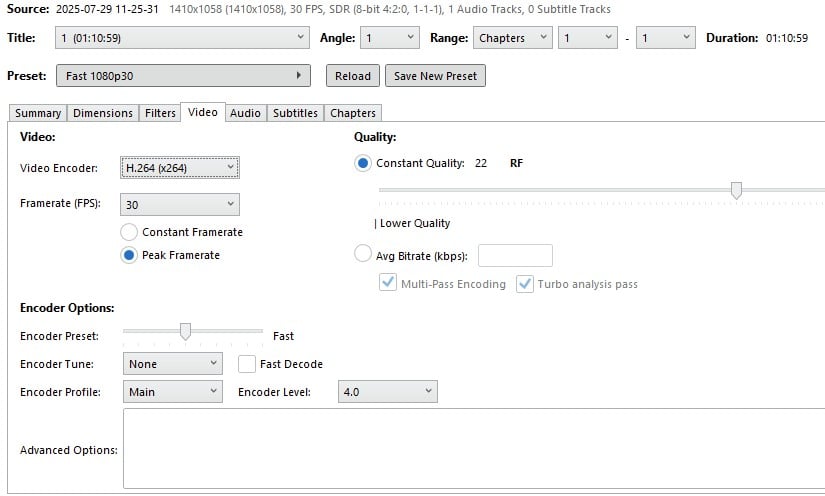
What Handbrake output settings are you using??
4GB for 70 mins still sounds rather HQ, y
You should be able to produce 720p files at a considerably smaller file size...


quickymart

15033 posts

Uber Geek
+1 received by user: 14146

ID Verified

  #3398065 29-Jul-2025 15:58
Send private message

Honestly don't know 😃 I'll have a look tomorrow when I have time and can post screenshots if that helps.


As I say I didn't tweak much so it was probably all on the default for everything.


quickymart

15033 posts

Uber Geek
+1 received by user: 14146

ID Verified

  #3398099 29-Jul-2025 18:53
Send private message

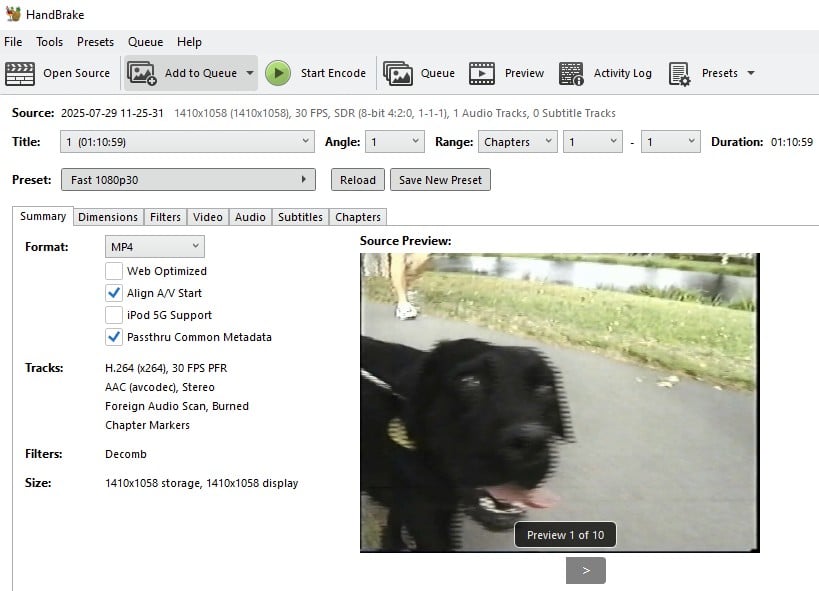
First options screen:


Video settings:


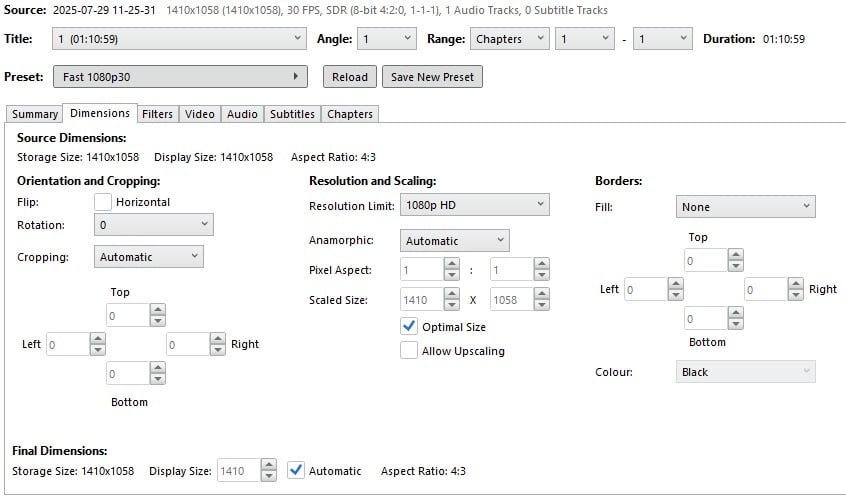
Something on here maybe?:


richms
29167 posts

Uber Geek
+1 received by user: 10285

Trusted
Lifetime subscriber

  #3398100 29-Jul-2025 18:56
Send private message

First screenshot shows interlacing artifacts in the video. The capture was not done correctly.


Richard rich.ms

quickymart

15033 posts

Uber Geek
+1 received by user: 14146

ID Verified

  #3398101 29-Jul-2025 19:03
Send private message

How can I correct that? Is there a setting I should be looking for?


quickymart

15033 posts

Uber Geek
+1 received by user: 14146

ID Verified

  #3398121 29-Jul-2025 21:49
Send private message

wellygary:


What Handbrake output settings are you using??
4GB for 70 mins still sounds rather HQ, y
You should be able to produce 720p files at a considerably smaller file size...


I'm trying 720p now, will see how large it is afterwards.


Edit, 2.4 gigabytes, so that's an improvement. I think I still need to tweak the settings a bit more though. Will give 576p a try (it is a video tape circa 1999, so hardly 4K or anything along those lines).


Edit part 2, 1.1 gigabytes. I think I'm on the right track but it could still be a bit smaller yet.


Shop now at Mighty Ape (affiliate link).
richms
29167 posts

Uber Geek
+1 received by user: 10285

Trusted
Lifetime subscriber

  #3398127 29-Jul-2025 22:16
Send private message

quickymart:


How can I correct that? Is there a setting I should be looking for?


The properties of the capture device that you have placed in OBS have the deinterlace settings. I dont have any analog hardware on any PCs at the moment to see.


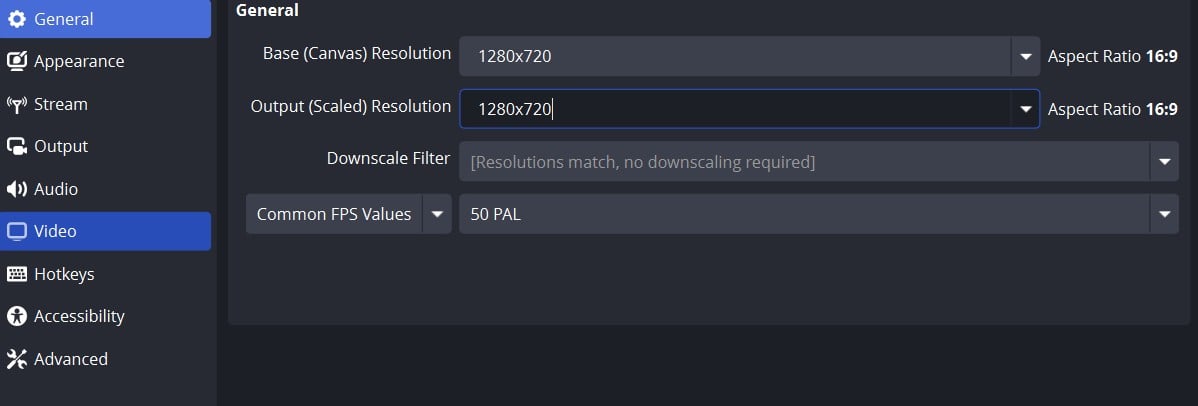
Also, the file properties is 30FPS, it should be 50 for a deinterlaced pal capture, or 25 if you want to use one of the non motion adaptive deinterlacing methods.


Richard rich.ms

quickymart

15033 posts

Uber Geek
+1 received by user: 14146

ID Verified

  #3398128 29-Jul-2025 22:18
Send private message

Thanks for that, I'll have another crack at it tomorrow and check for those settings.


gzt

gzt
18879 posts

Uber Geek
+1 received by user: 8001

Lifetime subscriber

  #3398130 29-Jul-2025 22:29
Send private message

Handbrake also has deinterlace if it comes to that for some reason.

richms
29167 posts

Uber Geek
+1 received by user: 10285

Trusted
Lifetime subscriber

  #3398132 29-Jul-2025 22:55
Send private message

gzt: Handbrake also has deinterlace if it comes to that for some reason.


Never worked for me at that point in the chain, only directly at capture time.


I guess if you were going into a legacy codec with no scaling like MPEG2 or something, then it might be able to do it since that codec natively supports interlaced since its from the DVD era.


Richard rich.ms

fe31nz
1295 posts

Uber Geek
+1 received by user: 423


  #3398138 30-Jul-2025 00:06
Send private message

Unless you are using AI processing, you never want to upscale a video when you compress it.  Doing that just reduces the quality - you are moving around where the pixels are, so the compression has to interpolate between the pixels, instead of just converting each pixel to a compressed version.  So what you want to do is use a tool like mediainfo or ffprobe to see what the capture file resolution is, and then set your compression programme to use exactly the same resolution for its output file.  Most video player programs (eg VLC) will also have an option to show "video information" or "codec information" or the like and will show the resolution of the file there.  And whether it is interlaced or not.  For VHS/S-VHS tape captures, the resolution is normally 720x480 for NTSC tapes and 720x576 for PAL tapes.  But it can depend on your capture device.


PAL format tapes (as in NZ) are normally recorded in an interlaced format, with every second line of the frame starting from the first line in the first half frame, followed by a second half frame with every second line starting from the second line of the frame.  Analogue TVs had hardware to deinterlace the two half frames and display them together as one full frame.  The idea was that for over the air signals, damage to the signal in one half frame would be balanced out by correct signal in the other half frame and would be much less visible.  When capturing an interlaced tape, you want to either capture it in the interlaced format and then use software deinterlacing as part of the compression process, or (if your capture device supports it) have the capture device deinterlace the signal.  If you do not deinterlace it, you will get nasty "jaggies" (comb effect) artefacts around the outlines of things.  It is impossible to remove the interlace artefacts from a compressed file - it has to be done before the compression is done.  If your capture file is interlaced, then you usually have to set up your compression programme to do deinterlacing before the compression - they do not seem to detect interlaced video and do it automatically.  There are quite a number of different ways of doing deinterlacing, and each compression programme usually has a number of different ones to choose from.  Some are "cheap and nasty" and run rapidly but produce bad results.  It is best to use one of the "good but slow" varieties.  This will add significant time to the compression run, but is well worth it as even tiny jaggies are nasty to watch.  If your compression programme does not have deinterlacing options, find a better programme.  Things have moved on since I was last doing video compression and deinterlacing.  It looks like the best deinterlacing filter now is nnedi, but that is often incredibly slow (less than one frame per second), so just doing the deinterlacing on 50 fps video will take 50 times as long as the playing time.  People seem to be recommending bwdif now if you want good deinterlacing with reasonable processing time.  If I remember correctly, I think the one I used to use was yadif, which still seems to be recommended by some people as giving a good result in a reasonable time.


Shop on-line at New World now for your groceries (affiliate link).
quickymart

15033 posts

Uber Geek
+1 received by user: 14146

ID Verified

  #3398152 30-Jul-2025 08:19
Send private message

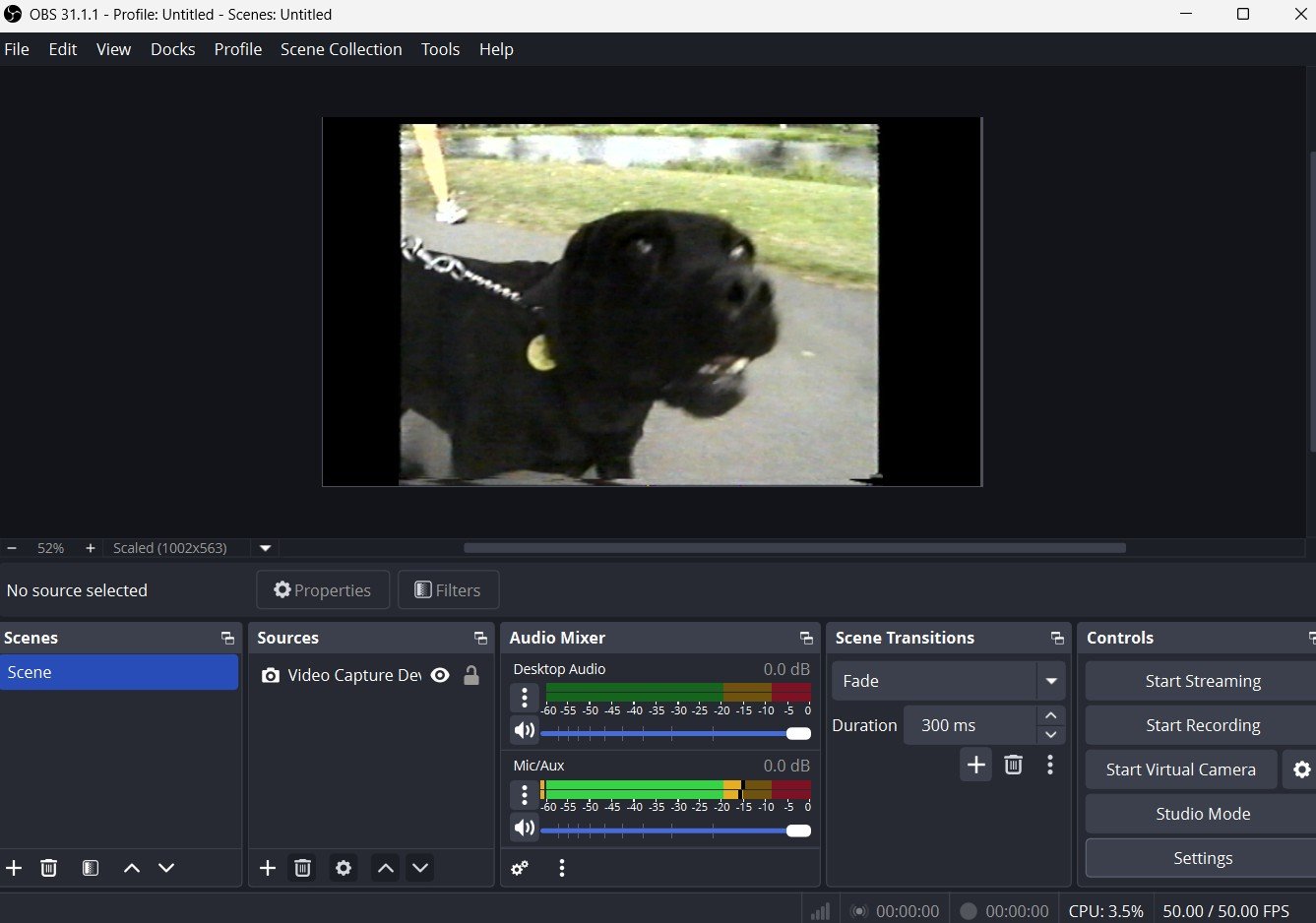
Before I start recording the VHS again, can someone please have a quick look at my OBS settings? I tweaked them a little based on the info above:


And again with the dog at the start:


I managed to change the recording format to be .mp4 but couldn't find any interlacing settings.


quickymart

15033 posts

Uber Geek
+1 received by user: 14146

ID Verified

  #3398887 31-Jul-2025 19:06
Send private message

Update, capturing of all videos now all done 🙂


However - I'm wanting to surprise my family by burning the files onto DVD and sending to them to watch as a movie in their DVD player (all of my relatives live rurally with not-great broadband).


Last time I burned DVD's I think it was with DVD Fab 8, which was years ago...what do people use these days? Free preferred - just looking for something I can drop the file onto, finalise the DVD, it goes into the DVD player and plays like a normal movie. Google gives me a trillion options but I'm looking for something straightforward/simple to use to do this.


Any tips appreciated, thanks 😊


quickymart

15033 posts

Uber Geek
+1 received by user: 14146

ID Verified

  #3399021 1-Aug-2025 09:35
Send private message

Thinking back a bit, I also used Nero a long time ago, is that still any good?


gzt

gzt
18879 posts

Uber Geek
+1 received by user: 8001

Lifetime subscriber

  #3399140 1-Aug-2025 21:59
Send private message

Newer DVD players will play nearly any file format you throw at them. For wide compat with old players use mpeg-2. I don't recall how the autoplay works on consumer dvd. I seem to recall they play the first file in most cases. Don't trust me on that part

1 | 2 
View this topic in a long page with up to 500 replies per page Create new topic


Geekzone Live »

Try automatic live updates from Geekzone directly in your browser, without refreshing the page, with Geekzone Live now.


Are you subscribed to our RSS feed? You can download the latest headlines and summaries from our stories directly to your computer or smartphone by using a feed reader.