Geekzone: technology news, blogs, forums
Guest
Welcome Guest.
You haven't logged in yet. If you don't have an account you can register now.


View this topic in a long page with up to 500 replies per page Create new topic
1 | 2 | 3 | 4 | 5 | 6 | 7
DarkShadow
1647 posts

Uber Geek
+1 received by user: 656


  #1681423 2-Dec-2016 17:56
Send private message

surfisup1000:


Would I need a new ONT  then?


Is your ONT black? If so UFF may need to swap it for a white one for you.


firefuze
510 posts

Ultimate Geek
+1 received by user: 85


  #1681432 2-Dec-2016 18:15
Send private message

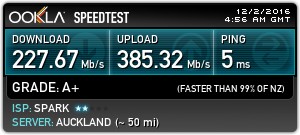
Up and running today on Fibre MAX


Need to work out where the potential bottleneck is.. Ethernet all the way through, using Spark Auckland server.


Testing done ONT > Miktrotik RB260GS (for VLAN tagging) > AirPort Extreme (6th Gen) > Ethernet to MacBook Pro


Jase2985
13735 posts

Uber Geek
+1 received by user: 6217

ID Verified
Lifetime subscriber

  #1681463 2-Dec-2016 20:11
Send private message

remove the airport first, then if you can connect the MBP and have it act as a router (i dont know if you can do this though)


Batman
Mad Scientist
30014 posts

Uber Geek
+1 received by user: 6217

Trusted
Lifetime subscriber

  #1681467 2-Dec-2016 20:25
Send private message

Is mbp hardware good enough for 1gbps?

Edit sorry even if not good enough it shouldn't be only 300

michaelmurfy
meow
13581 posts

Uber Geek
+1 received by user: 10914

Moderator
ID Verified
Trusted
Lifetime subscriber

  #1681543 3-Dec-2016 00:06
Send private message

firefuze:


Testing done ONT > Miktrotik RB260GS (for VLAN tagging) > AirPort Extreme (6th Gen) > Ethernet to MacBook Pro


Your AirPort Extreme is the bottleneck here - it doesn't have hardware acceleration. Looks like you're in for a new router (or just use the Spark provided one).


Michael Murphy | https://murfy.nz
Referral Links: Quic Broadband (use R122101E7CV7Q for free setup)

Are you happy with what you get from Geekzone? Please consider supporting us by subscribing.
Opinions are my own and not the views of my employer.


sbiddle
30853 posts

Uber Geek
+1 received by user: 9996

Retired Mod
Trusted
Biddle Corp
Lifetime subscriber

  #1681562 3-Dec-2016 09:02
Send private message

firefuze:


Up and running today on Fibre MAX


Need to work out where the potential bottleneck is.. Ethernet all the way through, using Spark Auckland server.


Testing done ONT > Miktrotik RB260GS (for VLAN tagging) > AirPort Extreme (6th Gen) > Ethernet to MacBook Pro


You need to ditch the Airport extreme and use the Spark supplied HG659b if you want better speeds. That is your bottleneck as it's incapable of routing anywhere near 1Gbps WAN-LAN


Shop now at Mighty Ape (affiliate link).
firefuze
510 posts

Ultimate Geek
+1 received by user: 85


  #1681573 3-Dec-2016 09:19
Send private message

Thanks, I have a spare 659, Will test again tonight and post results.


CNZ

CNZ
172 posts

Master Geek
+1 received by user: 33

ID Verified

  #1681741 3-Dec-2016 15:24
Send private message

Up and running at 93MB/s on unifi USG-PRO-4https://www.speedtest.net/my-result/5846595290


[URL=https://www.speedtest.net/my-result/3558175835][IMG]https://www.speedtest.net/result/3558175835.png[/IMG][/URL]

firefuze
510 posts

Ultimate Geek
+1 received by user: 85


  #1681894 3-Dec-2016 21:08
Send private message

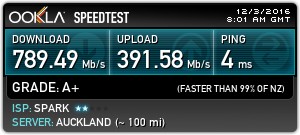
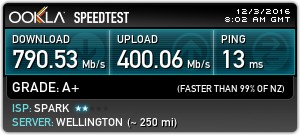
New stats using Spark supplied HG659b

Very upset my AirPort Extreme is under performing - I have 3 of them.


AKL


WEL


sbiddle
30853 posts

Uber Geek
+1 received by user: 9996

Retired Mod
Trusted
Biddle Corp
Lifetime subscriber

  #1681898 3-Dec-2016 21:15
Send private message

firefuze:


New stats using Spark supplied HG659b

Very upset my AirPort Extreme is under performing - I have 3 of them.


Airport's have always been very poorly performing routers spec wise - the biggest advantage is they're the only thing out there that doesn't have WiFi problems with Apple devices. WiFi on Apple devices is problematic with pretty much every vendor out there due to all the custom things Apple do that no longer make their products WiFi Alliance compatible.


It's hardly surprising Apple have pulled the plug on them though, they haven't done anything in years such as adding basic functionality such as VLAN tagging which is pretty much a core requirement for MEF fibre networks.


Since there is no benefit over 200Mbps for 99% of people and you're never going to use 1Gbps you need to decide what the best approach is.


Jinxy
3 posts

Wannabe Geek
+1 received by user: 1


  #1682792 5-Dec-2016 18:34
Send private message

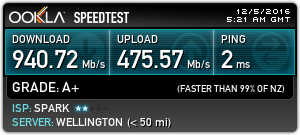
Just got the Fibre MAX plan today. Really happy with the speeds so far


Speedtest from PC connected to an access point


Stream your favourite shows now on Apple TV (affiliate link).
andrewcnz
965 posts

Ultimate Geek
+1 received by user: 73


  #1682842 5-Dec-2016 19:02
Send private message

How long does it take from putting in a request to the speed is upgraded? Ordered MAX Friday morning. In an Enable area.


Jinxy
3 posts

Wannabe Geek
+1 received by user: 1


  #1682855 5-Dec-2016 19:26
Send private message

andrewcnz:


How long does it take from putting in a request to the speed is upgraded? Ordered MAX Friday morning. In an Enable area.


I ordered mine on Saturday morning and got it running at 9am today. If you saved your order number you can track the progress here


http://www.spark.co.nz/myspark/myinternet/order-tracker/


Jase2985
13735 posts

Uber Geek
+1 received by user: 6217

ID Verified
Lifetime subscriber

  #1682957 5-Dec-2016 20:49
Send private message

@Jinxy do you think you could post what device you are using (router) and/or accesspoint. just helps others see which devices can give them better speeds


Talkiet

4819 posts

Uber Geek
+1 received by user: 3934

Trusted

  #1682958 5-Dec-2016 20:54
Send private message

Jase2985:


@Jinxy do you think you could post what device you are using (router) and/or accesspoint. just helps others see which devices can give them better speeds


Yes please, In fact please report the following when you report speeds please...


Computer specs (CPU, RAM, OS, Ethernet chipset if you know it).


Software info (Browser and version basically).


Who your LFC is.


Router / RGW type.


I'd also be interested to know fiddling it took (if any) to get the speeds you did.. (ie. "Got terrible results in Firefox but great in Chrome, had to update ethernet drivers and disable AV software")


Cheers - N


Please note all comments are from my own brain and don't necessarily represent the position or opinions of my employer, previous employers, colleagues, friends or pets.


1 | 2 | 3 | 4 | 5 | 6 | 7
View this topic in a long page with up to 500 replies per page Create new topic


Geekzone Live »

Try automatic live updates from Geekzone directly in your browser, without refreshing the page, with Geekzone Live now.


Are you subscribed to our RSS feed? You can download the latest headlines and summaries from our stories directly to your computer or smartphone by using a feed reader.