Geekzone: technology news, blogs, forums
Guest
Welcome Guest.
You haven't logged in yet. If you don't have an account you can register now.


neoprint

136 posts

Master Geek
+1 received by user: 11


#138335 30-Dec-2013 18:11
Send private message

Hey guys. Got a bit of an issue here.

Have had VDSL2 through Telecom for a couple of months now. Pretty happy with it except for the wifi speeds we got through the supplied Technicolor router.

We had a Draytek 2760VN at work that wasn't being used (from a job that the customer cancelled AFTER we'd supplied gear and were halfway through the install, so Snappernet wouldn't take it back since it had been out of the box and set up) so I took that home to give it a go. Sync rate stayed about the same, but throughput has taken a massive fall. Before I'd get ~40mb/s on speedtests, now I'm getting 9. It's set to do VDSL2, syncing at VDSL2 speeds, but giving me ADSL throughput. Put the old router back in and it goes back to the speeds it had before I started messing with things.

Checked most of the things I could think of, but nothing's seemed to help. Getting slow speeds regardless of whether I'm using WiFi or cat6. File transfers over the wifi go pretty good (5-6MB/s) so pretty sure that's not the issue either.

Anyone got any ideas? This isn't really my area of expertise so could do with some advice.

Create new topic
PeterReader
6028 posts

Uber Geek
+1 received by user: 461

Trusted
Geekzone
Lifetime subscriber

  #959209 30-Dec-2013 18:11
Send private message

Hello... Our robot found some keywords in your post, so here is an automated reply with some important things to note regarding broadband speeds.


If you are posting regarding DSL speeds please check that


- you have reset your modem and router


- your PC (or other PCs in your LAN) is not downloading large files when you are testing


- you are not being throttled by your ISP due to going over the monthly cap


- your tests are always done on an ethernet connection to the router - do not use wireless for testing


- you read this topic and follow the instructions there.


Make sure you provide information for other users to help you. If you have not already done it, please EDIT your post and add this now:


- Your ISP and plan


- Type of connection (ADSL, ADSL2, VDSL)


- Your modem DSL stats (do not worry about posting Speedtest, we need sync rate, attenuation and noise margin)


- Your general location (or street)


- If you are rural or urban


- If you know your connection is to an exchange, cabinet or conklin


- If your connection is to a ULL or wholesale service


- If you have done an isolation test as per the link above


Most of the problems with speed are likely to be related to internal wiring issues. Read this discussion to find out more about this. Your ISP is not intentionally slowing you down today (unless you are on a managed plan). Also if this is the school holidays it's likely you will notice slower than usual speed due to more users online.


A master splitter is required for VDSL2 and in most cases will improve speeds on DSL connections. Regular disconnections can be a monitored alarm or a set top box trying to connect. If there's an alarm connected to your line even if you don't have an alarm contract it may still try to connect so it's worth checking.


I recommend you read these two blog posts:


- Is your premises phone wiring impacting your broadband performance? (very technical)


- Are you receiving a substandard ULL ADSL2+ connection from your ISP?


I am the Geekzone Robot and I am here to help. I am from the Internet. I do not interact. Do not expect other replies from me.


Referral links: Quic Broadband (free setup code: R587125ERQ6VE) | Samsung | AliExpress | Wise | Sharesies 


Support Geekzone by subscribing (browse ads-free), or making a one-off or recurring donation through PressPatron.


coffeebaron
6304 posts

Uber Geek
+1 received by user: 3567

Trusted
Lifetime subscriber

  #959239 30-Dec-2013 19:32
Send private message

Check hardware NAT is not enabled.


Rural IT and Broadband support.


Broadband troubleshooting and master filter installs.
Starlink installer - one month free: https://www.starlink.com/?referral=RC-32845-88860-71 
Wi-Fi and networking
Cel-Fi supply and installer - boost your mobile phone coverage legally


Need help in Auckland, Waikato or BoP? Click my email button, or email me direct: [my user name] at geekzonemail dot com


momo21
9 posts

Wannabe Geek


  #960197 2-Jan-2014 09:52
Send private message

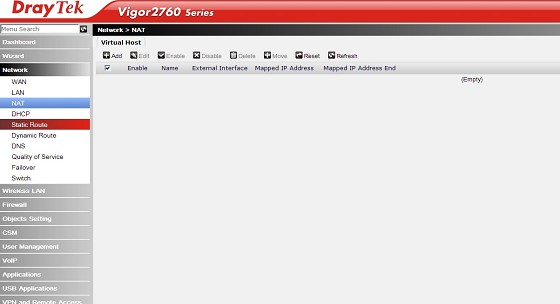
I am having this exact problem. I've been told as well to disable Hardware NAT however I can't find it in the settings. I am getting download speeds of 7-8 and upload of 9+!
I'm using a Vigor 2760VN. I have tried to update the firmware but out of the ten options (modem codes), I have no idea which one to use.

The NAT option looks like this, an empty list:


The only other place I can find where I can disable a NAT setting is in Firewall, but doing that disables the entire internet connection!

I'm stuck with slow speeds and my ISP have been trying for a month. 


Peppery
919 posts

Ultimate Geek
+1 received by user: 188

Trusted

  #960214 2-Jan-2014 10:38
Send private message

Maybe use the Technicolour modem with WiFi disabled and a separate AP. I do this with the Orcon Genius and an Airport Extreme and it works pretty well.

plambrechtsen
1948 posts

Uber Geek
+1 received by user: 459
Inactive user


  #960230 2-Jan-2014 11:11
Send private message

I would do a few things on your other router.

- change the ip address to something other than 192.168.1.254 (say 250)
- disable dhcp off the router

And just plug the lan port of your draytek it into the vdsl router lan port and run it in bridged mode.

neoprint

136 posts

Master Geek
+1 received by user: 11


  #961671 6-Jan-2014 00:36
Send private message

Fixed the issue - updated to the latest firmware.

However I'm still getting crap wifi throughput, which was the reason for the upgrade. Still only getting ~30mbit over wifi and 45 on a cable. I realise wifi isn't ever going to work as well as with a cable but was hoping for more.

Anyway, it started doing some WEIRD stuff the other day (lots of timing out etc), so I've gone back to the Technicolor for the time being.

Thanks for the suggestions


Shop now for Lego sets and other gifts (affiliate link).
Coil
6614 posts

Uber Geek
+1 received by user: 2153
Inactive user


  #961673 6-Jan-2014 00:49
Send private message

neoprint: Fixed the issue - updated to the latest firmware.

However I'm still getting crap wifi throughput, which was the reason for the upgrade. Still only getting ~30mbit over wifi and 45 on a cable. I realise wifi isn't ever going to work as well as with a cable but was hoping for more.

Anyway, it started doing some WEIRD stuff the other day (lots of timing out etc), so I've gone back to the Technicolor for the time being.

Thanks for the suggestions


Get a WiFi analyzer and see if you can fine tune it.

Cheers

plambrechtsen
1948 posts

Uber Geek
+1 received by user: 459
Inactive user


  #961706 6-Jan-2014 07:43
Send private message

neoprint: Fixed the issue - updated to the latest firmware.

However I'm still getting crap wifi throughput, which was the reason for the upgrade. Still only getting ~30mbit over wifi and 45 on a cable. I realise wifi isn't ever going to work as well as with a cable but was hoping for more.

Anyway, it started doing some WEIRD stuff the other day (lots of timing out etc), so I've gone back to the Technicolor for the time being.

Thanks for the suggestions


To be honest 30mb over wifi isn't that bad... could be your computer or a whole myriad of things. If you can get line speed over a fixed connection then that's what you will need to use to get the most out of your broadband

Ragnor
8279 posts

Uber Geek
+1 received by user: 585

Trusted

  #961910 6-Jan-2014 14:31
Send private message

plambrechtsen: 

To be honest 30mb over wifi isn't that bad... could be your computer or a whole myriad of things.


You don't often see better than 40-50Mbit via 802.11N in the real world, 30Mbit isn't that bad.

Create new topic


Geekzone Live »

Try automatic live updates from Geekzone directly in your browser, without refreshing the page, with Geekzone Live now.


Are you subscribed to our RSS feed? You can download the latest headlines and summaries from our stories directly to your computer or smartphone by using a feed reader.