Geekzone: technology news, blogs, forums
Guest
Welcome Guest.
You haven't logged in yet. If you don't have an account you can register now.


View this topic in a long page with up to 500 replies per page Create new topic
1 | ... | 3 | 4 | 5 | 6 | 7 | 8 | 9 | 10 | 11 | 12 | 13 | ... | 24
jlittle
200 posts

Master Geek
+1 received by user: 76

ID Verified
Subscriber

  #1876776 3-Oct-2017 16:46
Send private message

Morm: 


 Also, the login screen has always been the same layout even in pre-release versions"


Yes, I realize now the layout is sensitive to the browser window width. It flips at about 1024 pixels, which just happens to be about my typical browser window.


So not sure what happened with you there.... a reboot maybe - noting that there is a bug with not keeping updated login passwords when rebooted (fix coming) 


A reboot then.  I wonder why. The event log only keeps about 150 entries, so any info is long gone.  I don't suppose you'd allow users to log in and poke around.  The password problem would have been much less annoying if I'd known, or guessed, what had happened, and gone straight to it.  I agree with whoever said the power button seems too sensitive.


If it happens again and I notice I'll check the event log.


Regards, John Little


GazzaGazza
61 posts

Master Geek
+1 received by user: 11


  #1876858 3-Oct-2017 22:11
Send private message

Newly re-signed and got an Ultrahub with an upgraded connection today. I have found the same problem others have reported. If you change the main password, and save it (click on apply) it seems to, and appears to last for the current browser session. Close the browser and come back later and it has reverted to the password printed on the base of the hub. ??? Why?


MikeHales
615 posts

Ultimate Geek
+1 received by user: 213

Trusted

  #1877049 4-Oct-2017 09:52
Send private message

@gazzagazza Apologies, firmware fix on the way


GazzaGazza
61 posts

Master Geek
+1 received by user: 11


  #1877055 4-Oct-2017 09:55
Send private message

MikeHales:

@gazzagazza Apologies, firmware fix on the way


Excellent!

kiwifidget
"Cookie"
3640 posts

Uber Geek
+1 received by user: 1969

Lifetime subscriber

  #1877129 4-Oct-2017 11:22
Send private message

I just received my UHH.


It has a big sticker on the box saying "For VDSL broadband and homephone customers" but I'm on fibre.


Will it matter?


Delete cookies?! Are you insane?!


GazzaGazza
61 posts

Master Geek
+1 received by user: 11


  #1877142 4-Oct-2017 11:41
Send private message

Direct wired to Ultrahub on Windows 10 desktop. FibreX supposedly 200/20. Download on Speedtest consistently about 95 Mb/s. No matter what time of day or night. Should I expect more?


Stream your favourite shows now on Apple TV (affiliate link).
Alan2
21 posts

Geek
+1 received by user: 1


  #1877182 4-Oct-2017 12:49
Send private message

How will we know when the firmware fix for the password failure is available?


MikeHales
615 posts

Ultimate Geek
+1 received by user: 213

Trusted

  #1877188 4-Oct-2017 12:58
Send private message

Will be auto uploaded and/or I'll also make available via FAQs and Community (if we offer it that way)


Linux
12186 posts

Uber Geek
+1 received by user: 8480

Trusted
Lifetime subscriber

  #1877189 4-Oct-2017 13:08
Send private message

kiwifidget:


I just received my UHH.


It has a big sticker on the box saying "For VDSL broadband and homephone customers" but I'm on fibre.


Will it matter?


@kiwifidget of course not, It's not a modem when on Fibre it's a AP


Linux


foxy38
360 posts

Ultimate Geek
+1 received by user: 10


  #1877434 4-Oct-2017 19:30
Send private message

it says on the box to plug your phone into the modem is that correct?


foxy

GazzaGazza
61 posts

Master Geek
+1 received by user: 11


  #1878414 6-Oct-2017 12:11
Send private message

Perhaps I have found a bug in the Ultrahub...


I have 3 wireless bridges and one access point on our home network. These are on TP-Link wireless routers, all running Gargoyle.


I have set my Ultrahub to serve up ip addresses to the local network in the range 192.168.0.2-99


The wireless bridges are all assigned static ip addresses eg 192.168.0.101, 102, 103, 110


Everything has been like this for a very long time. The Ultrahub replaces an Asus N56u.


If I use the Static DHCP capability of the Ultrahub to lock in the ip address for the above devices based on their Mac addresses I strike a problem.


The network functions, the Hub shows three green lights, but I cannot access external websites via the browser (any browser). This applies to any device on our network.


Some messing around led me to discover that if I manually enter googles DNS servers to the network adapter on my main desktop machine I can then access the web normally on that machine.


I spoke to a Vodafone "ninja" for assistance the same day this was installed and he wasn't able to understand what was going on. But he did get me to reset the Ultrahub to its default settings. (Hold down the reset button and watch the green lights go out one by one). Having done this everything magically worked again.


Yesterday I set the static ip addresses in the Ultrahub again and bingo, no web access again. I then removed them, and back came the web.


Bug?


Stream your favourite shows now on Apple TV (affiliate link).
GazzaGazza
61 posts

Master Geek
+1 received by user: 11


  #1878432 6-Oct-2017 12:38
Send private message

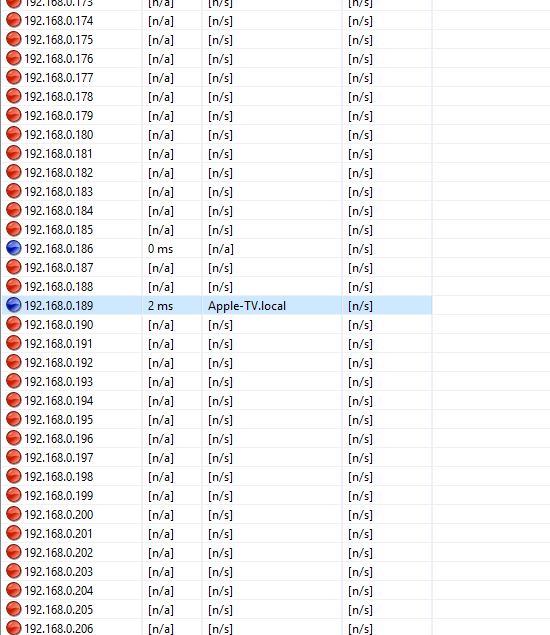
Another anomaly.


AppleTV suddenly has started to appear outside of the assigned ip range.


Click to see full size


dacraka
771 posts

Ultimate Geek
+1 received by user: 165

ID Verified
Trusted

  #1878437 6-Oct-2017 12:59
Send private message

Can anyone confirm that the new router uses the larger larger 2.5mm DC power connection on the back of the router or something else?


Thanks!


Morm
87 posts

Master Geek
+1 received by user: 20


  #1878477 6-Oct-2017 14:01
Send private message

GazzaGazza:


Perhaps I have found a bug in the Ultrahub...


I have 3 wireless bridges and one access point on our home network. These are on TP-Link wireless routers, all running Gargoyle.


I have set my Ultrahub to serve up ip addresses to the local network in the range 192.168.0.2-99


The wireless bridges are all assigned static ip addresses eg 192.168.0.101, 102, 103, 110


Everything has been like this for a very long time. The Ultrahub replaces an Asus N56u.


If I use the Static DHCP capability of the Ultrahub to lock in the ip address for the above devices based on their Mac addresses I strike a problem.


The network functions, the Hub shows three green lights, but I cannot access external websites via the browser (any browser). This applies to any device on our network.


Some messing around led me to discover that if I manually enter googles DNS servers to the network adapter on my main desktop machine I can then access the web normally on that machine.


I spoke to a Vodafone "ninja" for assistance the same day this was installed and he wasn't able to understand what was going on. But he did get me to reset the Ultrahub to its default settings. (Hold down the reset button and watch the green lights go out one by one). Having done this everything magically worked again.


Yesterday I set the static ip addresses in the Ultrahub again and bingo, no web access again. I then removed them, and back came the web.


Bug?


I run the same IP range - 192.168.0.1. I also have 2 static assigned DHCP and the rest dynamic IP for the lan devices.


I've change my dhcp pool to be the same as yours (just to match)  are rebooted everything and it all works ok. The DHCP assigned devices get IPs from the nominated range and the statics assign.


It sounds like you know what you are doing, but just throwing it out there - I've seen this happen before when there are two DHCP servers on the network. Thats not happening here is it?


Whats the IP config of the network adapters showing? Did you populate the DNS IP fields in theUltra Hub config too or is it still blank? (mine is blank)


Also, for your Apple TV, I wonder if it still had a valid DHCP lease before from the bigger range before it changed, and the renewal has requested the same again?


Morm
87 posts

Master Geek
+1 received by user: 20


  #1878482 6-Oct-2017 14:07
Send private message

dacraka:


Can anyone confirm that the new router uses the larger larger 2.5mm DC power connection on the back of the router or something else?


Thanks!


Yeah, seems to be. It is a bigger pin than the HG659 router. The HG659 power plug doesn't fit


1 | ... | 3 | 4 | 5 | 6 | 7 | 8 | 9 | 10 | 11 | 12 | 13 | ... | 24
View this topic in a long page with up to 500 replies per page Create new topic


Geekzone Live »

Try automatic live updates from Geekzone directly in your browser, without refreshing the page, with Geekzone Live now.


Are you subscribed to our RSS feed? You can download the latest headlines and summaries from our stories directly to your computer or smartphone by using a feed reader.