


 ID Verified

Hi GZ,
I thought I would share a recent win with the Geekzone crowd. I am fully aware I am no expert and realise this was achieved by, figuratively speaking, standing on the shoulders of experts — including a few helpful people from this community (Thank you, again! :-) ). Hopefully it is of some interest, given this is a forum full of people who enjoy tech, and tech related rabbit holes.
My day-to-day work is in telco. I am Wellington-based and quickly approaching the two-decade mark in the industry. These days, I am predominantly office-bound. While chained to the desk, I have got to know one of the draftsmen who sits across from me.
Let’s just say this guy has been on the job for a little over twice as long as I have been alive.
He has a small collection of retro phones on display, including a PERT, a Statesman, a couple of 100-types, some 1956/57-era Bakelite phones, and even an Ericofon/Cobra.
One day, I said to him in passing:
“Would you like those phones to ring again someday?”
I swear his eyes lit up. The answer was a very enthusiastic “yes”.
Originally, I brought the phones back to life using an old Panasonic KX-TES824 PABX and a few three-wire plug-in adaptors. That worked well enough until last week, when the Panasonic finally died.
It is currently in bits on the dinner table — one of the very few (dear I say) perks of single life. The ex would almost certainly have had something to say by now about the parts, tools, and gear all over the place.
I have made some progress with the Panasonic. I have got power back, but I suspect there may be a memory, backup CMOS, or EPROM-related issue. After a couple of resets the config can be reloaded and it works okay until it is powered off. When it is powered back up, the master phone starts flashing and playing Minuet, which cant be a good sign.
Anyway, while I am still mucking around with that, I ended up putting together a “Mark 2” version, where the switching has effectively been collapsed onto IP/SIP. For any NEAX 61 S/K/M/E people here, I suppose I have basically recreated a glorified RLU.
What I can say is that it was far more of a headache/drama than expected to get everything working properly. Tones, ringing, codecs, pulse dialling and a bit of good old-fashioned trial and error. I would be lying if I said there was not a lot of advice from Uncle and Aunty Google & AI too.
However, it all seems to work okay now. The phones, whether DTMF or pulse dialling, all work and ring properly. All Done in my own time, but I (somehow) stuck at it, and surprisingly it was achievable with affordable off-the-shelf gear.
I have also shared a version of this write-up on the Facebook group Ex NZ Post Office Construction Staff, and I have been in touch with the good folks at Ferrymead. Feedback so far has been positive.
There are bound to be a few others here with telephone collections and/or similar projects, so I am happy to share lessons learnt, config files, or setup notes where useful. I am also very open to suggestions and improvements. Feel free to reach out,
I reckon next step get some outside lines/SIP trunks into this beast!
Now what takes the cake…A couple of the office inmates are not fans of the “loud” ringing bells. Let's just say, I am in no rush to adjust the ring power setting 🤣
Cheers,
DanF
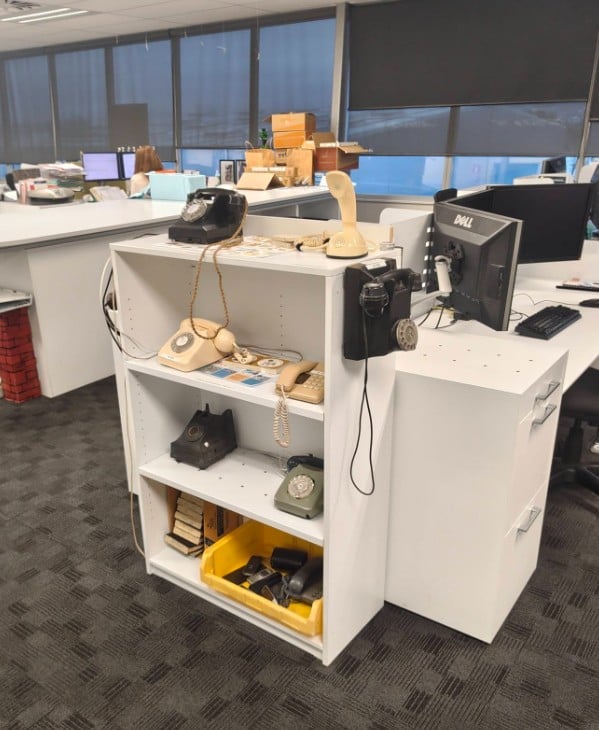
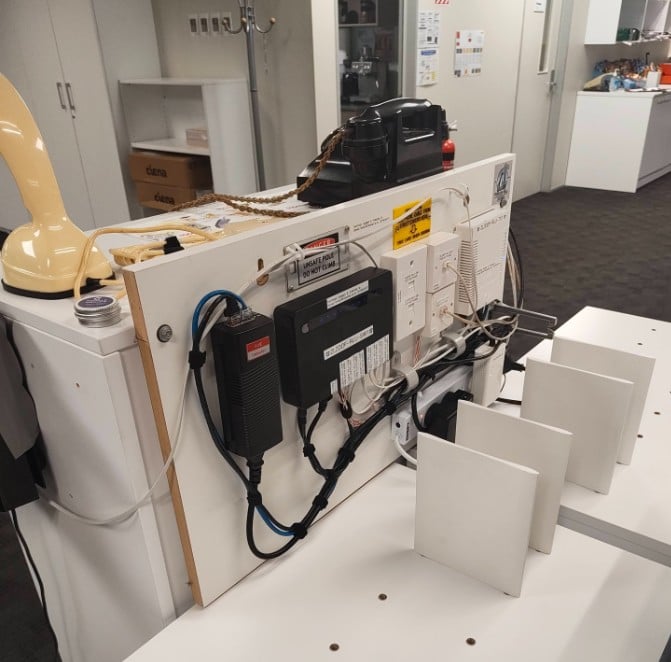
High Level Detail….
Ringtone c=400/200-400/2000
Ring Frequency: 25Hz
Dial Tone: f1=400@-9,c=0/0
Engaged Tone: f1=400@-9,c=500/500
NU Tone: f1=400@-9,c=250/250;
Basic Block Diagram…
HT818 8Port ATA (In office/remote location)<<<>>>MikroTik hAP ac (connected to guest wifi) <<<>>>Internet<<<>>>My Home Router<<<>>>Traffic to sip server-(currently Raspberry Pi)


 Hero
Hero
 Trusted


